Oil and gas software UX design case studyComboCurve: 3.5 years ofoil and gas software.
ComboCurve is the cloud platform where 400+ energy companies forecast wells, run economics and plan development. For 3.5 years DIXI worked inside its product team on complex, everyday and custom client features across forecasting, economics, scheduling and the map, plus the design system that ties them together.
 By Ignat, founder of DIXI · Updated
- ClientComboCurve, Houston
- IndustryUpstream oil and gas software
- ModulesFeatures across forecasting and type curves, economics, scheduling, map
- ServicesProduct design, design system, website concept
- Timeline3.5 years, 2022–2025
- TeamEmbedded with ComboCurve's engineers, developers and designer

“He built our design system and improved key workflows for a platform trusted by 170+ companies.”
Isabel Ramos · UX Architect, ComboCurve
The short version
Oil and gas engineers decide where billions of dollars go using forecasts, type curves and economics. For decades that work lived in desktop tools like ARIES and PHDwin, stitched together with Excel. ComboCurve moved it to the cloud and grew from 170+ to 400+ companies. DIXI was part of the product team for 3.5 years. We designed features across the modules engineers use every day, from forecasting to economics, scheduling and the map: complex workflows, small everyday improvements and custom solutions for specific customers. And the design system that keeps a fast-growing product consistent.
Energy decisions, moved to the cloud.
- Founded2017 in Houston by Armand Paradis, a former reservoir engineering manager at Statoil (now Equinor), and Jeremy Gottlieb. The product launched in May 2020.
- ProductForecasting, type curves, economics, scheduling and reserves in one browser workflow, plus data integration (ComboSync), emissions (ComboCarbon) and an AI agent in beta (2026).
- UsersReservoir, reserves and A&D engineers at operators, plus banks, advisors, private equity and mineral owners.
- CustomersEQT, Hilcorp, Permian Resources and Devon, plus Marathon Oil and Pioneer before their acquisitions: 400+ companies in total. Banks such as JPMorgan Chase, Barclays and RBC Capital Markets.
- FundingSeed from the Rice brothers in 2018, a Series A in 2021 and a $50M Series B led by Dragoneer and Bessemer in 2022: more than $60M in total.
- ConsolidatesWork spread across ARIES, PHDwin, Excel and Spotfire, in one platform that still connects to Excel and Spotfire. Kirk Hanes, who helped launch ARIES in the late 1980s, joined ComboCurve as Chief Revenue Officer in 2023.
Companies on ComboCurveHighlighted: the years DIXI was part of the product team
Self-reported by ComboCurve. Its growth is the work of its whole team; we were one part of it. Sources: PR Newswire, 2021; Series B release, 2022; Hart Energy, 2022; ComboCurve, 2024; ComboCurve, 2025.| The legacy stack | Owner | Since | How it works |
|---|---|---|---|
| ARIES | Halliburton Landmark | Late 1980s | Desktop-born system of record for economics and reserves, now also offered on Halliburton's cloud |
| PHDwin | TRC Consultants | 1986 (maker) | Windows desktop or client-server software on Microsoft SQL Server |
| Val Nav | Quorum Software | 1998 (as Energy Navigator) | Desktop and enterprise forecasting, economics and reserves, strongest in Canada and now moving to the cloud |
| Excel and Spotfire | Microsoft, Cloud Software Group | 1985, 1996 | The glue between tools: exports, checks and charts that live outside the system of record |
| ComboCurve | ComboCurve | 2020 | Cloud-native: one browser workflow, shared data, many users on the same project at once |
Sources: Halliburton · ComboCurve on the history of ARIES · PHDwin on Capterra · Quorum · The ComboCurve Origin Story · JPT, May 2022.
From production data to a capital decision.
Every module we worked in sits on one chain. An engineer turns production history into a forecast, the forecast into cash flow, and cash flow into a decision: buy, drill, book or sell.
Data
Production history, well headers and costs from ComboSync, data vendors, ARIES or a data room.
Forecast
A decline curve fitted to each well's history, often for thousands of wells at a time.
DIXI featuresType curves
P10, P50 and P90 profiles from analog wells, for wells that haven't been drilled yet.
DIXI featuresEconomics
Prices, costs and ownership turn volumes into cash flow, NPV and IRR, scenario by scenario.
DIXI featuresSchedule and decide
Rigs and crews sequence the plan. Then reserves get booked, wells get drilled and deals get priced.
DIXI features
The terms behind every screen
- Decline curve analysis (DCA)
- Fitting a curve to a well's falling production rate to forecast what it will produce next. The standard method since J.J. Arps published his equations in 1945.
- Arps b-factor
- The curvature of a hyperbolic decline. Small changes move EUR a lot, and shale wells often show a b-factor above 1.
- Type curve
- The production profile of a typical well in an area, built from analog wells and used to forecast wells not yet drilled.
- P10, P50, P90
- Probabilistic cases. P90 is the low case, with a 90% chance of being equalled or exceeded; P10 is the high case.
- EUR
- Estimated ultimate recovery: everything a well is expected to produce over its life.
- PDP and PUD
- Proved developed producing reserves come from wells already on production. Proved undeveloped reserves need new wells, generally within five years under SEC rules.
- Economics run
- A cash-flow model for each well or group: volumes times prices, minus royalties, taxes, operating costs and capital.
- NPV10
- Net present value of future cash flow, discounted at 10% a year: the industry's standard yardstick. PV10 is the version companies report for proved reserves, before tax and at SEC prices.
- IRR and payout
- The return on a well's capital, and the time until its cumulative cash flow turns positive.
- Price deck
- The oil and gas price assumptions behind an economics run. Teams often compare several decks side by side.
- A&D
- Acquisitions and divestitures: buying and selling assets, where the fastest credible evaluation often wins the deal.
- Pad and lateral
- A pad is one drilling site for several horizontal wells; the lateral is the horizontal section that produces.
Glossary sources: PetroWiki on decline curve analysis · SEC oil and gas reporting rules · SPE on type curves · PetroWiki on P10, P50 and P90 · Mercer Capital on reserve categories.
Decades of habit, thousands of wells at a time.
Thousands of wells, not one dashboard
The US alone has about 918,000 producing wells. ComboCurve auto-forecasts up to 25,000 of them in minutes and runs economics on up to 75,000 at once. Every table, chart and selection had to stay usable at that count.
Tools engineers learned over decades
ARIES dates from the late 1980s and PHDwin's maker from 1986. Engineers know them by heart, even as they work around them. A new platform had to feel familiar on day one and clearly faster by day two.
Every number is a capital decision
“In our space, all the decisions are expensive,” says CEO Armand Paradis. Automated forecasts still need an engineer's judgement, so every assumption had to be visible, editable and traceable.
A product that never stopped growing
From 170+ to 400+ companies, and from forecasting to scheduling, emissions and data integration. New modules shipped every release and large customers asked for their own workflows, yet it all had to stay one product.
Sources: EIA, 2024 well count · ComboCore · ComboCurve on ARIES · PHDwin on Capterra · Armand Paradis on the Houston Innovators Podcast, 2022.
Inside the team, next to the engineers.
Learn the engineering
Working sessions with ComboCurve's petroleum engineers: how they forecast, review and book, in their words and their units.
Map the whole workflow
Forecast, type curve, economics and schedule designed as one path, so the output of one module is the input of the next.
Design with real-scale data
Tables with thousands of wells, missing values, long well names, mixed units and ten scenarios side by side.
Ship with developers
Figma components, specs and every state, reviewed with developers during the build and checked after release.
3.5 years in one team with ComboCurve's engineers, developers and in-house designer. Not a hand-off over the wall.
Three principles behind every screen
Bulk first, then the single well
Engineers act on hundreds of wells at once and open a single well only when something looks wrong. Selection, filters and bulk actions come first.
The assumption sits next to the number
A forecast, an NPV or a schedule is only as good as its inputs. The inputs stay one click away from every result.
Speak the engineer's language
bbl/d, Mcf, b-factor, NRI, P90. The interface uses the industry's own terms and units, not friendlier words that mean less.
Oil and gas software UX: four modules, one workflow.
We didn't build these modules from scratch in one go. For 3.5 years we designed features inside each of them, release after release: large workflows, small improvements and custom solutions for specific customers. The diagrams explain what each module does, using illustrative data rather than client data.
Three kinds of feature work in every module
Complex features
New workflows that run across several screens or modules. Researched with ComboCurve's engineers, prototyped, then reviewed with developers before and after the build.
Everyday improvements
Smaller changes shipped every release: a clearer table state, a new filter, a faster bulk action, a fix that came from user feedback.
Custom for specific customers
Features shaped around a large customer's own process and data. We describe them here without names or data.
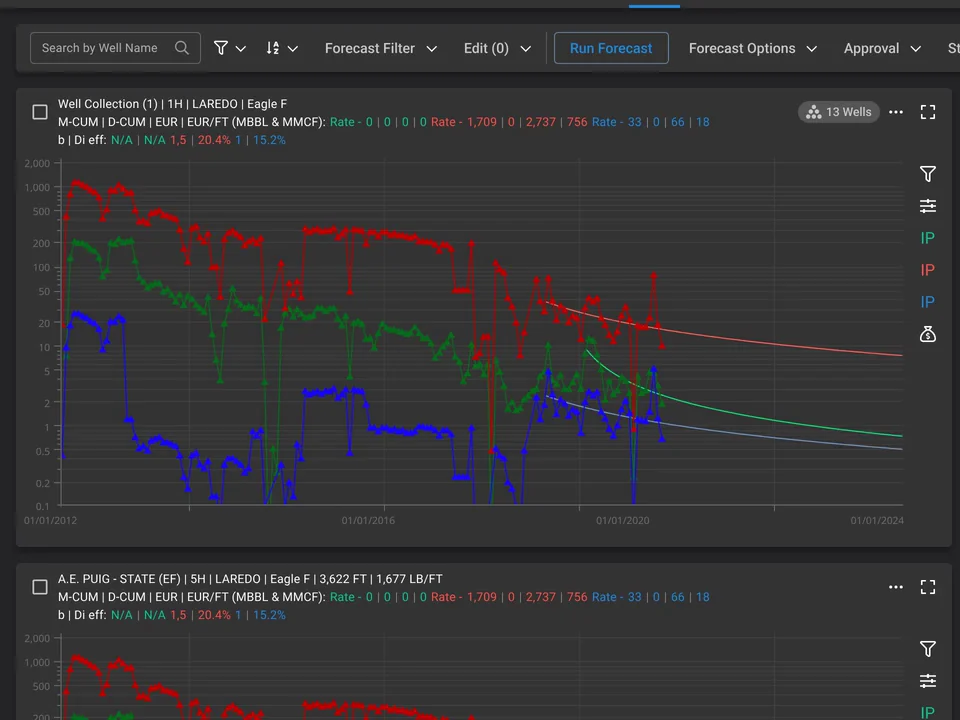
Forecast thousands of wells, then fix the few that matter
Auto-forecasting fits a decline curve to every well in minutes. The engineer's real work is the review: finding outliers, adjusting a fit, and building type curves from analog wells for the wells not yet drilled.
- Bulk auto-forecast, with the wells that need attention pulled to the top
- History and forecast on one log-scale chart, with the fit parameters beside it
- Outliers and shut-in months flagged before they skew a fit
- P10, P50 and P90 type curves built from a selection of analog wells
From volumes to value, scenario by scenario
Economics turns forecasts into cash flow. Engineers compare price decks, costs and ownership across scenarios, often for a whole asset or data room at once, and they need to trust every line.
- Scenarios compared side by side, up to ten at a time
- Well-level detail behind every portfolio number
- Price deck, costs and interests one click from the result
- Reports and exports for finance, banks and auditors
- NPV10$5.0M
- IRR41%
- Payout2.0 yrs
- D&C cost$9.2M
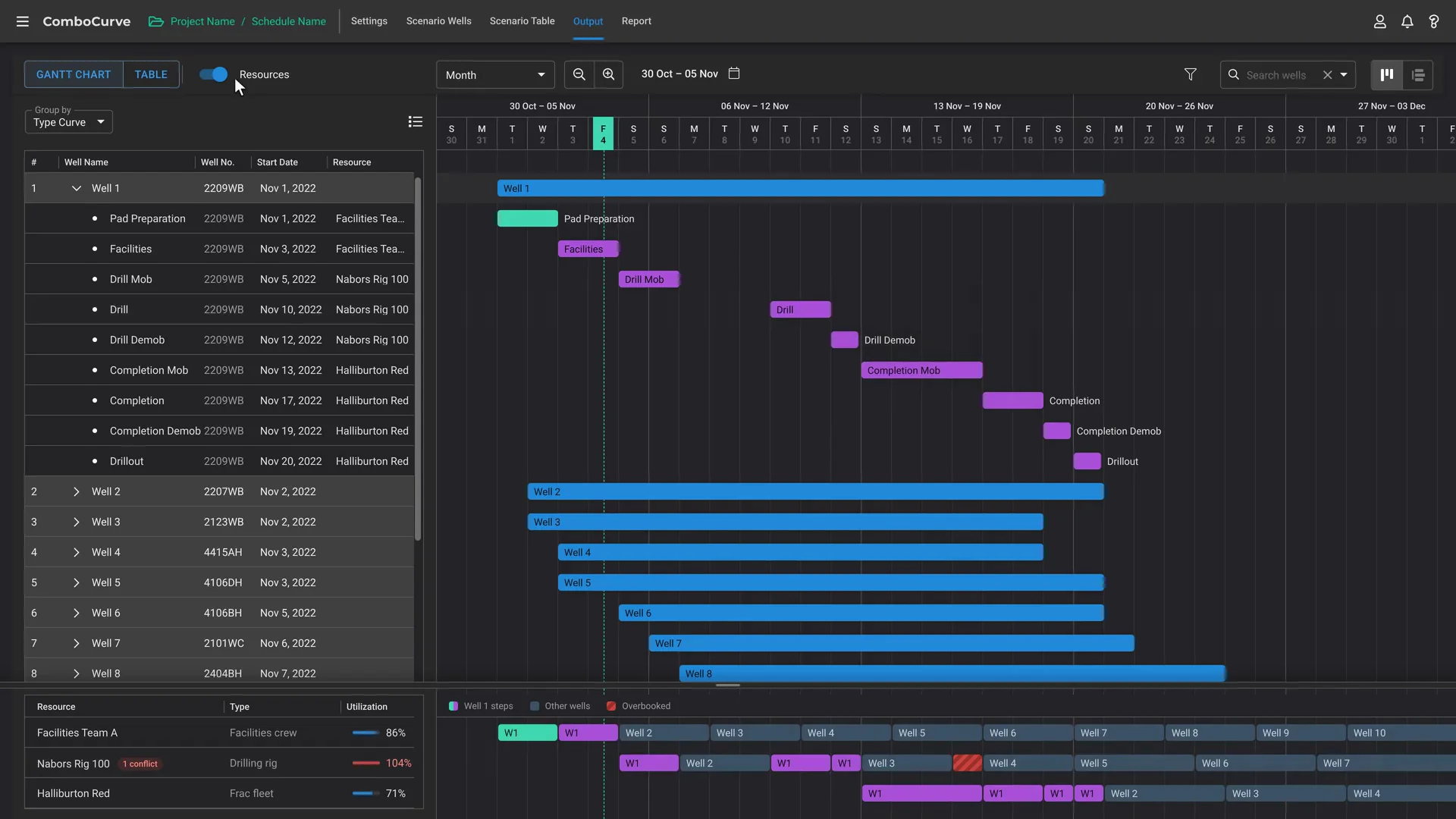
A development plan that respects rigs, crews and time
Scheduling sequences pads and wells across drilling rigs and completion crews. When the plan moves, the dates every well comes online move with it.
- Rigs and crews as resources, pads and wells as activities
- Custom activity steps for each company's own process
- A Gantt view that stays readable across years and dozens of pads
- Utilization for every rig, crew and facility team, with overbooked days flagged
Select wells where engineers think about them: on the map
Engineers think in basins, sections and offset wells. The map is where they find analogs, draw an area and act on every well inside it.
- Wells drawn as laterals and coloured by any attribute, such as EUR
- Lasso and polygon selection that feeds forecasting and type curves
- Filters and layers that stay in sync with the well table
- Offset wells in view, so a forecast's analogs are easy to check
One system for every module.
Forecasting, economics, scheduling and the map grew feature by feature, release after release. The design system made them one product: shared units, shared data components and one way to select and act on wells.
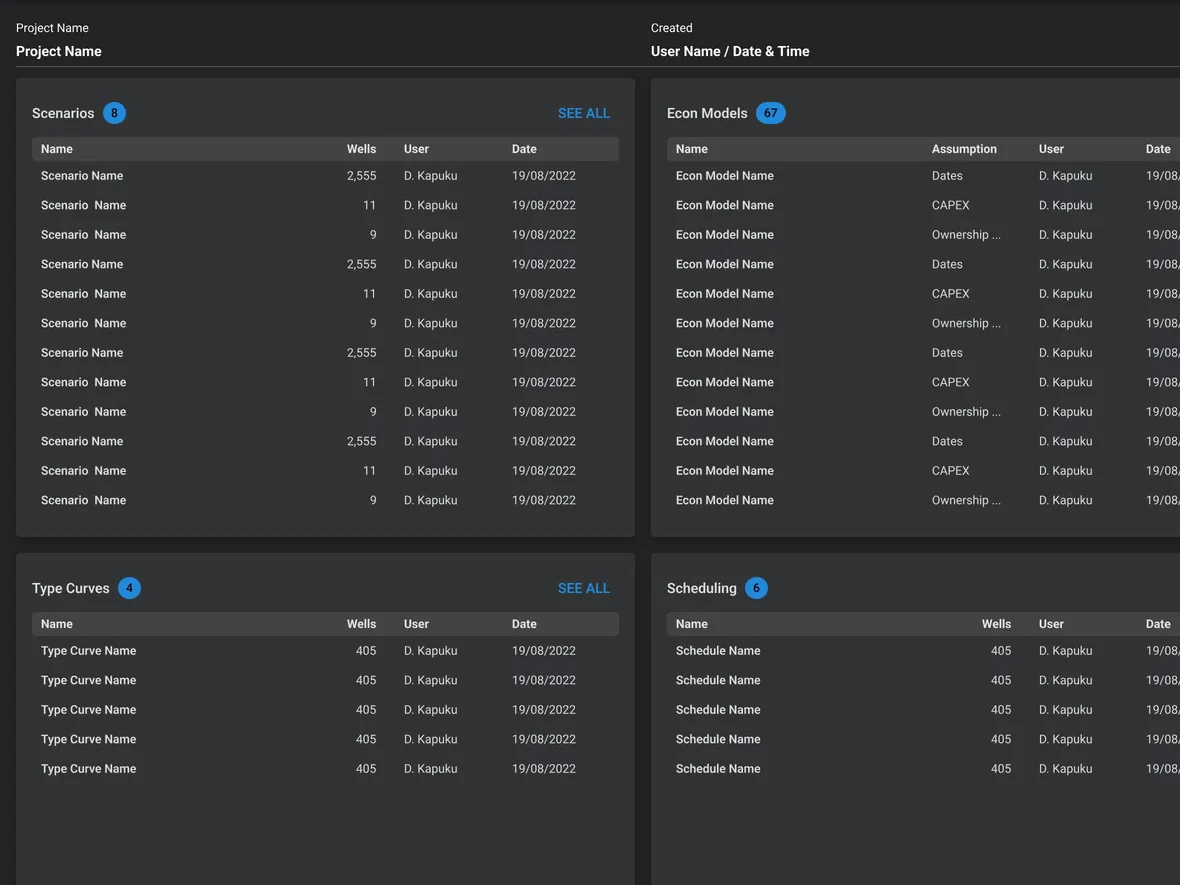
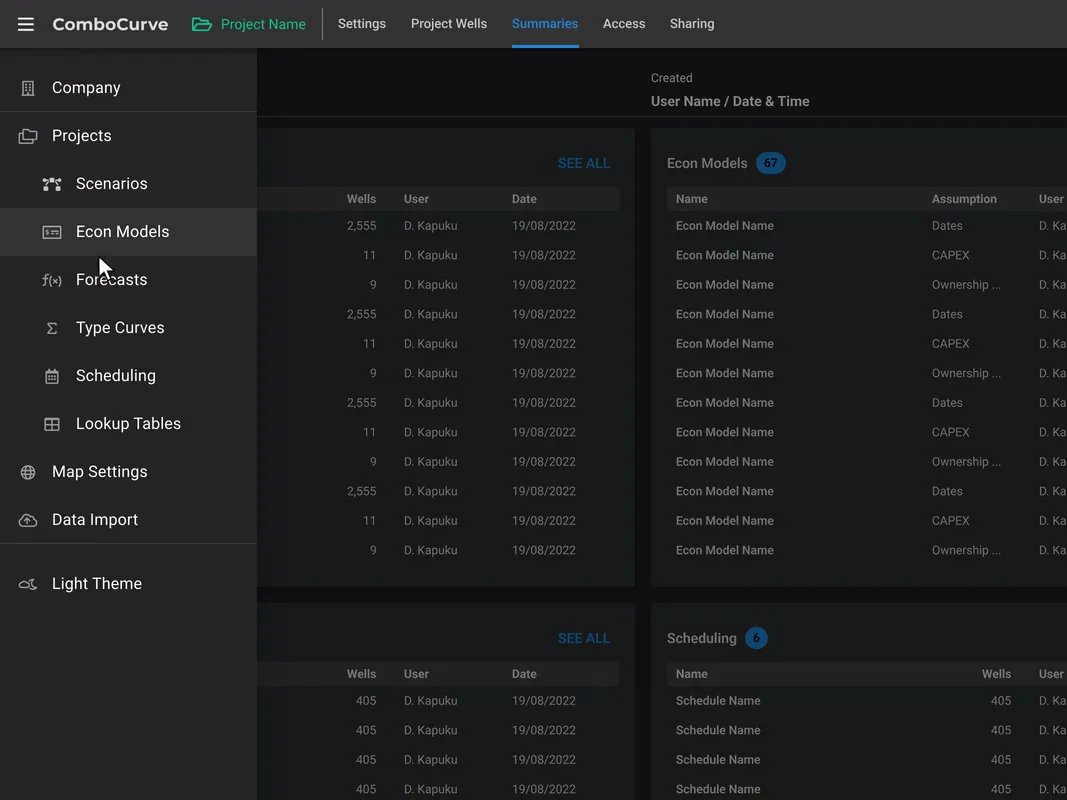
What's shared and what's per module
| Layer | Across forecasting, economics, scheduling and the map |
|---|---|
| Units and number formats | SharedOil in bbl, gas in Mcf, rates per day, money in $M: one format in every table, chart and export. |
| Colour and signal | SharedNeutral surfaces for long sessions; colour kept for data series, scenarios and warnings. |
| Data tables | SharedOne table for wells, cases and results: sticky headers, frozen columns, bulk selection, inline status. |
| Charts | SharedLog and linear scales, history against forecast, P10–P90 ranges: the same chart grammar in every module. |
| Selection | SharedSelect once on the map, in a table or with a filter, and act on the same wells anywhere. |
| Layout | Per moduleA review queue for forecasting, scenario columns for economics, a Gantt for scheduling, a canvas for the map. |
A website idea: sell a platform, not a tool
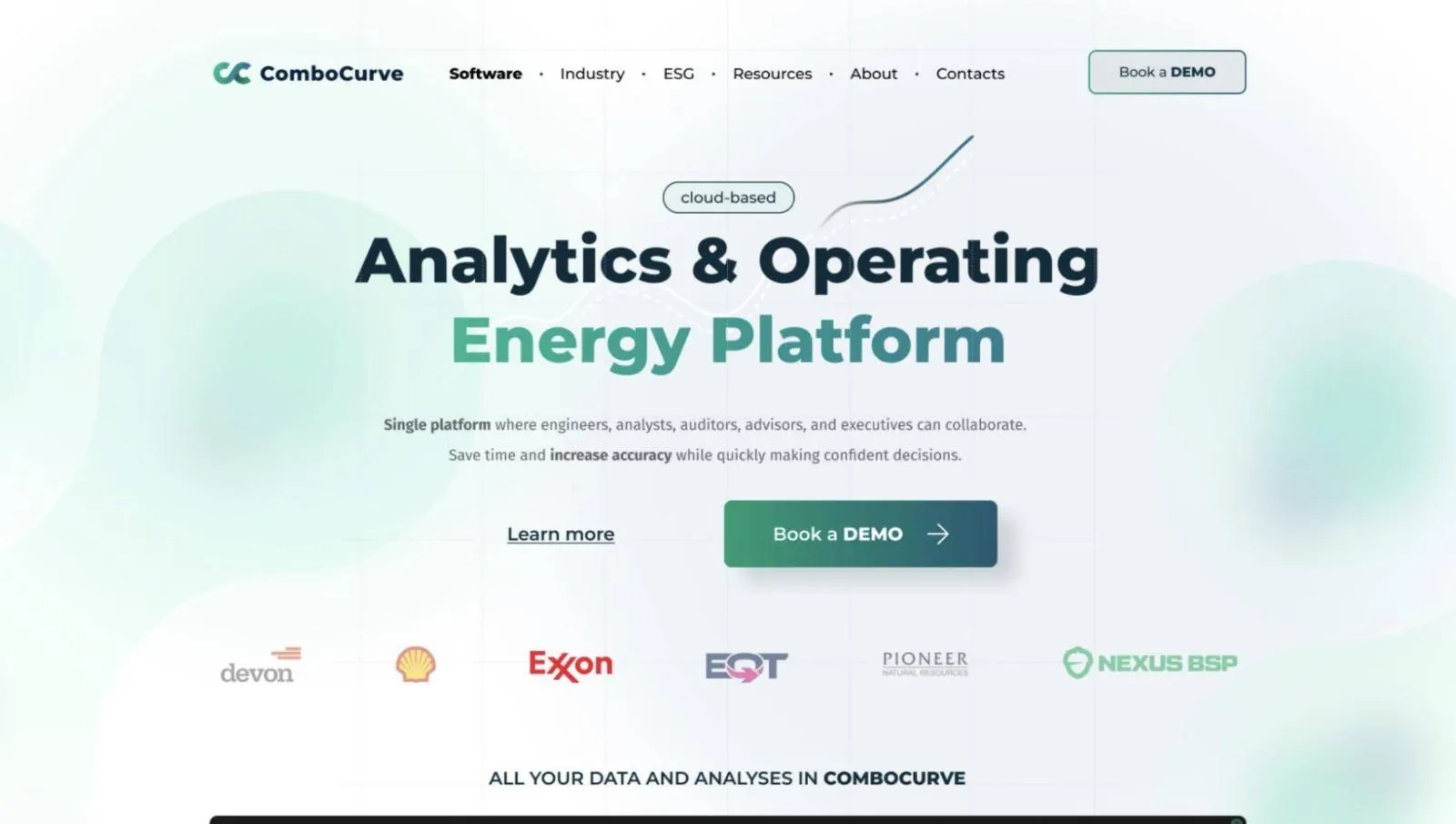
Alongside the product work we sketched a concept for ComboCurve's website around one message: a cloud-based analytics and operating platform where engineers, analysts, auditors, advisors and executives work together. It is a concept we proposed, not the live site.
- One message for every role, from engineer to executive
- Customer logos and proof above the fold
- The product shown in motion, not stock imagery
What customers report after the switch.
Results ComboCurve's customers describe in its published case studies. They are platform results: the work of ComboCurve's whole team, of which design was one part.
- EQT3–4 days → 3–4 hours
Reserves reports at EQT, one of the largest US natural gas producers, went from three or four days to three or four hours.
EQT case study - Silver Cross Energy Partners8–10 h → ≤2 h
Forecasting 600 wells took 8–10 hours in ARIES and 2 hours at most in ComboCurve, says CEO Leslie Armentrout.
Silver Cross case study - Double EagleWeeks → days
Evaluations went from a week or two to a day or two.
Double Eagle case study - Arrington Oil and Gas60–70% less time
An Arrington engineer estimates 60–70% less time spent evaluating prospects with ComboCurve and ComboSync.
Arrington story - Marathon OilSource of truth
At SPE ATCE 2024, a Marathon Oil senior reservoir engineer said ComboCurve was becoming the team's single source of truth for forecasting and type curves.
SPE ATCE 2024 talk - PetroLegacy EnergyARIES retired
PetroLegacy moved off ARIES and now runs its evaluation work entirely on ComboCurve.
PetroLegacy story
What we delivered, and where ComboCurve went.
Where ComboCurve went during our partnershipClient milestones: the work of ComboCurve's whole team, of which design was one part.
“Over 3 years of collaboration, Ignat played an important role in scaling the product and website while the company grew by 650%. He built our design system and improved key workflows for a platform trusted by 170+ companies.”
Lessons for energy software teams.
- Design for the 10,000th wellMost enterprise software is designed around one record. Engineers work in bulk, so selection, review queues and bulk actions come first.
- Keep the engineer in the loopAutomation writes the first draft. Diagnostics, overrides and visible assumptions are what make engineers trust it.
- Build the system before the next moduleA fast-growing product adds features every release. Shared units, tables and charts keep it one product instead of five.
Armand Paradis, Co-founder and CEO · Isabel Ramos, UX Architect · ComboCurve's product, engineering and petroleum engineering teams
Product design led by Ignat: features across forecasting and type curves, economics, scheduling and the map, custom work for large customers, the design system and a website concept
Sources: Series B release, GlobeNewswire, April 2022 · JPT, May 2022 · PR Newswire, November 2021 · The ComboCurve Origin Story, 2024 · ComboCurve, 2025 · ComboCore · ComboCurve Upstream · ComboCurve Banks and Advisors · ComboCurve Scheduler docs · EIA · DIXI project records.
What did DIXI design for ComboCurve?
Over 3.5 years inside ComboCurve's product team we designed features across its core modules: forecasting and type curves, economics, scheduling and the map. The modules weren't built from scratch in one go: the work ranged from complex new workflows to small everyday improvements and custom solutions for specific customers. We also built the design system the modules share, next to ComboCurve's engineers, developers and designer. The website on this page is a concept we proposed, not the live site.
How do you design UX for oil and gas software?
We start from the engineering workflow, not the screen: how a reservoir engineer goes from production data to a forecast, an economics run and a decision. Then we design for scale (thousands of wells at once), for trust (visible assumptions, diagnostics and overrides) and in the industry's own units and terms.
Do designers need oil and gas domain knowledge?
Enough to work with engineers in their language: decline curves, type curves, P10/P50/P90, PDP and PUD, NPV10. We learn the domain with the client's engineers and design with real-scale data, so edge cases show up in design reviews, not in production.
What is the difference between a decline curve and a type curve?
A decline curve forecasts one producing well from its own production history. A type curve describes a typical well in an area, built from many analog wells, and is used to forecast wells that haven't been drilled yet, usually as P10, P50 and P90 cases.
Why are E&P teams moving from ARIES and PHDwin to cloud platforms?
Desktop tools were built decades ago for one user on one machine. Teams now evaluate thousands of wells, work across offices and need an audit trail, so browser-based platforms with shared data, real-time collaboration and fast economics are replacing a patchwork of desktop tools and spreadsheets.
What should a design system for a data-heavy enterprise product include?
More than colour and type: units and number formats, data tables with every state, chart components, one selection model and rules for density. That is what keeps a growing product consistent when several teams ship at the same time.
Can you work inside our product and engineering team?
Yes. Our longest partnerships, including ComboCurve and Koyfin, were embedded: the same rituals and tools as the client's team, with designs reviewed with developers before and after the build.
Do you work under NDA?
Yes. We're used to confidential products and data. In case studies we only show what is public or cleared with the client.
Building softwarefor energy?
Book a discovery call, or start with a free teardown of your homepage.
We use essential storage to run this site. With your OK we also use analytics to see which pages help visitors. No ad tracking. Cookie policy
Cookie settings
Choose what we can use. You can change this any time from Cookie settings in the footer.
- Strictly necessaryKeeps the site secure and working, and remembers your cookie choice.Always on
- AnalyticsAnonymous usage stats and heatmaps (Microsoft Clarity) that show which pages help visitors.
- MarketingAd measurement, only if we run campaigns. We do not use it today.
