Koyfin · Investment research
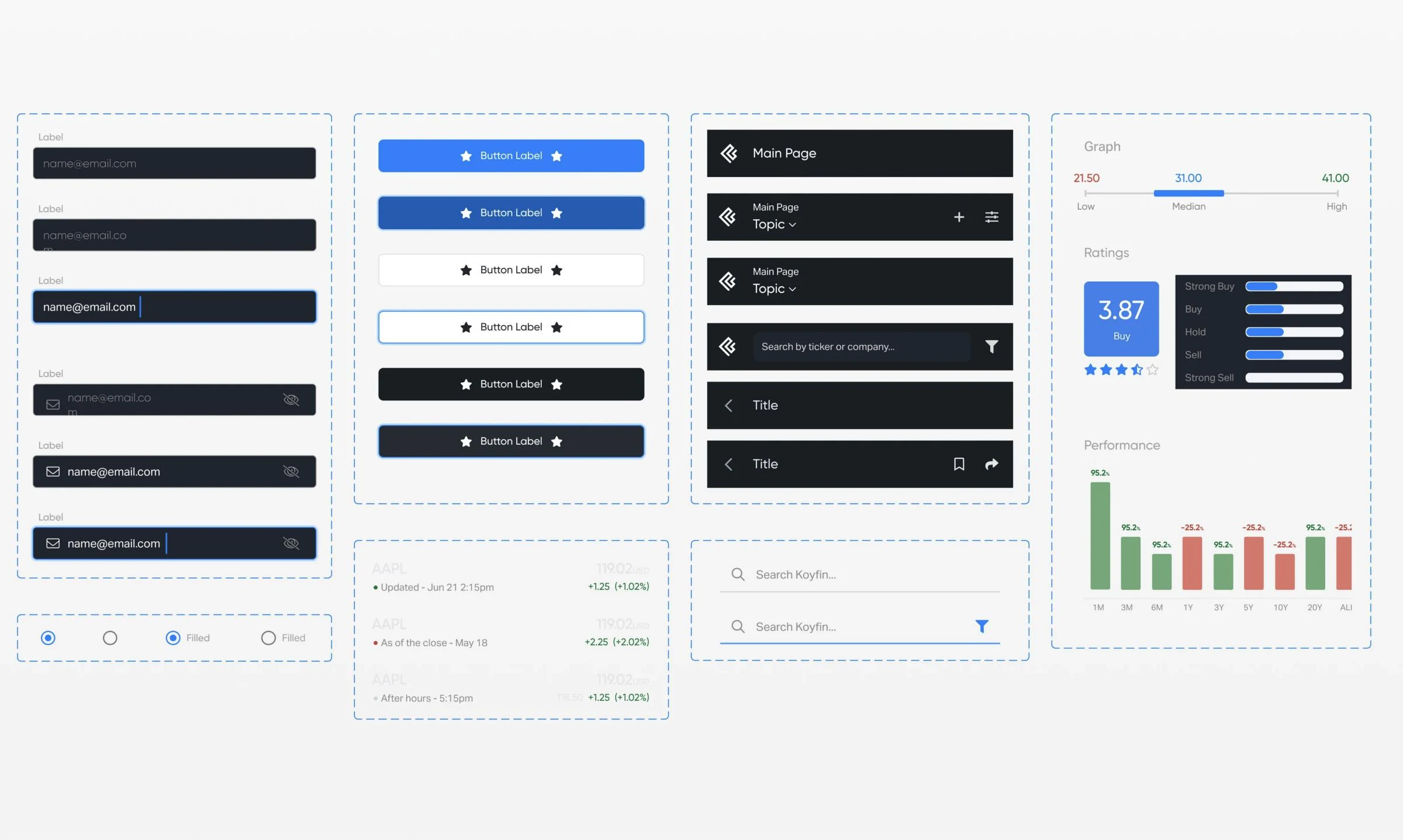
3 platformsweb, iOS and Android on one fintech design system: shared tokens for colour, type, spacing and number formats, native components per platform.
Tokens, a Figma library, coded components and docs your team can run without us, as for Koyfin, ComboCurve and HCM. A $4,000 fixed audit, a build from $15k, a portal like ours from $10k, upkeep from $6k a month. The panel below runs on our own tokens: change them.
 By Ignat, founder of DIXI · Updated
Figma and code in one team · 40+ B2B products · founder-led
+12.4%+12,4 % vs last month
+38 this month
| Select | Name | Plan | MRR | Status |
|---|---|---|---|---|
| Northwind Analytics | Scale | $12,400.0012.400,00 $ | Healthy | |
| Brightline Logistics | Growth | $8,950.508.950,50 $ | At risk | |
| Fieldstone Energy | Scale | $21,300.0021.300,00 $ | Healthy | |
| Halcyon Health | Enterprise | $48,000.0048.000,00 $ | Churn risk |
--dx-accent-solid#4461F0#2FB45A#7A4FE0#8C9CFF#6FD08C#C3A9FF--dx-action-primary-bg#111113#237A3B#653DBE#F6F6F7#6FD08C#C3A9FF--dx-bg-raised#FFFFFF#1A1A20--dx-text-primary#111113#F6F6F7--dx-table-row-height36px44px52px--dx-radius-tile16px4pxNow: light themedark theme · DIXI BlueField Green (sample brand)Ledger Violet (sample brand) · compact densitydefault densitycomfortable density · DIXI radiussharp radius · US number formatEU number format (de-DE). The components never change; only the token values do.
Sample screen and data. The tokens are DIXI’s own (design system v1.1, 30 Oct 2026). Field Green and Ledger Violet are made-up brands: they map the same semantic tokens to other DIXI primitives, which is how one system serves several brands.
A design system agency builds the shared foundation a product team designs and codes from: tokens for colour, type, spacing and data formats, a Figma library with every component state, matching coded components, and the docs and rules that keep them in sync. DIXI builds them for SaaS and data-heavy products, on web and native mobile, with design and code in one team.
Need the screens designed too, not only the system? See SaaS product design.
When the same decision gets made twice. The usual signals are a second designer, a second platform such as a mobile app, a third module built by a different team, engineers asking for hex values, or a rebrand that would take months of front-end work. Before your core flows settle, a small token set and a Figma library are enough.
Which of these are true for your product today?
of 6 signals
A rule of thumb from our projects, not a score. Nothing you tick is stored.
| Stage | Typical signals | What to build | DIXI format |
|---|---|---|---|
| Pre-seed and Seed | One designer; flows still changing every week | A small token set and core components, coded as the product is built | Inside a product project |
| Series A | A second designer; a mobile app on the roadmap; modules multiply | A Figma library with variables, coded core components, short docs | System build, from $15k |
| Series B and later | Several squads; design and code drift apart | The full system: data components, a docs site, contribution rules, an adoption metric | Audit, build, then a design partner |
| Several products or brands | White-label requests, acquisitions, a second app | A theming tier: one component set, one semantic set per brand | Quoted after the $4,000 audit |
DIXI’s view from our own projects, not an external benchmark.
Shared colour, type and number formats meant Koyfin’s iOS and Android app started from decisions, not from a blank file.
Speed, consistency and fewer arguments. In Figma’s own controlled test, designers with a relevant design system finished a task 34% faster. Yet zeroheight’s 2026 survey finds only 7% of teams report full adoption, only 5% track ROI, and satisfaction with code lags design. The gap is rarely Figma; it is the bridge to code and to people.
| Finding | Number | Source |
|---|---|---|
| Organisations with a dedicated design system team | 83% | zeroheight, Design Systems Report 2026 |
| Teams that feel understaffed | 61% | Same report |
| Systems fully adopted across all teams | 7% (31% by most teams) | Same report |
| Teams that measure ROI | 5% | Same report |
| Tokens in code / in design tools | 82% / 90% | Same report |
| No token automation | 60% | Same report |
| Three-tier token structure | 52% | Same report |
| Code library included (React among web frameworks) | 78% (72%) | Same report |
| Satisfied with implementation: design vs code | 72% vs 54% | Same report |
| Top challenge: lack of resourcing or staffing | 56% | Same report |
| Faster task completion with a relevant design system | Up to 34% (controlled test) | Figma, “Measuring the value of design systems” |
zeroheight surveyed 147 design system practitioners. Checked 1 November 2026.
That’s why we design and code in one team, and agree one adoption metric before we start.
Six layers, sized to your stage: an audit of what exists, tokens in three tiers with light and dark themes, a Figma library with variables and every component state, coded components in React or React Native, a documentation site with usage rules and a changelog, and a governance model so your team can run it without us.
“Our components drift and nobody knows which one is right.” An inventory of colours, type, spacing and components in Figma and in code, ending in a ranked roadmap.
“A rebrand would take months.” Primitive, semantic and component tokens for colour, type, spacing, radius, motion and data formats, in light and dark, as CSS and W3C DTCG JSON.
“Designers rebuild the same table every sprint.” Components with variables, variants and every state, including data components: tables, KPI cards and charts.
“Design and code say different things.” React and Next.js components, or React Native for mobile, reading the same tokens; or pairing with your engineers on theirs.
“Nobody knows when to use which.” Usage, do and don’t, accessibility notes and code for every component, plus a changelog, in Storybook or a docs site like ours.
“We built it, then nobody used it.” Naming rules, a contribution flow, versioning and deprecation, and one adoption metric read at handover.
The audit ends with a ranked roadmap you can run with or without us. Ask for an audit.
More than colours and type. A data-heavy product needs shared units and number formats, one table component with every state, a chart grammar, one selection model, density rules, and tokens that both web and native apps read. DIXI built systems like this for ComboCurve, Koyfin and HCM, so new features start from decisions, not a blank file.
| Element | Shared or per platform | Why it matters | Where we built it |
|---|---|---|---|
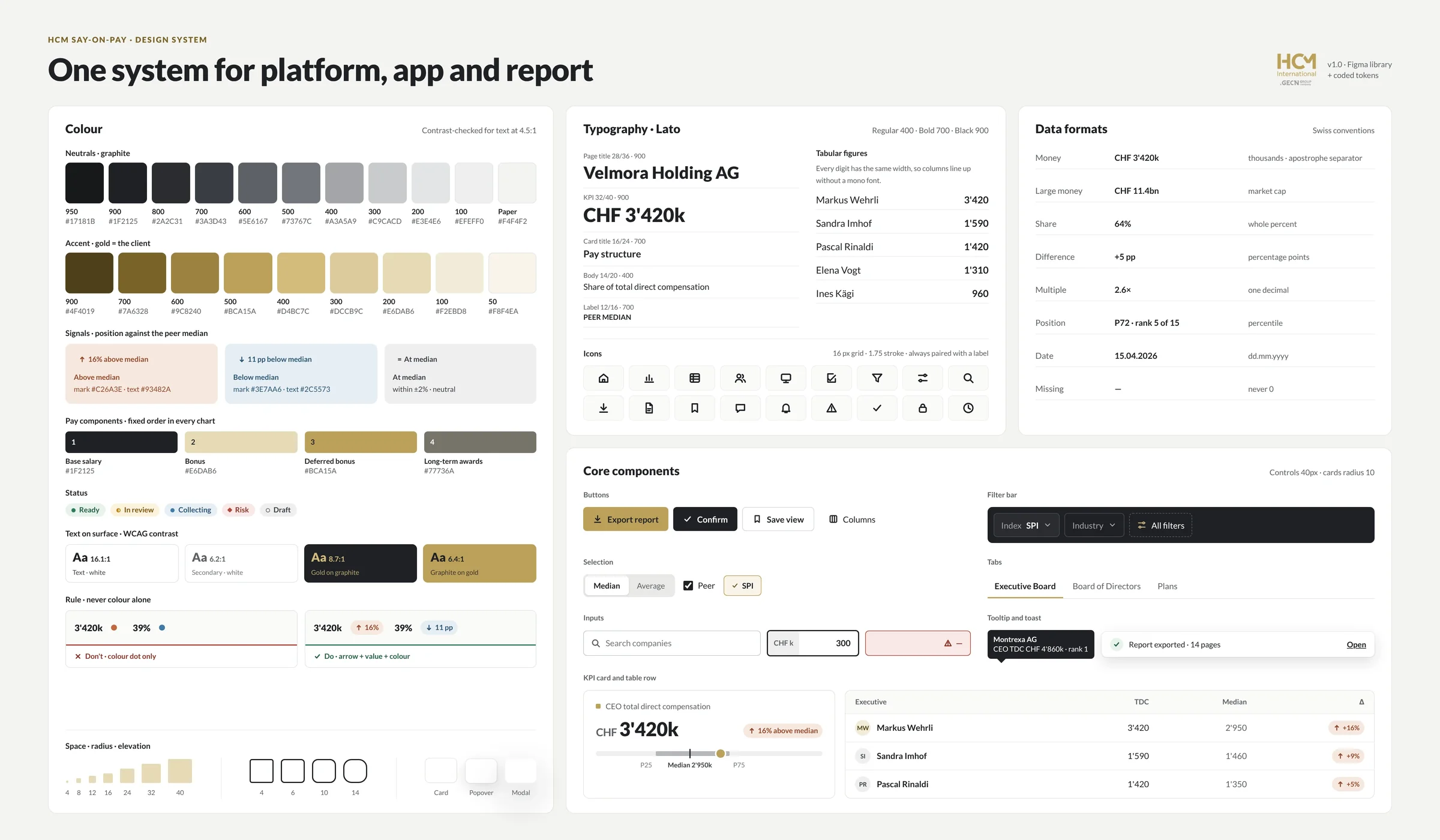
| Units and number formats | Shared | The same number reads the same way on every screen: separators, decimals, currency, percentages | Koyfin: price, change and % change · HCM: currency, thousands, pay multiples |
| Colour and signal | Shared | Colour marks meaning, not decoration | Koyfin: green and red only for price moves · HCM: signal colours for above or below the peer median |
| Type and numbers | Shared | Tabular numbers align in every table and chart | Koyfin and HCM: one type scale, tabular figures |
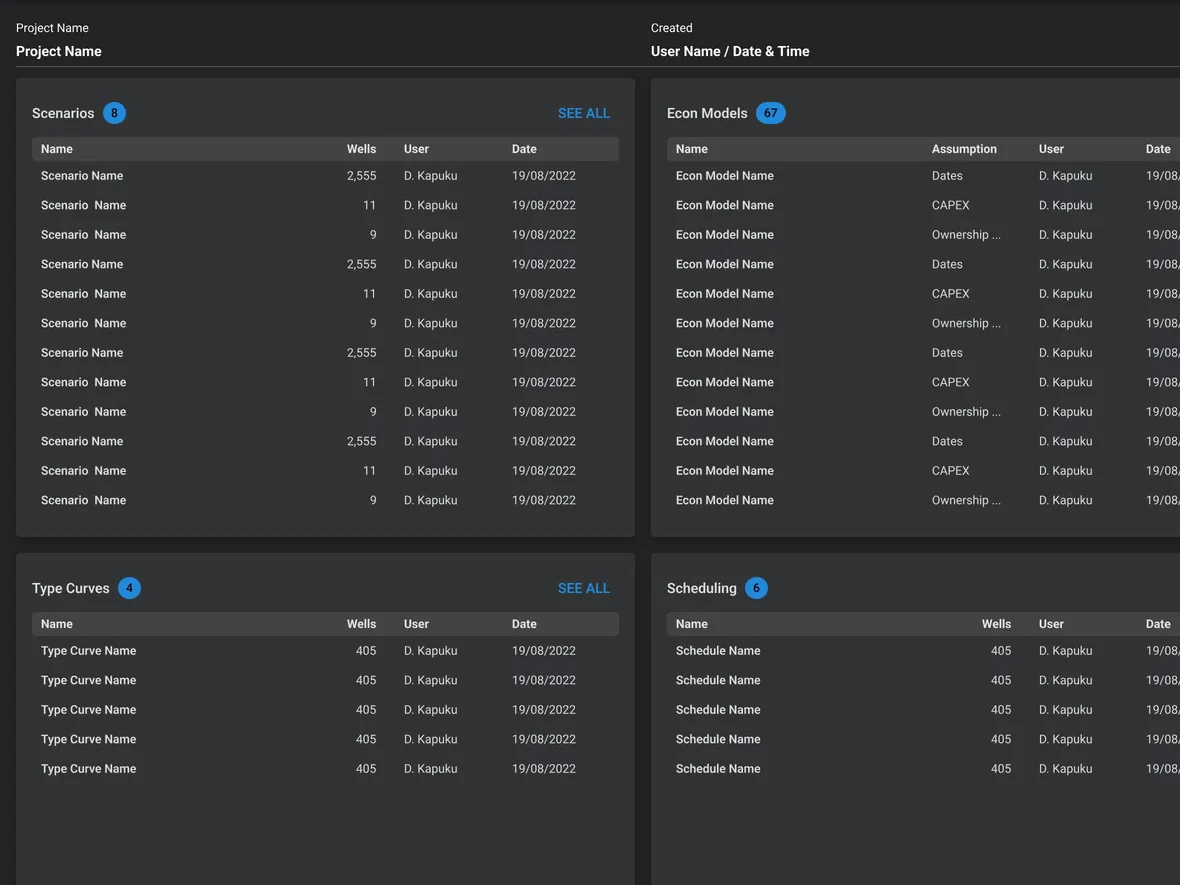
| Data table | Shared: one component with every state | Sorting, selection, empty and loading behave the same everywhere | ComboCurve: scenarios, economic models, type curves and schedules on one table |
| Chart grammar | Shared | Axes, legends and tooltips work one way | ComboCurve’s chart components · HCM’s pay level and pay structure charts |
| Selection model | Shared | Bulk actions work the same in every module | ComboCurve: one way to select and act on wells |
| Navigation and search | Per platform | Native on iOS and Android, dense on desktop | Koyfin: native components per platform |
| Layout | Per module or surface | Each workflow gets the layout it needs | ComboCurve’s four modules · HCM’s wide tables, also on a phone |
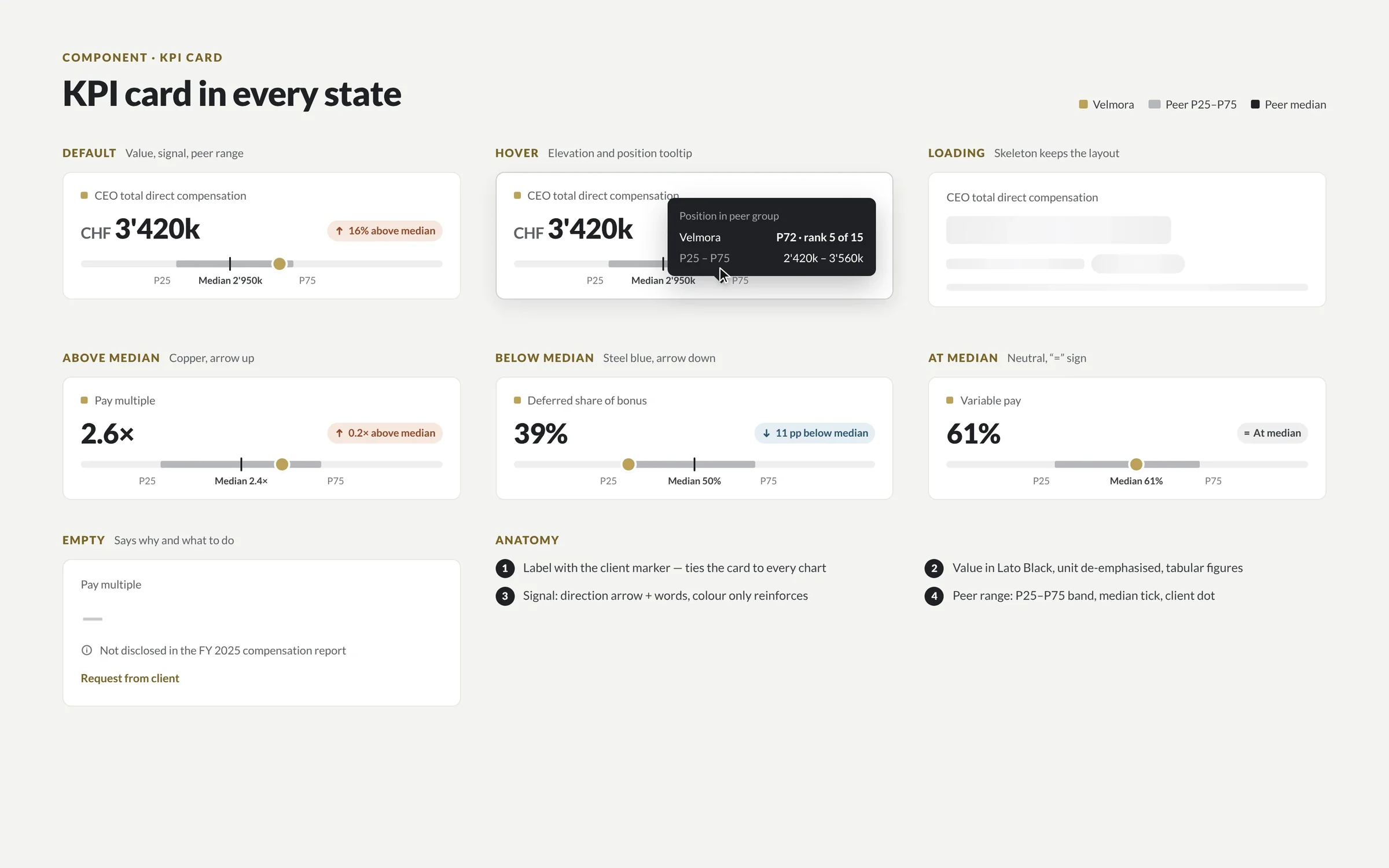
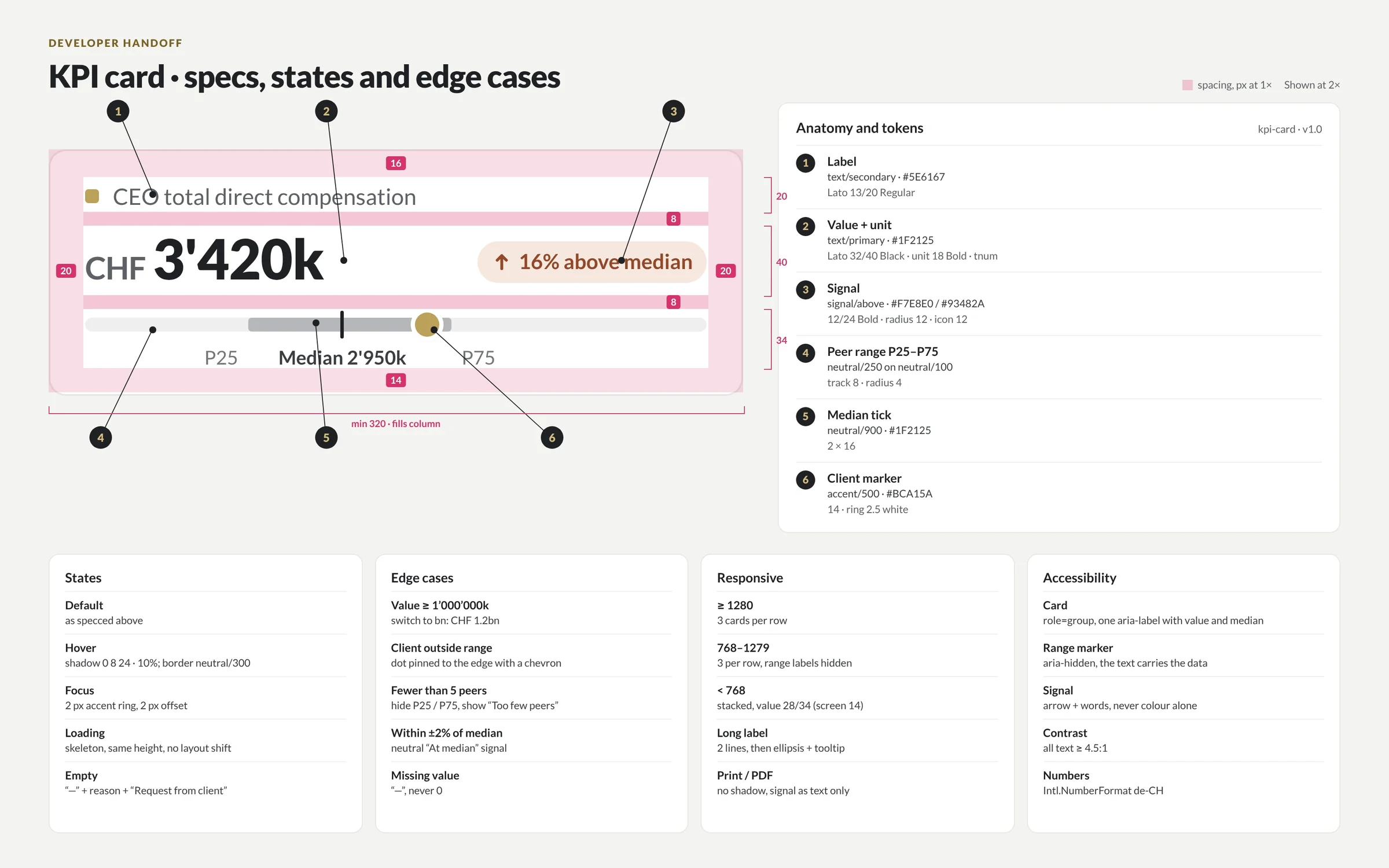
Five, across fintech, energy, compensation, music and our own studio: Koyfin’s web and mobile systems, ComboCurve’s system tying four modules into one product, HCM’s single system for a reporting platform and an internal app, Mediator’s iOS and Android app, and DIXI’s own, behind this site and our client portal.
web, iOS and Android on one fintech design system: shared tokens for colour, type, spacing and number formats, native components per platform.
on one system, grown for 3.5 years: shared units, one table component, chart components and one way to select and act on wells.
two products, one design system: the reporting platform and the internal app share tokens, data formats and components.
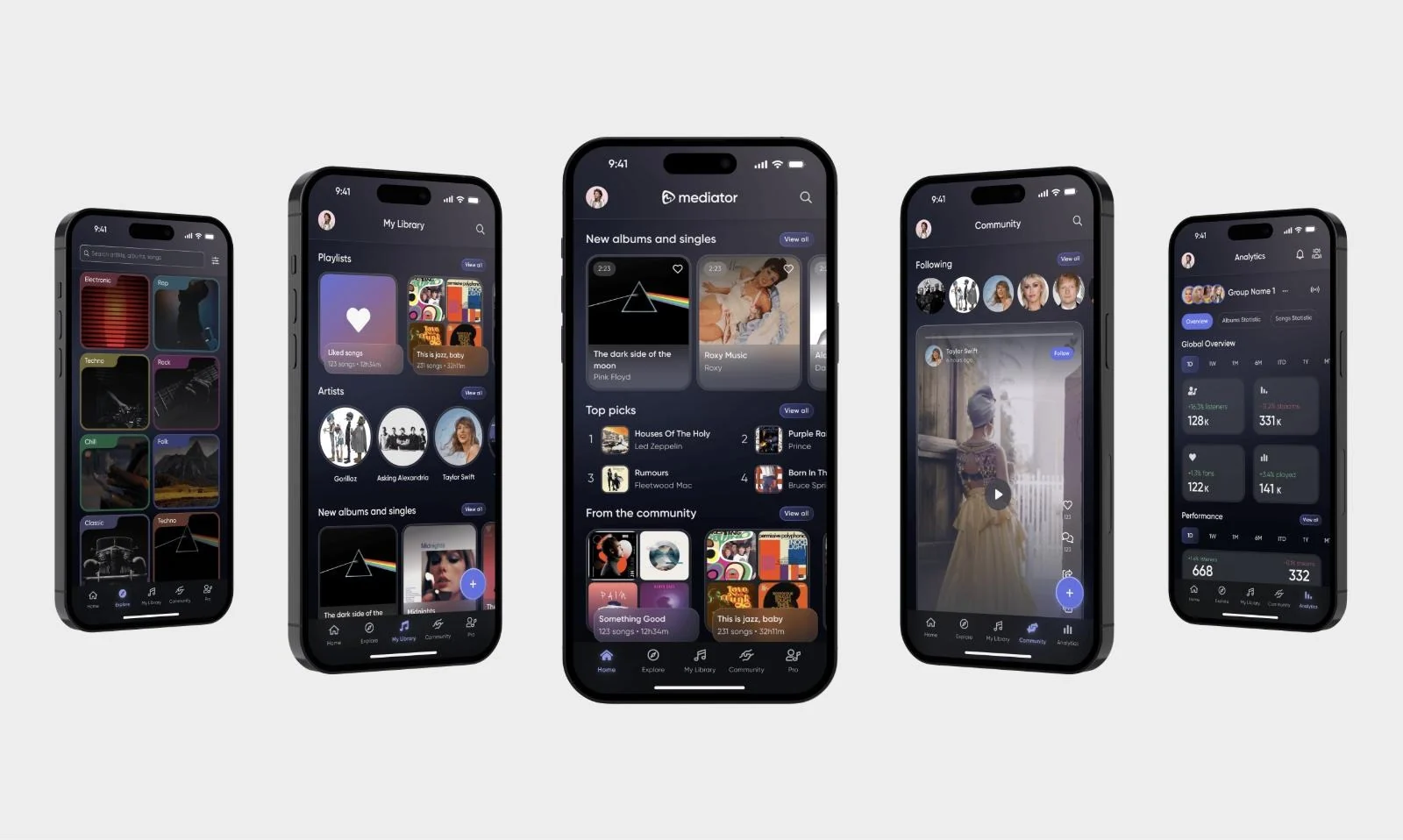
iOS and Android on one component library, designed and built in-house in React Native. A new service reuses what exists.
Client milestones are the work of each client’s whole team; design was one part.

“Over 3 years of collaboration, Ignat played an important role in scaling the product and website while the company grew by 650%. He built our design system and improved key workflows for a platform trusted by 170+ companies.”
Isabel Ramos · UX Architect, ComboCurve

“DIXI helped us build a mobile app from the ground up and update the product. Their focus on user needs played an important role as we scaled to 500K+ users and expanded our subscription.”
Rich Meatto · Co-Founder, Koyfin

“As we prepared for the relaunch, we needed to simplify a product that had become increasingly complex. Ignat helped improve clarity, streamline key workflows and create a much stronger experience for our users.”
Olga Beregova · Partner, HCM
| Client | Platforms | What’s shared | What’s per platform or module | Who built it in code | Duration |
|---|---|---|---|---|---|
| Koyfin | Web, iOS, Android | Colour and signal, type and tabular numbers, spacing, price and % change formats | Native components and navigation | Koyfin’s engineers | 2020–2022, inside the product team |
| ComboCurve | Web, four modules | Units, the data table, charts, one selection model | Layout per module | ComboCurve’s engineers | 3.5 years, inside the product team |
| HCM International | Reporting platform; internal web and desktop app; responsive | Colour and signal, tabular numbers, currency and pay-multiple formats, chart and table components | Layout per surface; wide tables adapted for a phone | HCM’s developers, from DIXI’s specs | 5–6 months |
| Mediator | iOS, Android | One component library for the label tools and the listener side | Platform conventions | DIXI, React Native | About 6 months to a beta-ready first version |
| DIXI DS v1.1 | dixi.agency and the client portal | Three token tiers, light and dark, components with playgrounds and code | — | DIXI | v1.1 released 30 October 2026 |
Checked 1 November 2026. We say who wrote the production code because design-only and design-plus-build are different jobs.
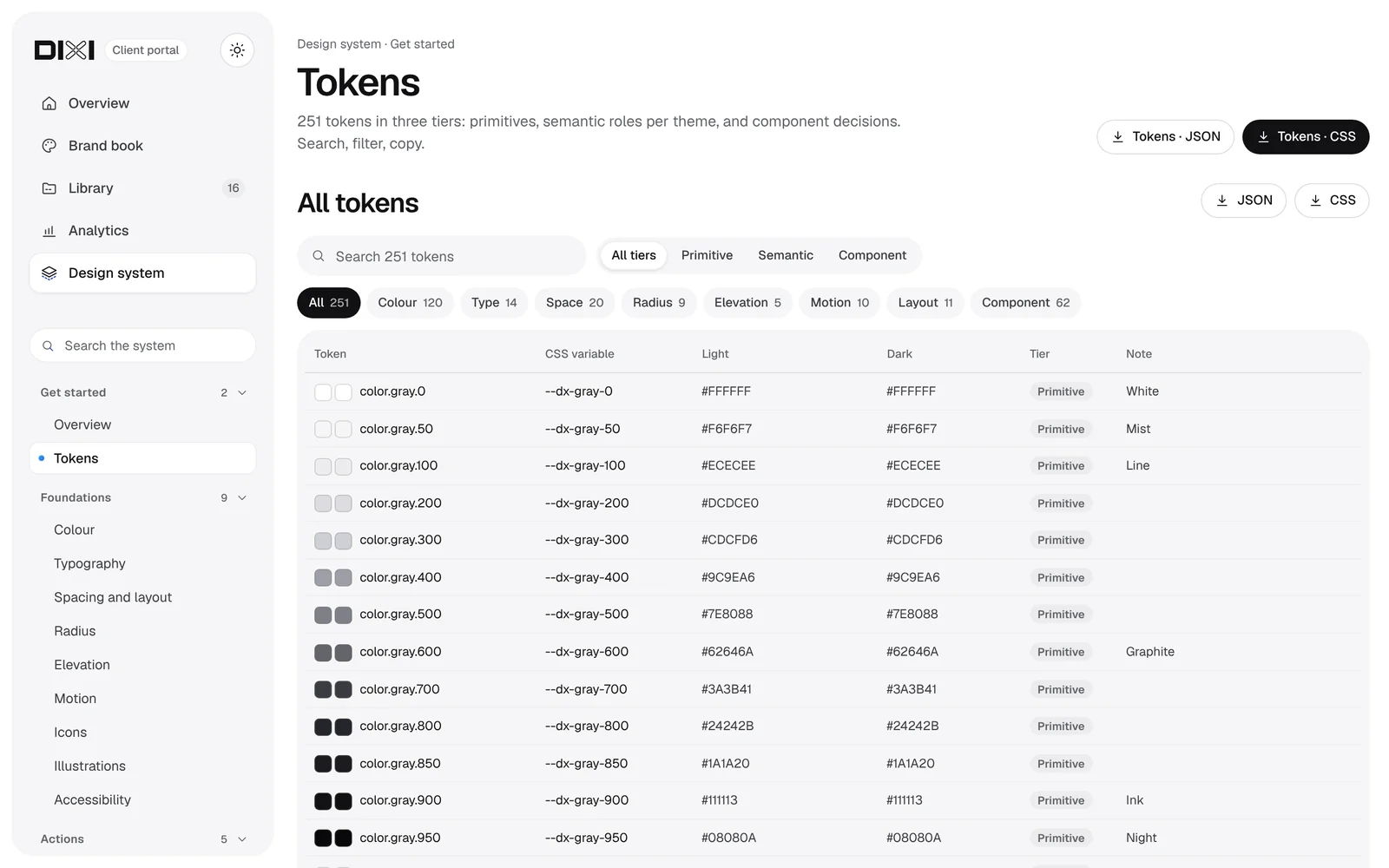
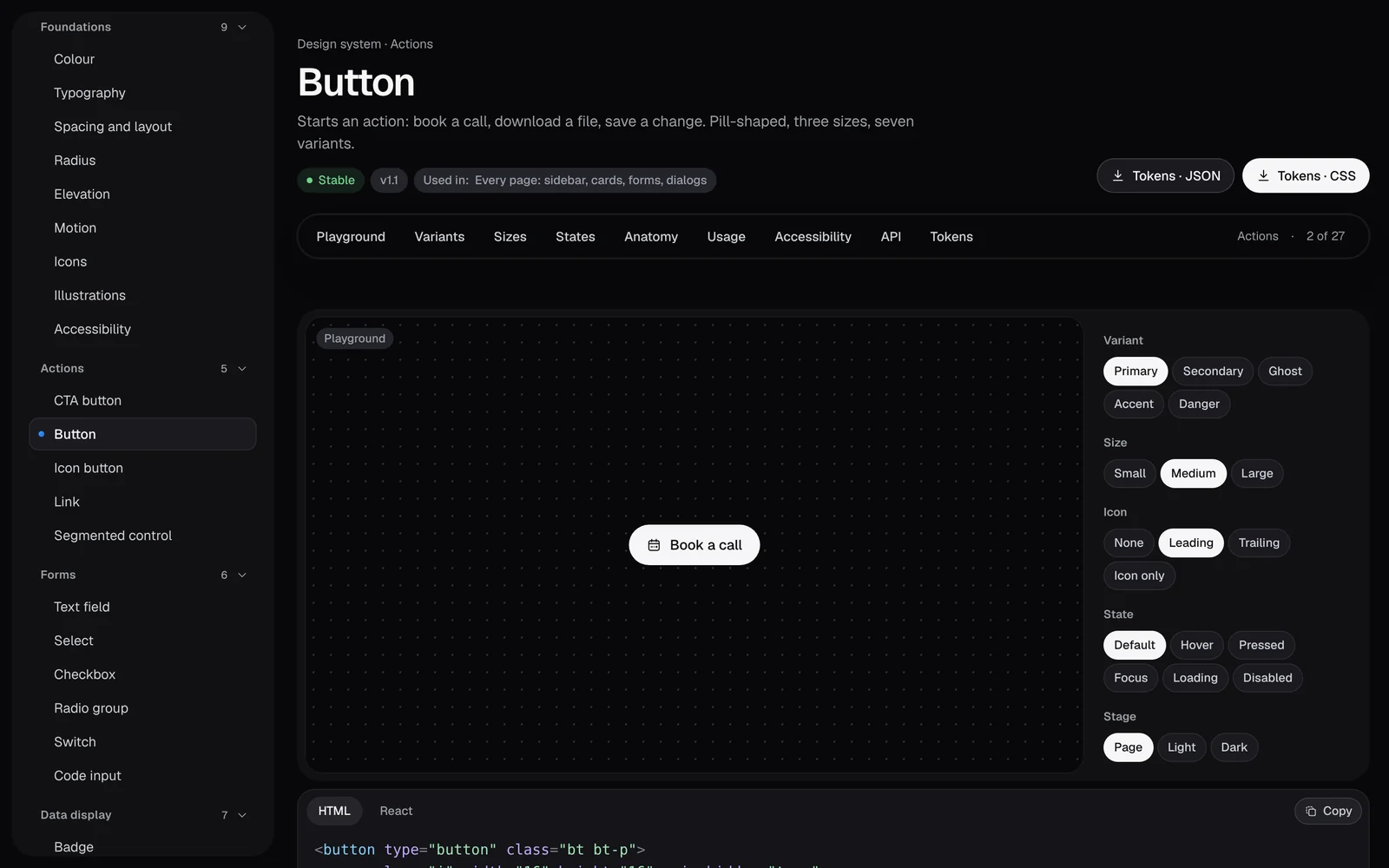
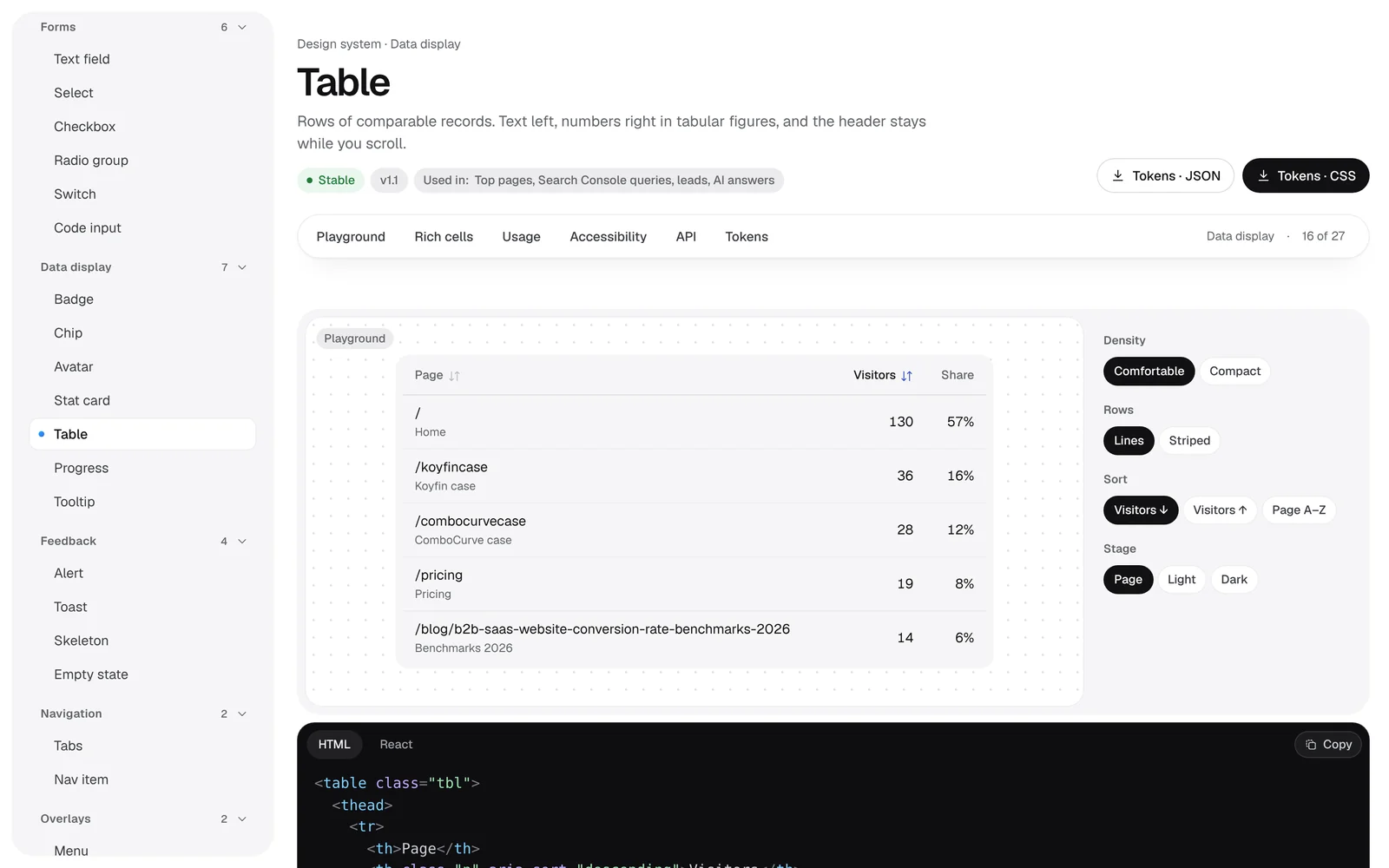
A portal is where a design system lives after handover: every foundation, token and component on one site, with live playgrounds, code to copy, and light and dark themes. Ours, DIXI design system v1.1, runs dixi.agency and the portal our clients sign in to. These are real screens; on a call we walk you through it live.
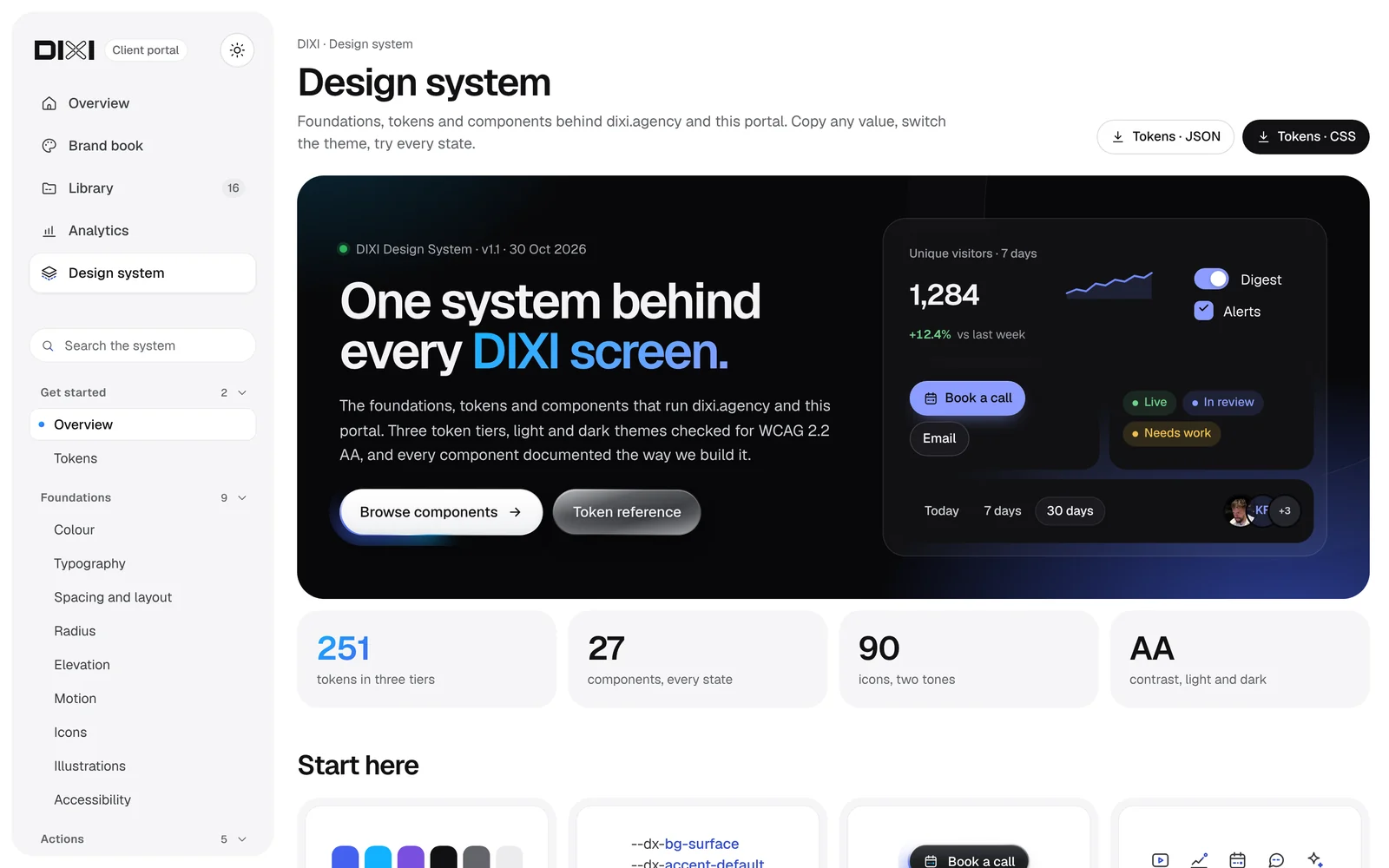
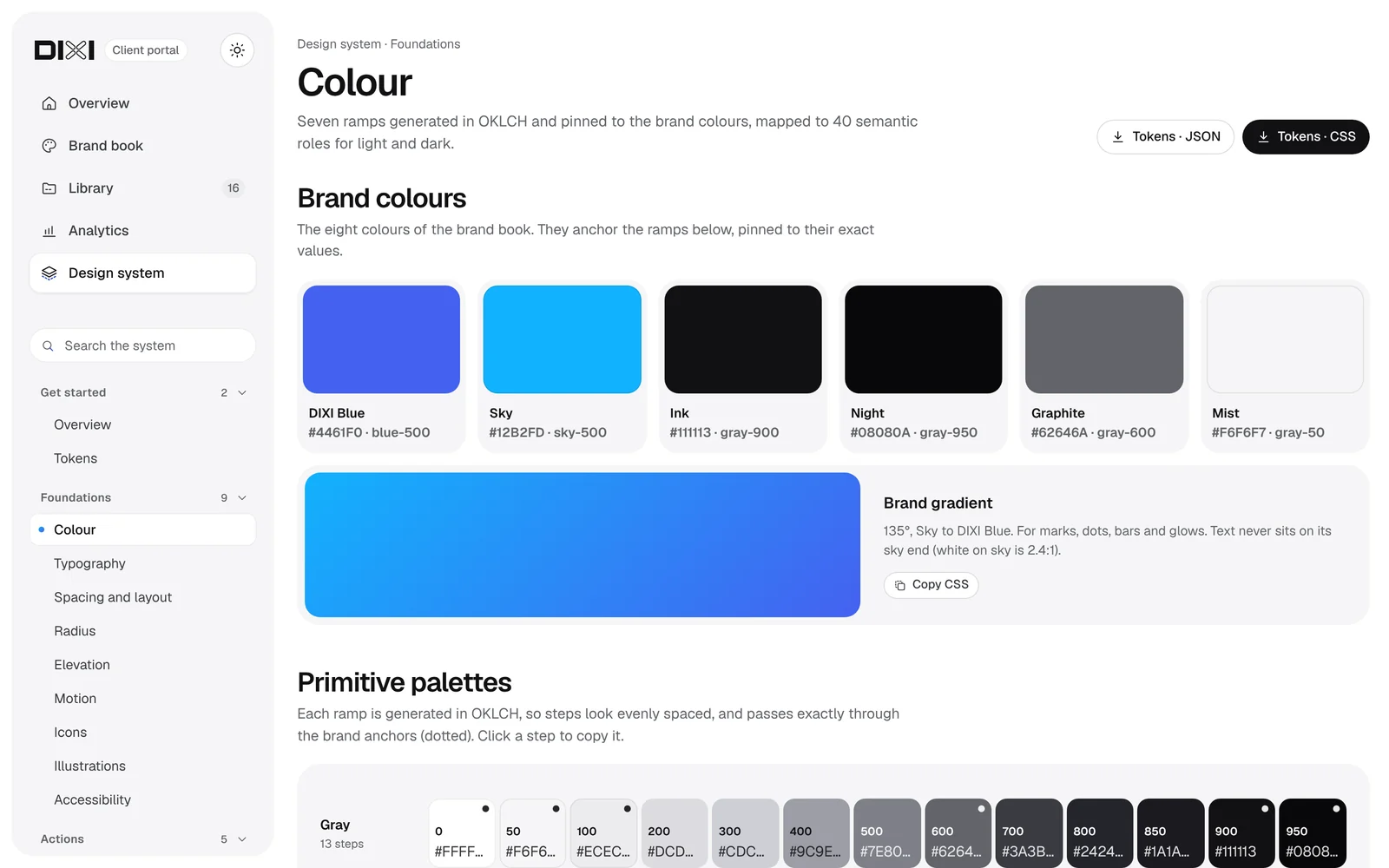
| Part | What’s in it | In our portal |
|---|---|---|
| Get started | Overview, principles, how to read and use tokens, versions and a changelog | v1.1, four principles every screen is checked against |
| Foundations | Colour with ramps and semantic roles, typography, spacing and layout, radius, elevation, motion, icons, illustrations, accessibility | 9 pages |
| Tokens | Every token with its light and dark value and tier; search, filters, one-click copy; downloads as CSS and DTCG JSON | 251 tokens |
| Components | One page each: live playground with variants, sizes and states, anatomy, usage do’s and don’ts, accessibility notes, props, tokens used, code in HTML and React | 27 components in 7 groups |
| Brand and files | Logos in SVG, PNG and PDF, guidelines PDF, fonts, templates, a library to search | Brand book and a 16-item library |
| Search and themes | Search across pages, tokens and components; light and dark everywhere | Yes |
| Access and hosting | Public, or sign-in for your team; on your domain or inside your product; deployed from your repository | Sign-in with a one-time code, on Cloudflare |
| Upkeep | Updated with each release: new components, deprecations, a dated changelog | v1.0 to v1.1 in three days |
Our own portal, checked 1 November 2026. Yours is scoped to your system: fewer components cost less, a second brand or platform adds pages.
A design system portal comes with a system build, or on its own for a system you already have: from $10k, 4–6 weeks. Hosted tools such as zeroheight start at $49–59 per editor a month (PricingSaaS, zeroheight pricing history); a portal of your own has no seat fees and lives in your repository.
Tokens are named decisions stored once and read everywhere. We use three tiers: primitives hold raw values, semantic tokens give them roles with a value per theme, and component tokens belong to one component. Exported as W3C DTCG JSON, the same file feeds CSS, Figma variables, React and native apps, so a brand change is one edit.
--dx-blue-600#364DCC · primitive.color.blue.600--dx-accent-defaultlight--dx-accent-solid-hoverlight--dx-action-primary-bg-hoverlight--dx-info-fglight--dx-action-primary-bg-hoverdarkLight theme: links and accent text, the primary button on hover, info messages, accent icons. Dark theme: the primary button on hover.
--dx-button-primary-bg-hover--dx-icon-accent--dx-gray-900#111113 · primitive.color.gray.900--dx-bg-inverselight--dx-border-stronglight--dx-text-primarylight--dx-action-primary-bglight--dx-bg-surfacedark--dx-text-inversedarkLight theme: body text, primary buttons, strong borders, tooltips. Dark theme: the surface everything sits on.
--dx-button-primary-bg--dx-blue-500#4461F0 · primitive.color.blue.500--dx-accent-solidlight--dx-data-1lightLight theme: the focus border on fields, checked boxes and switches, the first chart series.
--dx-field-border-focus--dx-sky-500#12B2FD · primitive.color.sky.500--dx-border-focuslight--dx-data-2light--dx-border-focusdarkBoth themes: the keyboard focus ring. Light theme: the second chart series.
--dx-blue-300#8C9CFF · primitive.color.blue.300--dx-accent-defaultdark--dx-accent-soliddark--dx-info-fgdarkDark theme only: links, accent text, focus borders and info messages.
1 primitive → 5 semantic roles → 2 component tokens. Change --dx-blue-600 once and every one of them follows.1 primitive → 6 semantic roles → 1 component token. Change --dx-gray-900 once and every one of them follows.1 primitive → 2 semantic roles → 1 component token. Change --dx-blue-500 once and every one of them follows.1 primitive → 3 semantic roles → 0 component tokens. Change --dx-sky-500 once and every one of them follows.1 primitive → 3 semantic roles → 0 component tokens. Change --dx-blue-300 once and every one of them follows.
The card reads --dx-text-primary: #111113 in light, #F6F6F7 in dark. Both readable.The card reads --dx-gray-900 directly. Light still works; in dark the text disappears into the surface. That is why components read semantic tokens, never primitives.
Counts and names come from DIXI’s own dixi-tokens.json (v1.1, W3C DTCG format, 30 Oct 2026), not from a mock-up.
color.action.primary.bg-hover in JSON becomes --dx-action-primary-bg-hover in CSS and the same variable in Figma.The W3C Design Tokens Community Group format reached its first stable version, 2025.10 on 28 October 2025. In zeroheight’s 2026 survey 52% of teams use a three-tier structure, and 60% have no token automation at all (zeroheight, Design Systems Report 2026).
DIXI’s design system v1.1 runs dixi.agency and our client portal: three token tiers, light and dark, CSS and DTCG JSON, and a component library with playgrounds and code. We walk you through it on the first call.
In three stages. An audit inventories every colour, type style and component in Figma and in code and ends with a ranked roadmap. Foundations and core components follow, designed and coded in parallel or paired with your engineers, reviewed every week. Documentation, governance and a first adoption check close the build; upkeep can continue month to month.
Weeks 1–2: an inventory of values and components in Figma and in code; short interviews with designers and engineers.
You hold: the inventory, a ranked roadmap and a token mapWeeks 3–4: primitive, semantic and component tokens, light and dark, data formats; Figma variables and modes.
You hold: tokens as CSS and DTCG JSON, Figma variablesWeeks 5–6: buttons, fields, tables, cards and charts with every state, designed and coded in parallel, reviewed weekly.
You hold: the Figma library and the first coded componentsWeeks 7–8: usage, accessibility notes, contribution and deprecation rules, a changelog.
You hold: a docs site or Storybook, and v1.0Weeks 9–10: we read the adoption metric, walk your team through the system and agree who owns changes.
You hold: an adoption baseline and a named ownerTypical for one SaaS product; 925Studios’ 2026 guide publishes the same 6–10-week range for a single-product build. Several products or brands take longer. Your weeks are confirmed in the written plan.
Start with a $4,000 fixed audit if you already have components that drift; the fee counts toward the build. A system build, designed and coded, starts at $15k and takes 6–10 weeks; a portal like ours adds from $10k. A design partnership, from $6k a month, keeps the system growing with every release. Our pricing page shows what changes the price.
For teams whose components already drift: what to keep, merge and retire, before anyone builds more.
A new system or a rebuild of a drifting one, designed and coded against your real screens.
A site where the whole system lives, like ours: foundations, tokens and every component with a playground and code.
The system grows with every release, the way ComboCurve’s did for 3.5 years.
Several products or brands? The audit sets the scope and the price of the build. Redesigning the product at the same time? The system can come inside a product project.
By designing adoption, not announcing it. We agree one adoption metric before kickoff, such as the share of UI built from library components, involve engineers from week one, ship components in the stack you already use, write contribution and deprecation rules, and keep a changelog. ComboCurve’s system grew with its modules for 3.5 years, built next to its engineers.
| Criterion | What you get from DIXI |
|---|---|
| Figma variable architecture | Variables and modes mapped to semantic tokens, light and dark from day one |
| Token completeness | Colour, type, spacing, radius, motion and data formats, in three tiers |
| Component library depth | Every state, including data components: tables, KPI cards, charts |
| Accessibility | Contrast checked in light and dark against WCAG 2.2 AA, a focus-ring token, 36 px minimum targets |
| Engineering path | Coded components in React, Next.js or React Native, or paired review with your engineers |
| Governance | Contribution, versioning and deprecation rules, with a named owner on your side |
| Post-handoff adoption | An adoption metric read at handover; upkeep month to month if you want it |
Criteria from 925Studios’ 2026 guide to choosing a design system agency, checked 1 November 2026. Ask every agency on your list the same seven questions.
A style guide documents visual rules. A UI kit is a set of drawn components. A component library is reusable components, in Figma or in code. A design system is all of these plus tokens, documentation, and the rules and people that keep design and code in sync. Most product teams past Series A need the system, not just the library.
| What it contains | Lives in | Who maintains it | Enough when | |
|---|---|---|---|---|
| Style guide | Visual rules: colours, type, logo use | A PDF or a page | Brand or marketing | You have a brand, not yet a product UI |
| UI kit | Drawn components, without states or logic | Figma | A designer, until it drifts | You are designing the first screens |
| Component library | Reusable components with variants, in Figma or code | Figma or a code repo | Designers and engineers, often separately | One team, one platform |
| Design system | Tokens, a Figma library, coded components, docs, rules and owners, kept in sync | Figma, code and a docs site | A named owner with a contribution model | Several designers, platforms or modules |

I’m Ignat. I lead every design system engagement myself and sit in every weekly review. You work with me and a senior team of seven: product designers and developers in one team, so the Figma library and the coded components come from the same people, plus an SEO specialist and QA.
At DIXI an audit of an existing system is $4,000 fixed for one product and takes two weeks; the fee counts toward the build if you continue. A system build, with tokens, a Figma library, coded components and docs, starts at $15k for 6–10 weeks. A design system portal like ours starts at $10k, and upkeep with a design partner at $6k a month. Scope sets the price: how many components, platforms, themes and brands. What changes it is on our pricing page.
For one SaaS product, 6–10 weeks from audit to handover: two weeks of audit and token architecture, then foundations, core components, docs and an adoption check. Several products or brands take longer. Koyfin’s systems for web and mobile grew over two years, feature by feature.
Not before your core flows settle. The usual signals are a second designer, a second platform, a third module built by another team, engineers asking for hex values, or a rebrand that would take months. One signal: a small token set is enough. Several: it is time. The signals check above takes a minute.
Yes, and we usually do. The audit shows what to keep, merge and retire. We put tokens under what works, keep old names as aliases for one version and deprecate before deleting, so nothing breaks for your engineers in the middle of a release.
Both. When DIXI builds the front-end, components ship in React and Next.js, or React Native for mobile, as on EW and our own app Mediator. When your engineers build, as at Koyfin, ComboCurve and HCM, we deliver the Figma library, tokens and specs, and review the coded components with them.
Figma variables and modes in design. Tokens are exported as W3C DTCG JSON, which Tokens Studio and Style Dictionary read, and as CSS variables. Documentation lives in Storybook or a docs site like ours. If your team already uses a tool, we join it rather than bring our own.
With a semantic tier. Components read roles such as bg.surface or accent.solid; light and dark map those roles to different primitives, and so does each brand. Nothing in the components changes. Try it in the panel at the top of this page.
A named owner on your side, with the rules to do it: how to propose a component, who approves it, how versions and deprecations work, and a changelog. If you want help, upkeep continues in a design partnership, month to month after the first three.
Accessibility is built into the tokens and components: text and UI contrast checked in light and dark against WCAG 2.2 AA, a visible focus ring with its own token, 36 px minimum targets and reduced motion respected. Each component’s docs list its states and keyboard behaviour.
You do, in full: Figma files, tokens, code and docs, from the first handover. Ownership and handover details are in our FAQ.
Book a 25-minute call with Ignat. You get a written plan, a quote and an honest answer on whether you need a system yet. Ignat replies within one business day.
We use essential storage to run this site. With your OK we also use analytics to see which pages help visitors. No ad tracking. Cookie policy
Choose what we can use. You can change this any time from Cookie settings in the footer.