On this page
The short answer
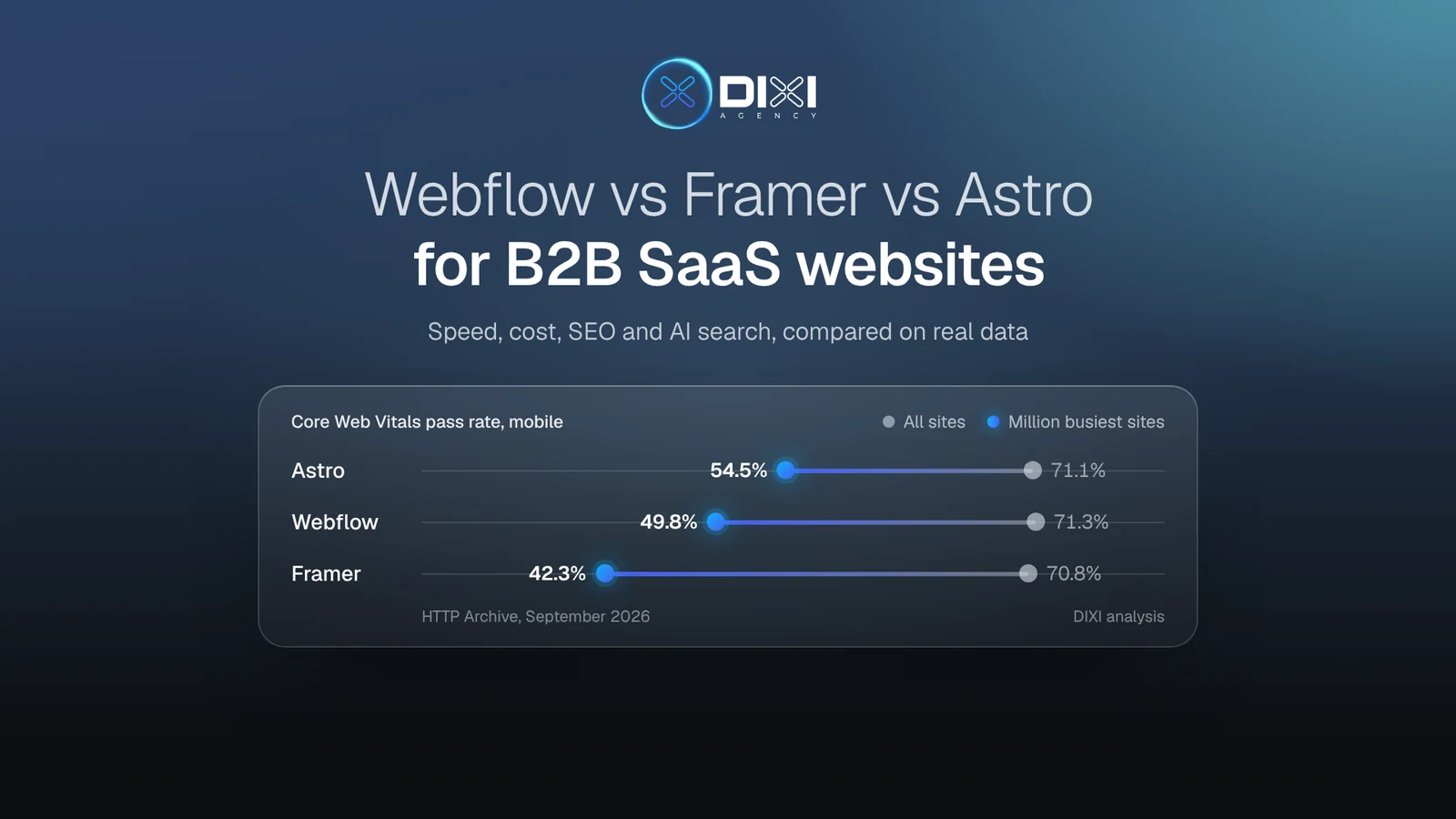
Choose the platform by who will change the site every week. Speed rarely settles it: in HTTP Archive's September 2026 data, Webflow (71.3%), Astro (71.1%) and Framer (70.8%) sites pass Google's Core Web Vitals on mobile at almost the same rate. The gap opens on busy sites: among the million most-visited sites on the web, Astro passes 54.5%, Webflow 49.8% and Framer 42.3%. For most SaaS teams, the platform decides what the site costs, who can edit it and how hard it is to leave. On a high-traffic site, it affects speed too.
| Your situation | Choose | Watch out for |
|---|---|---|
| Marketers ship new pages every week, there is no engineer, and the site stays under about 150 pages | Framer | Slower response to clicks on heavy pages; no code export; 150 pages and 10 CMS collections before add-ons |
| A content engine with many collections, plus approvals and audit logs | Webflow | The May 2026 repricing; AEO agents and publishing workflows need the $2,500-a-month Team plan or Enterprise |
| An engineer, or an AI-assisted developer with review, owns the site and you want to own the code | Astro | Marketers need a headless CMS or a reviewed Git workflow to publish |
| Marketing wants a visual builder, but product needs code for docs, calculators or app pages | Hybrid (Webflow plus Webflow Cloud, or a builder and Astro under one domain) | Two systems to keep on brand |
At DIXI we design and build B2B SaaS websites on all three, and this article is the comparison we'd walk a founder through. Every number has a date and a source, and where we use our own data we say how we got it.
How do Webflow, Framer and Astro compare side by side?
Framer is the fastest way for a marketing team to design and ship pages on its own. Webflow is the most complete hosted CMS, with governance for bigger teams. Astro is a code framework: the most control and the lowest running cost, but someone has to own the code. Prices below were checked on 3 November 2026 and are billed yearly.
| Framer | Webflow | Astro (code) | |
|---|---|---|---|
| What it is | Hosted visual builder with a design canvas, React under the hood | Hosted visual builder on the CSS box model, with a mature CMS | Open-source framework (MIT), backed by Cloudflare since January 2026; you host the output |
| Best for | Seed to Series A sites up to about 150 pages, design-led launches | Content-heavy sites, many collections, teams that need approvals | Teams with an engineer, custom integrations, code ownership |
| Site plan with a CMS | Pro, $30/mo | Premium, $25/mo ($39 billed monthly) | Framework free; static hosting on Cloudflare free; Workers Paid from $5/mo for forms and APIs |
| Pages and CMS | 150 pages (up to 700 with add-ons); 2,500 CMS items (up to 40,000) | 300 static pages; 20,000 CMS items and 40 collections | No platform limit |
| Each extra editor | $20/mo; content-only $10/mo; viewers free | Workspace seats: $39/mo full, $15/mo limited | Free in Git; headless CMS seats vary (Sanity Growth is $15 per seat) |
| Extra languages | $20/mo per locale, up to 20 | $9/mo for 3 locales or $29/mo for 10, with word caps | Built-in i18n routing; the translation workflow is yours |
| Bandwidth included | 100 GB, then $40 per 100 GB | 50 GB, then from $20/mo per extra 50 GB | Static requests free and unlimited on Cloudflare |
| Staging and approvals | Staging and branches with preview links on Pro | Publishing workflows and single-page publishing from the Team plan ($2,500/mo) | A preview deploy for every Git branch |
| A/B testing | Convert add-on from $50/mo, usage-based | Optimize add-on from $299/mo | Any testing tool you add |
| Code apps under the same domain | Advanced hosting add-on, $200/mo (reverse proxy, up to 6 rewrites) | Webflow Cloud on paid plans: Astro, Next.js or Vite apps at a path such as /app | Native: route any path to any app |
| AI crawlers and agents | Pre-rendered HTML, a Markdown copy of each page for AI agents, MCP server (October 2026) | Server-rendered HTML, MCP server on all plans, AEO agents on Team or Enterprise | Static HTML; robots.txt, schema, llms.txt and Markdown copies are yours to build |
| Enterprise security | SSO and SCIM on Enterprise; SOC 2 Type 2 and ISO 27001 | SSO, SCIM, audit-log API and a 99.99% hosting uptime SLA on Enterprise; SOC 2 Type II | Inherits your host's security; Git history is the audit trail |
| Leaving later | No self-hostable export: a move means a rebuild | HTML, CSS and JS export on Workspace plans, without the CMS, forms or site search | You own the repository |
| Main risk | Page and collection limits, slower interactions on heavy pages, lock-in | Price changes; a 20,000-item cap below Enterprise; the best tools sit on Team and Enterprise | Needs an owner for code, dependencies and QA |
The row that usually decides it is who edits the site after launch. We get to it after the data on what startups use, speed, cost and search.
What do freshly funded SaaS startups build their websites on?
Half of them build in code. We checked the website platform of every company from our October homepage study: 42 B2B software startups that announced a pre-seed to Series B round between 1 September and 27 October 2026. Next.js was the most common single platform with 12 sites, ahead of Webflow (11), Framer (8), Astro (2) and WordPress (2). Seven more were custom code that we couldn't pin to one framework.
How we checked. On 3 November 2026 we read each homepage's asset addresses and generator tags. Webflow serves files from website-files.com, Framer from framerusercontent.com, Astro from /_astro/ paths and Next.js from /_next/ paths. The seven "other code" sites show no builder signature: five serve files from their own domain and two from a headless CMS, so none of them runs on Webflow or Framer.
The platform follows how the company sells. In our November test, 15 of these startups let a buyer start without talking to sales, through a free plan or a trial. Eight of those 15 run on Next.js and four on Framer. None of the 11 Webflow sites offered a self-serve start or published a price.
That doesn't mean Webflow hides prices. It means the companies that sell through demos picked a tool built for marketers. Developer tools and product-led startups tend to build the site in the same stack as the product, so engineers ship pricing pages, docs and changelogs alongside the app: 7 of the 12 AI, developer and security companies built in code. Demo-led companies in fintech, insurance and physical industries lean on builders, where marketing publishes case studies and resources without a ticket: 6 of the 10 vertical SaaS companies run on Webflow or Framer.
In practice, start from how your buyers begin. If buyers start inside your product, the site is part of the product and code makes sense. If buyers start with a demo, the site is a marketing engine, and a builder keeps it moving.
Which platform is fastest: Webflow, Framer or Astro?
For a typical site, none of them. In HTTP Archive's September 2026 field data from real Chrome users, 71.3% of Webflow sites, 71.1% of Astro sites and 70.8% of Framer sites pass all three Core Web Vitals on mobile. That puts all three far ahead of the web as a whole (52.8%) and of Next.js sites (35.7%). The tie holds across the web as a whole. Among the million most-visited sites, where pages carry more content, scripts and tags, every platform drops and the order spreads out.
Busy sites pile on analytics, chat widgets, consent managers, A/B tests and video, and each platform absorbs that weight differently. At the median, a busy Astro site ships 643 KB of JavaScript on mobile. Busy Webflow and Framer sites ship about twice that: 1,258 KB and 1,306 KB. Starting with less code leaves room for the tags marketing will add later.
Each platform also has its own profile once you split the score into its parts:
LoadingLCP, good on mobile
- Astro81.1%
- Webflow78.6%
- Framer83.4%
Response to tapsINP, good on mobile
- Astro85.0%
- Webflow88.0%
- Framer80.3%
Layout stabilityCLS, good on mobile
- Astro93.6%
- Webflow93.6%
- Framer94.2%
Server responseTTFB, good on mobile
- Astro63.1%
- Webflow73.1%
- Framer69.3%
- Framer loads fastest and responds slowest. It has the best loading score of the three (83.4%) and the weakest response to taps (80.3%, against 88.0% for Webflow). Framer pages run as React apps in the browser, so scroll effects and animations compete with clicks. Among the busiest sites, only 54.2% of Framer sites respond to taps fast enough.
- Webflow answers fastest and weighs the most. Its hosting has the best server response of the three (73.1%), and the median page is the heaviest at 3.3 MB.
- Astro ships the least and depends on your host. Pages are less than half the weight of the other two, but its server response is the weakest (63.1%), because Astro sites run everywhere from fast edge networks to cheap shared servers. So with Astro, choose the host carefully.
For US visitors, all three do better and Astro leads. 84.2% of Astro sites, 81.7% of Framer sites and 80.2% of Webflow sites pass, because devices and networks there are faster.
Our own numbers. The Framer version of dixi.agency scored 62 for mobile performance in PageSpeed Insights, with a 5.7-second LCP (27 October 2026). The Astro rebuild scores 96 with a 1.3-second LCP (PageSpeed Insights, 3 November 2026). To be honest, much of that gain came from rebuilding with a performance budget: lighter images, no autoplay video on load and tracking scripts that wait for cookie consent. Astro made the budget easy to keep, because a page ships almost no JavaScript unless we add it. The full before and after, with search data, comes in our article on the move on 17 November.
So if your site will stay small, choose on editing and cost. If you expect heavy traffic and a long list of marketing tags, plan performance work on any builder, or pick a stack that ships less code from the start.
What does each platform cost to run for a SaaS team?
Platform fees are the small part of the bill. A Seed team pays roughly $500 to $800 a year on Framer or Webflow and close to nothing on Astro. By Series A, with more editors, languages and A/B testing, Webflow can cost twice as much as Framer, mostly because of its testing add-on. The bigger money goes into the build and into the hours someone spends changing the site every month.
We priced three typical teams on 3 November 2026, with yearly billing and platform fees only:
| Platform fees per year | Framer | Webflow | Astro on Cloudflare |
|---|---|---|---|
| Seed: 2 people edit, one language, under 50 GB of traffic a month | $600 (Pro $30 + 1 editor $20, monthly) | $480–768 (Premium $25 + 1 seat at $15 limited or $39 full) | $0–60 (free hosting; Workers Paid $5/mo once you add forms) |
| Series A: 5 editors, 2 extra languages, 150 GB a month | $2,280 (Pro + 4 editors + 2 locales + 100 GB extra) | $2,184 (Premium + 2 full and 2 limited seats + Localization $9 + 100 GB extra $40) | $960 (Workers Paid + Sanity Growth for 5 seats) |
| Series A with A/B testing | from $2,880 (Convert from $50/mo, usage-based) | $5,772 (Optimize from $299/mo) | $960 plus the testing tool you choose |
| Series B: approvals, audit logs, SSO for editors | Enterprise, custom price | Team $30,000 ($2,500/mo; SSO and SCIM need Enterprise) | Your Git and CMS plans; SSO depends on those vendors |
If an agency or freelancer manages your Webflow site, check the renewal date this month. Sites in Freelancer and Agency workspaces, and sites on legacy pricing, move to the new plans at their next renewal or billable change on or after 16 November 2026. Switching to yearly billing before then keeps the current plan for another year (Webflow). Former Business plans lost half their bandwidth, from 100 GB to 50 GB, so high-traffic sites can end up paying more: in Webflow's own example, a site using 150 GB on yearly billing goes from $59 to $65 a month (Webflow Help).
The cost nobody puts in the comparison is the change request. Frigade, a Y Combinator startup, left Framer in May 2026 partly because new page templates beyond its agency's original set cost "a few hundred to thousands of dollars each" and edits queued up on one person (Frigade). StackOne moved from Webflow to Astro with Claude Code and cut the time to ship a new page from 24–72 hours to 1–2 hours (StackOne). In both stories, the cost that mattered was who could change the site and how long changes took.
The number that changes the decision is the build. We publish ours on the DIXI pricing page: website projects start at $12k for 6–10 weeks and a move to a new platform from $6k, whichever platform fits. The cost calculator gives a range in about a minute.
Which is best for SEO and AI search: Webflow, Framer or Astro?
All three can rank and be cited, because all three serve real HTML that Google and AI crawlers can read without running JavaScript. They differ in defaults and control. Framer does the most for you out of the box, Webflow keeps its AI-search tools for its top plans, and Astro gives you full control but sets nothing up for you. What actually breaks AI visibility is how a page was built, and we saw it on Webflow, WordPress and custom-code sites.
HTTP Archive's Lighthouse audits agree that the basics are covered everywhere:
Astro
- SEO
- Accessibility
- Best practices
Framer
- SEO
- Accessibility
- Best practices
Webflow
- SEO
- Accessibility
- Best practices
- Framer. Every page is pre-rendered as HTML. AI agents can ask for a Markdown copy of a page, by sending an
Accept: text/markdownheader or adding?mdto the address, and robots.txt lets AI crawlers in by default. The sitemap is automatic and redirects support wildcards. An llms.txt file is a manual upload, and schema goes in as custom code or from CMS fields (Framer Help). - Webflow. Mature per-page SEO fields, meta tags driven by the CMS, and schema through custom code. Its AEO agents, which audit pages for AI search and suggest content fixes, are listed on the $2,500-a-month Team plan and on Enterprise, though Webflow's AEO page still says Enterprise only (Webflow pricing, Webflow AEO). Every plan now includes an MCP server, so AI assistants can read and edit the site.
- Astro. Static HTML by default, with full control over meta tags, JSON-LD, headers, redirects, robots.txt and llms.txt, none of which exists until someone builds it. On dixi.agency we generate Organization, Person, Article, Breadcrumb and FAQ schema from one content source, so every page stays consistent. PageSpeed Insights has started scoring an "Agentic browsing" category, which Google still marks as in development, and our Astro build passes 3 of 3 checks (3 November 2026).
The JavaScript trap isn't tied to one platform. In our October study, an AI model read each homepage as plain text. On two sites, animated stat counters came through as "0%", because the real numbers only appear after a script runs. On two more, customer names existed only in image file names. The counter sites ran on Webflow and on custom code, and the logo sites on Webflow and WordPress. To check yours, ask ChatGPT or Claude to read your homepage URL and list every number and customer name it finds.
What moves AI citations has little to do with the platform. The first result ChatGPT's search tool returns is cited 58% of the time, and the 11th only 14% (Search Engine Journal). 44% of its citations come from the first 30% of a page (Search Engine Journal). So the platform question for AI search is narrow: does it serve fast HTML, and can you control redirects and structured data? All three do, so after that, rankings and content decide. Our GEO playbook covers getting mentioned and cited, and our test of what a buyer's AI agent finds covers what it needs from the page once it arrives.
Who can edit the site after launch?
This is the question that decides the platform. If marketing will change the site every week and nobody on the team writes code, choose Framer or Webflow. If an engineer owns the site, Astro works well, with marketers publishing through a headless CMS or through an AI agent whose changes someone reviews. In 2026 the line moved from both sides: Framer and Webflow now let AI assistants edit a site through MCP, and AI coding tools let one person ship pages in code.
- Framer: the marketer builds. Designers and marketers work directly on the canvas, including new pages assembled from existing components. Content-only editors cost $10 a month. Pro adds staging and branches with preview links, so a launch can be reviewed before it goes live. In late October 2026 Framer added an MCP server, free while in preview, that lets assistants such as Claude or Cursor work on the site, and its CMS view can now filter collections by references (Framer updates).
- Webflow: the marketer edits, a specialist builds. Editing content and CMS entries is easy for marketers. New layouts are another matter, because Webflow follows the CSS box model and takes real practice. Publishing workflows and single-page publishing start on the Team plan. At Webflow Conf in September 2026 the company announced MCP 2.1 and Agent Instructions, rules that tell AI assistants how to work on your site (Webflow).
- Astro: the engineer owns it, the marketer publishes or asks. Three setups work:
- A headless CMS, where marketers edit in a web interface and each publish rebuilds the site. Sanity starts free with Growth at $15 a seat, Keystatic is free for up to 3 users, TinaCMS's Team plan is $24 a month billed yearly, and Contentful's first paid plan is $300 a month.
- Markdown files in Git, edited through pull requests. Very Good Ventures runs its 309-page site this way (VGV).
- An AI-agent workflow, where a marketer describes the change, an agent prepares it and a person approves it. StackOne runs four AI reviewers on every change (practices, SEO, security and accessibility), with security as the only gate that can block it, and a merge goes live in about 90 seconds (StackOne).
Our own blog runs on the third setup. Each article is drafted in a shared doc, an AI agent builds the page in our repository, we review the preview, and a merge to main deploys it to Cloudflare.
Our rule of thumb at DIXI: count the new page layouts marketing will want each month without help. If it's more than two or three and nobody on the team writes code, a visual builder is worth its fees. If the site changes mostly through articles and someone can review code, even with an AI agent doing the typing, Astro costs less and gives you more control.
What does a B2B SaaS website need from its platform?
A SaaS site has jobs that a portfolio site doesn't: forms that land in the CRM, consent that holds up in an audit, experiments, pages generated from data, docs, and a security review from a large customer. All three platforms can do each job. They differ in how much you have to assemble and pay for yourself.
| What the site needs | Framer | Webflow | Astro |
|---|---|---|---|
| HubSpot or Salesforce forms | HubSpot component embeds HubSpot forms; native forms go to email, Google Sheets or a webhook, not straight into HubSpot | HubSpot app embeds HubSpot forms or maps native Webflow forms (plain text fields only) | Embed the HubSpot form, or post to HubSpot's Forms API from a small server function |
| Cookie consent | Built-in Cookie Banner component tied to Google Consent Mode; Framer's own analytics need no banner | No native consent tool; you add a consent app or script, and its place in the head code is up to you | Any consent platform, but test it with your other scripts |
| A/B tests and personalization | Convert add-on from $50/mo, up to 5 tests | Optimize from $299/mo; Salesforce and HubSpot targeting on the Enterprise version | Any tool, including server-side tests that don't flicker |
| Pages generated from data (integrations, comparisons, glossary) | CMS up to 40,000 items; sync through plugins or the Server API | CMS up to 20,000 items on Premium; sync through the Data API | Built from any API or file at build time; StackOne generated 914 connector pages |
| Docs and changelog | Usually a separate tool on a subdomain, or a path through Advanced hosting | Usually a separate tool, or an app on Webflow Cloud at a path like /docs | Same repository (Astro's Starlight docs theme) or any path |
| Security review | SOC 2 Type 2 and ISO 27001; SSO and SCIM on Enterprise | SOC 2 Type II; SSO, SCIM and audit logs on Enterprise | Your host's reports (Cloudflare, Vercel and Netlify publish SOC 2) plus your own repository controls |
| Analytics | Built-in analytics without cookies; funnels with Convert | Analyze add-on from $9/mo for 2,000 sessions | GA4, Plausible, PostHog or any other tool |
Consent is where the quietest damage happens. On Webflow, a tracking script pasted above the consent code can fire before the visitor chooses, and Webflow says it doesn't enforce the order. On Astro, StackOne's consent banner and its script loader kept calling each other until the browser stopped the script, so the banner never showed and analytics lost sessions. On any platform, a declined cookie means HubSpot still gets the form but not the visit history, which looks like a tracking bug to sales. Test consent on the published site, in an EU and a US session, before launch.
Can you use Webflow or Framer together with Astro on one site?
Yes, and for many SaaS companies it's the best answer. Marketing keeps a visual builder for the homepage, landing pages and blog, while code handles the parts that behave like product: docs, a pricing calculator, an integrations directory or a sign-up flow. Visitors and Google see one domain. The two worlds are closer than they look: when Cloudflare bought the Astro team in January 2026, it said Astro already underpins platforms such as Webflow and Wix (Cloudflare).
There are three ways to set it up:
- Webflow with Webflow Cloud. Deploy an Astro, Next.js or Vite app and mount it at a path of your Webflow site, such as /app or /tools. It runs on Cloudflare Workers; the Premium plan includes 15 apps and 2 million requests a month, then $2 per million requests (Webflow Cloud, Webflow pricing).
- Framer with Advanced hosting. A $200-a-month add-on on Pro puts several sites under one domain through reverse-proxy rewrites (up to 6) and custom headers (Framer pricing).
- A router in front of everything. A Cloudflare Worker, or rewrites on Vercel or Netlify, sends /docs to a docs site, /tools to an app and everything else to Framer or Webflow. It's the most flexible option and the cheapest to change later, but an engineer owns it.
A hybrid also has a cost: two systems mean two places for the navigation, footer, fonts and tracking. Keep one design system and one tag manager across both, merge the sitemaps, and make sure every canonical tag points at the main domain. It's also a gentle way to migrate, one section at a time, without a big-bang relaunch.
Should you build your SaaS website with Claude Code or Lovable instead?
AI coding tools make a code website cheap to build, but owning it still takes judgment. They're a good way to ship a first landing page, or to rebuild an existing site in Astro in days instead of months. For a company website that has to rank, convert and stay on brand for years, treat an AI-built site like any other code site: it needs a design system, an owner, and checks before every release.
What AI does well. The 2026 migrations show the speed:
- Omnia moved about 800 pages from Webflow to Astro. The agent ran for 8 hours 46 minutes, the whole move took 23 hours from kickoff to the DNS switch, and it cost about $1,200 in AI usage (Omnia).
- Very Good Ventures rebuilt its Webflow site in Astro with Claude Code in under two weeks: 291 URLs in the old sitemap, 309 pages at launch and more than 1,500 automated tests (VGV).
- Frigade rebuilt its Framer site in about a week, in 267 commits, by talking to Claude (Frigade).
What AI doesn't do for you:
- Speed isn't automatic. Only 35.7% of Next.js sites pass Core Web Vitals on mobile, against 71.1% for Astro (HTTP Archive, September 2026). Many of those Next.js sites are apps rather than marketing pages, but if an AI tool hands you a client-rendered React app as your marketing site, check that pages are server-rendered and light before launch. Lovable has rendered new projects on the server since 13 May 2026 (Lovable); older projects get pre-rendering for crawlers instead.
- Failures are quiet. After StackOne's launch, old URLs without redirects showed up as 404s in Search Console, content inside client-side React components was invisible to search engines, and the sitemap stamped every page with the build date. The AI also proposed aggressive caching headers that the team had to roll back (StackOne).
- The brand drifts. An agent repeats whatever patterns it sees. Without a design system and component rules, each new page looks a little less like the last.
- Someone still owns it. Someone has to update dependencies, review changes and answer when the site breaks the night before a launch.
Framer vs Claude Code is now a smaller choice than it sounds. With Framer's MCP server, Claude Code can work on a Framer site too. The real question is where the source of truth lives: on a canvas your marketers can see and fix, or in a repository your engineers can review.
How we use AI at DIXI. We design the system first: tokens, components and page templates. Then AI speeds up implementation inside that system, every change goes through review, and every page has a performance budget it must meet before launch. The client owns the design, the code and every account. If your team already built the product with Lovable, Bolt or Cursor, our AI-built MVP cleanup guide covers what to fix inside the app.
Is Framer replacing Webflow, and what changed in 2026?
Framer is winning new design-led sites, but it isn't replacing Webflow. The bigger shift of 2026 is toward code. Across sites with real Chrome traffic, Astro nearly tripled in a year and Next.js grew by about two thirds, while Framer grew by a third and Webflow shrank slightly.
The switching data points the same way. In the 90 days to 7 September 2026, TechnologyChecker saw 391 domains move from Webflow to Framer and 108 move the other way. Webflow is still far larger, with 262,281 detected domains against Framer's 58,661, and WordPress, with 1,195 sites, is the most common destination for sites leaving Webflow (TechnologyChecker). Among the freshly funded startups we checked, Webflow still edges Framer, 11 sites to 8.
What changed this year, newest first:
- WebflowWebflow's new prices reach agency and freelancer workspacesAt the next renewal or billable change. Yearly billing before then keeps the current plan for a year.
- FramerFramer's CMS view filters collections by referencesLarge collections of posts and case studies are faster to manage.
- FramerFramer adds an MCP server, free in previewAI assistants such as Claude or Cursor can work on a Framer site directly.
- WebflowWebflow Conf: MCP 2.1, Agent Instructions, AEO content agentsWebflow bets on agents working inside the site.
- AstroAstro 7 ships a new compilerBuilds 15–61% faster, so large sites rebuild faster after every publish.
- FramerFramer retires Scale, cuts editor seats to $20, adds AI creditsCheaper seats for growing marketing teams.
- WebflowWebflow merges CMS and Business into Premium, launches Team at $2,500/moBusiness sites lose half their bandwidth, from 100 GB to 50 GB.
- AI buildersLovable renders new projects on the serverAI-built sites become readable to search engines and AI crawlers.
- AstroCloudflare acquires the Astro team; Astro stays open sourceLong-term backing for the fastest-growing of the three.
Sources: Framer updates, Framer pricing, Framer: AI credits and simpler plans, Webflow Conf 2026, Webflow pricing update, Astro 7, Lovable, Astro joins Cloudflare.
When should a SaaS company switch platforms, and what does a move cost?
Switch when the platform blocks something the business needs: content scale, cost, code ownership, an integration, or speed you can't fix inside it. Don't switch to fix messaging or conversion, because a new platform carries the same problems over. If demos are the problem, start with our diagnostic for sites with traffic but no demos instead.
Signs it's time to move:
- You're near a ceiling. Framer Pro stops at 40,000 CMS items and 700 pages even with add-ons. Webflow Premium holds 20,000 CMS items, and the $2,500-a-month Team plan adds collections but not items.
- The renewal got more expensive. Webflow sites in agency and freelancer workspaces move to the new prices at renewal from 16 November 2026, and former Business sites now pay for bandwidth above 50 GB.
- Every change waits on someone. Frigade left Framer partly because new templates went through an agency and edits queued up on one person.
- The team changed. An engineer now owns the site, or marketing lost the person who knew the builder.
- The site is turning into product. Calculators, sign-in, docs or pages generated from your data. A hybrid setup often solves this without a full move.
How hard it is to leave each platform:
| Leaving | What you can take with you | What it means |
|---|---|---|
| Framer | No self-hostable export of the site | A move is a rebuild; plan the design and the CMS content separately |
| Webflow | HTML, CSS, JS and assets on Workspace plans; not the CMS, forms, site search, password protection or extra languages | The export is a starting point, and CMS content comes out by CSV or the Data API |
| Astro | The whole repository | Changing hosts is a configuration change |
What a move costs. With AI-assisted development, the build itself has become fast: Omnia's 800 pages took 23 hours and Very Good Ventures' 309 pages under two weeks. The work that protects traffic doesn't compress the same way: the redirect map, content parity, form and tracking tests, and watching Search Console for weeks after the switch. At DIXI a move to a new platform starts at $6k and takes 3–5 weeks, including that protection work (pricing).
We moved dixi.agency in October for ownership, and the hosting saving is small. We wanted our own integrations and a strict performance budget. Next week we publish our checklist for redesigning a SaaS site without losing search traffic, and on 17 November the full log of our own move.
Which platform fits your team?
Stage matters less than who runs the site. A two-person Seed team without an engineer is usually best served by Framer. A Series A or B company with a content engine and a security review leans to Webflow, or to Astro once someone can own the code. A company whose buyers start inside the product usually ends up in code, often with a builder kept for campaign pages.
Two questions settle most cases: who changes the site every week, and how much content and governance it carries. When the answers split, for example a large CMS but an engineer on the team, Astro with a headless CMS covers both. If you're still unsure, our free homepage teardown includes a view on whether the platform is part of the problem.
FAQ
Is Framer better than Webflow for a SaaS website in 2026?
It depends on who edits. Framer is faster for designers and marketers to launch pages and loads fastest; for a two-person team both cost $500 to $800 a year. Webflow includes more CMS out of the box (20,000 items and 40 collections on Premium, against 2,500 items and 10 collections on Framer Pro, which add-ons take to 40,000 items) and governance on its Team and Enterprise plans. Among the freshly funded B2B startups we checked in November 2026, Webflow edged Framer 11 sites to 8.
Is Framer good for SEO?
Yes. Framer pre-renders every page as HTML, generates the sitemap and robots.txt, supports 301 redirects with wildcards and serves a Markdown copy of pages to AI agents. The median Framer site scores 100 in Lighthouse's SEO audit on mobile (HTTP Archive, September 2026). Its limits are elsewhere: 150 pages and 10 collections on Pro before add-ons, and no code export.
Is Webflow still worth it after the May 2026 price change?
For content-heavy sites, often yes: Premium includes 20,000 CMS items for $25 a month billed yearly. Former Business plans lost half their bandwidth, so high-traffic sites may pay more. If an agency or freelancer workspace manages your site, the new prices apply at renewal from 16 November 2026, and switching to yearly billing before then keeps your current plan for another year.
Is Astro better than Webflow or Framer for a B2B SaaS site?
It is when someone can own the code. Astro pages are less than half the weight of Webflow's (1.3 MB against 3.3 MB at the median), and Astro holds up best on busy sites: among the million busiest sites, 54.5% of Astro sites pass Core Web Vitals, against 49.8% of Webflow and 42.3% of Framer sites. If marketers must build new layouts without help, a builder fits better.
Can marketers edit an Astro site without a developer?
They can edit content, not layouts. With a headless CMS such as Sanity, Storyblok or Keystatic, marketers write and publish in a web interface and the site rebuilds on its own. New page layouts need someone who works in code, or an AI agent whose changes a person reviews before they go live.
Can I export my Framer or Webflow site?
Framer has no self-hostable export, so leaving means rebuilding. Webflow exports HTML, CSS and JavaScript on Workspace plans, but without the CMS, forms, site search or extra languages; CMS content comes out by CSV or the Data API. An Astro site lives in your own repository, so there's nothing to export.
Which platform do ChatGPT and other AI assistants read best?
All three serve HTML that AI crawlers can read, and Framer also serves a Markdown copy of each page to AI agents. Whether an assistant cites you depends far more on ranking for the question and answering it near the top of the page. Check that the numbers and customer names on your homepage are real text, not animations or images.
Should a startup build its website with Claude Code or Lovable?
For a first landing page, it's a reasonable shortcut. For the company website, use AI inside a real design system, keep the code in your own repository, and check speed, forms, redirects and SEO before every release. Lovable has rendered new projects on the server since May 2026; older projects get pre-rendering for crawlers instead.
How we got these numbers
- Speed and adoption: HTTP Archive Tech Report API, read on 3 November 2026. The latest month available was September 2026. Figures are for mobile and come from the Chrome UX Report, which measures real Chrome users. "Pass" means good LCP, INP and CLS at the 75th percentile. "Busiest sites" is HTTP Archive's top 1 million origins by traffic rank.
- Startup platforms: the 42 companies from our October 2026 homepage study, checked on 3 November 2026 by reading each homepage's asset addresses and generator tags. 35 carried a platform signature, one of them only a Next.js meta tag. The other 7 show no builder signature (five serve files from their own domain, two from Sanity's image CDN), so we count them as code with the framework not identified. Price and self-serve data come from our 2 November test. We don't publish which company runs on what; the anonymized data is in a CSV under CC BY 4.0.
- Prices: checked on each vendor's pricing page on 3 November 2026, yearly billing, US dollars.
- dixi.agency: PageSpeed Insights, mobile, on 27 October 2026 (Framer) and 3 November 2026 (Astro, Lighthouse 13.6).
Sources
All pages opened on 3 November 2026.
- HTTP Archive Tech Report: Core Web Vitals, Lighthouse, page weight and adoption, September 2026
- Framer pricing, Framer trust, Framer updates, Framer: AI credits and simpler plans, Framer: making a site readable by AI agents, Framer: HubSpot forms, Framer: GDPR and cookies, Framer vs Astro
- Webflow pricing, Webflow: May 2026 plan changes, Webflow: pricing update announcement (13 May 2026), Webflow Conf 2026 (2 September 2026), Webflow AEO, Webflow Cloud, Webflow code export, Webflow HubSpot app, Webflow and cookie consent
- Cloudflare acquires Astro (16 January 2026), Astro joins Cloudflare, Astro 7, Cloudflare Workers pricing, Sanity pricing
- TechnologyChecker: Webflow vs Framer (data to 7 September 2026)
- Omnia: Webflow to Astro (13 October 2026), Very Good Ventures: Webflow to Astro (26 March 2026), StackOne: rebuilding with Claude Code and Cloudflare (3 March 2026), Frigade: We left Framer (11 May 2026)
- Lovable: server-side rendering
- Search Engine Journal: shorter, focused content wins in ChatGPT and the science of how AI pays attention
- DIXI data: platform check of 42 startup homepages (3 November 2026); SaaS homepage study (October 2026); AI agent shortlist test (November 2026); PageSpeed Insights runs on dixi.agency