AI dashboard design case study · Operations software Mullion: an AI dashboard people can trust.
Mullion is an operations platform for B2B teams: workflows, approvals and run history on one design system. We designed and built it from the first wireframe to a React codebase, then gave it an AI layer that says what changed, shows where each answer comes from and asks a person before it changes anything.
 By Ignat, founder of DIXI · Updated
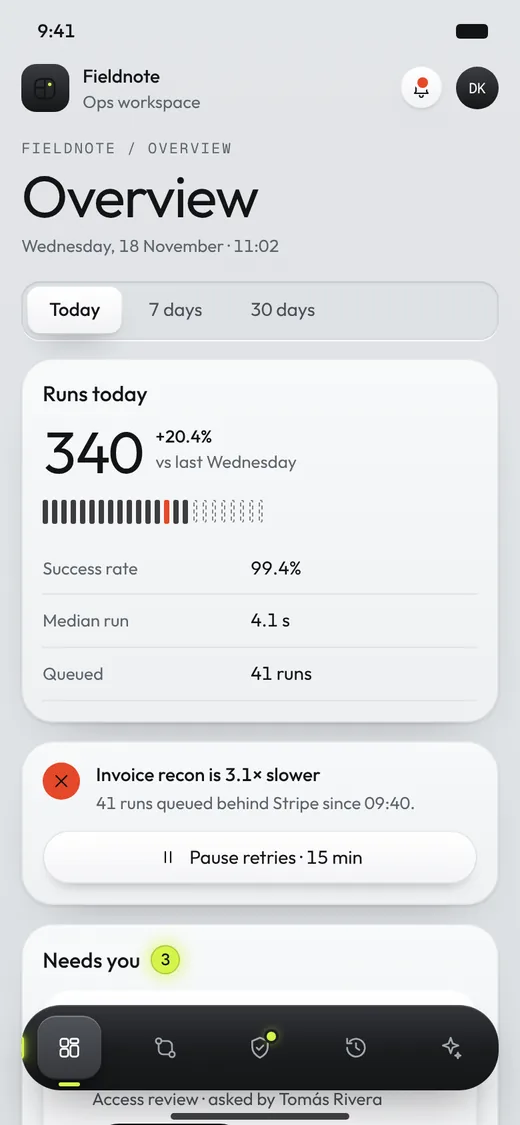
- ProductMullion, a B2B operations platform with an AI layer
- IndustryOperations and analytics software
- ServicesResearch, UX, UI, design system, custom charts, front-end
- PlatformsWeb at 1440 px, phone at 390 px
- Built withFigma, HTML, React and TypeScript
- ReleasedNovember 2026
The short version
Operations teams spend their day in dashboards that show a lot of numbers and say little about what to do next, and most AI added to them is a chat box that waits for the right question. Mullion starts from the decisions people make every morning. Its AI layer opens with what changed and why, answers with the runs it actually read and sends every change through the same approvals a person would. You can click through it in the live preview. The names, the company and the data in the screens are changed.
AI is moving into ops software. Trust is not keeping up.
Almost every operations and analytics product now ships an AI layer, and that layer is moving from answering questions to taking actions. Use is wide, scaled use is rare, and people are careful about what AI tells them.
What the leading products ship
| Product | AI pattern | What Mullion took |
|---|---|---|
| Tableau Pulse | A digest of the metrics a person follows, with AI summaries next to charts, in the app, Slack and mobile | The morning brief, where each sentence sits next to the chart that backs it |
| Datadog Bits AI | An agent that investigates alerts, tests several root causes and shows its reasoning and evidence | Visible reasoning: every AI conclusion opens into the runs and approvals behind it |
| Microsoft HAX Toolkit | 18 guidelines by moment: first use, during interaction, when the AI is wrong and over time | Screens for the moments when the AI is unsure or wrong, designed as fully as the happy path |
| Google PAIR Guidebook | Help people calibrate their trust and show confidence where it informs a decision | Confidence in plain words: which records an answer used and which it did not check |
The hard part of AI dashboard design has moved from drawing charts to designing supervision. Article 14 of the EU AI Act asks high-risk AI systems for interface tools to understand, interpret, override and stop them, from 2 December 2027. Most ops dashboards are not high-risk, so we used the article as a UX checklist.
Dashboards show everything. Chat boxes show nothing.
A typical ops dashboard gives every metric the same weight, so each morning starts with a search across runs, approvals, vendor email and team chat. A chat box in the corner helps only people who already know what to ask: Jakob Nielsen calls it the articulation barrier.
Nothing says what changed
The screen shows the state of everything instead of the few changes that need a person today.
The empty chat box
It asks people to know the question before they have seen the data.
Answers without sources
People cannot tell a number the system counted from one it guessed, or see what it did not check.
Actions without an owner
Nobody can see what the agent is about to change, who allowed it or how to undo it.
What we studied before drawing.
The research behind the AI layer was desk research: published guidelines, shipping products, regulation and large surveys. The people in the screens are proto-personas, our assumptions written down so the team could design against them.
| Finding | Source | What it changed in Mullion |
|---|---|---|
| People should calibrate their trust in AI, not trust it fully | Google PAIR | A one-line confidence note under each answer: Confident, Likely or Not sure, what it is based on and what it did not check |
| Design for the moments when the AI is wrong | Microsoft HAX | A “This is wrong” control on every answer, a review screen for flagged answers and a weekly quality view |
| Prose prompts alone leave many people out | Jakob Nielsen, NN/g | The product opens on a brief, and Ask why opens the chat with the question already written |
| Oversight needs tools to understand, override and stop | EU AI Act, Art. 14 | An action preview, a named approver, an undo window, an agent log and an AI rules page |
| Leading products pair AI text with charts and evidence | Tableau Pulse, Datadog | Brief cards carry a chart, and each source opens the actual run or approval |
Four people, one morning at Fieldnote
- Dana KimOpens Mullion in the morning and needs the three changes that matter today, why they happened and what to do.
- Marcus LeeApproves agent actions, often from a phone, and needs the reason and the evidence on one screen.
- Priya ShahWatches access changes, such as new admin rights, and who allowed each one.
- Tom BeckerWants to know if the AI is getting better or worse, and sets what it may do alone.
The personas also draw on DIXI’s work on data-heavy products such as ComboCurve and Koyfin. A team building on Mullion should replace them with interviews in its first week.
From research to React, one product.
Six stages, one design system. The AI layer lives inside the Mullion shell and uses kit components only, so every AI screen goes through the same trust controls.
- 01ResearchGuidelines, shipping products, the EU AI Act and surveys
- 02FlowsBrief, ask, check, approve and log, before any layout
- 03WireframesThree homes for the AI; the ranked brief won
- 04Design systemFrost and Graphite, 50+ components
- 05ChartsEight types as React components, no chart library
- 06Screens and code30 + 3 screens in Figma and React
One morning at Fieldnote
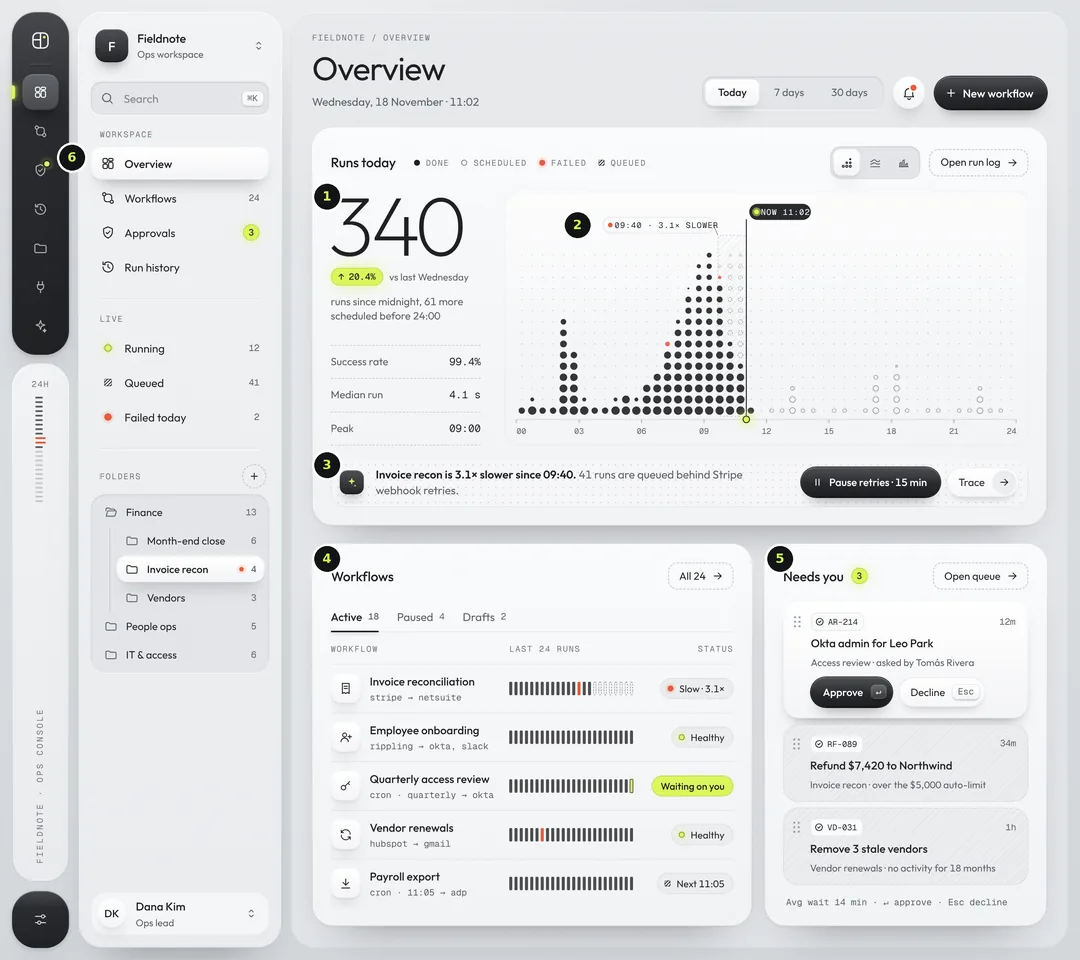
- 01 · OverviewBriefWhat changed, and does it need me?
- 02 · Mullion AIAskWhy did it happen, and how do you know?
- 03 · Run detailCheckWhich record backs the answer?
- 04 · ApprovalsApproveWho allows this change?
- 05 · Run historyLogWhat happened, and can I undo it?
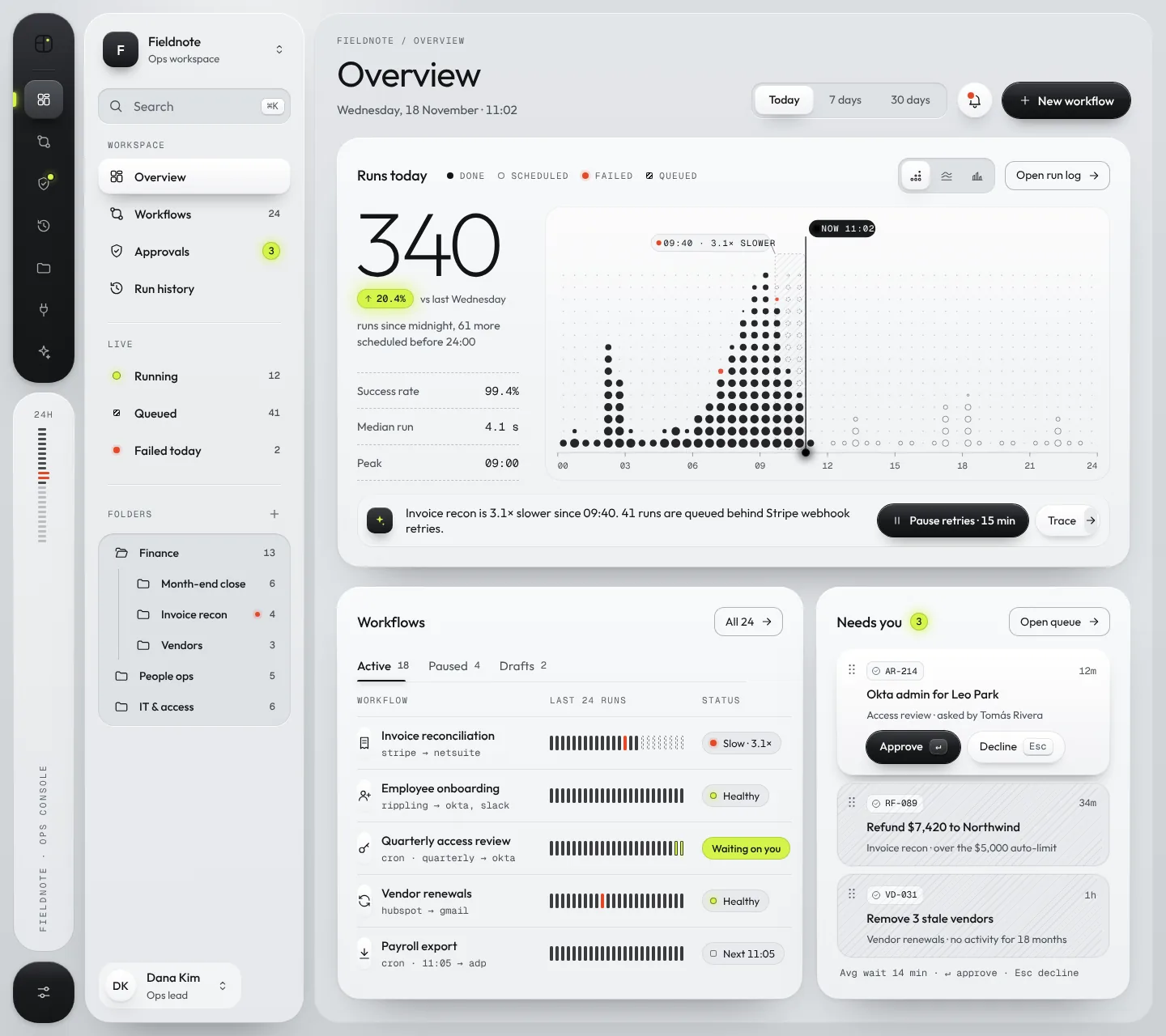
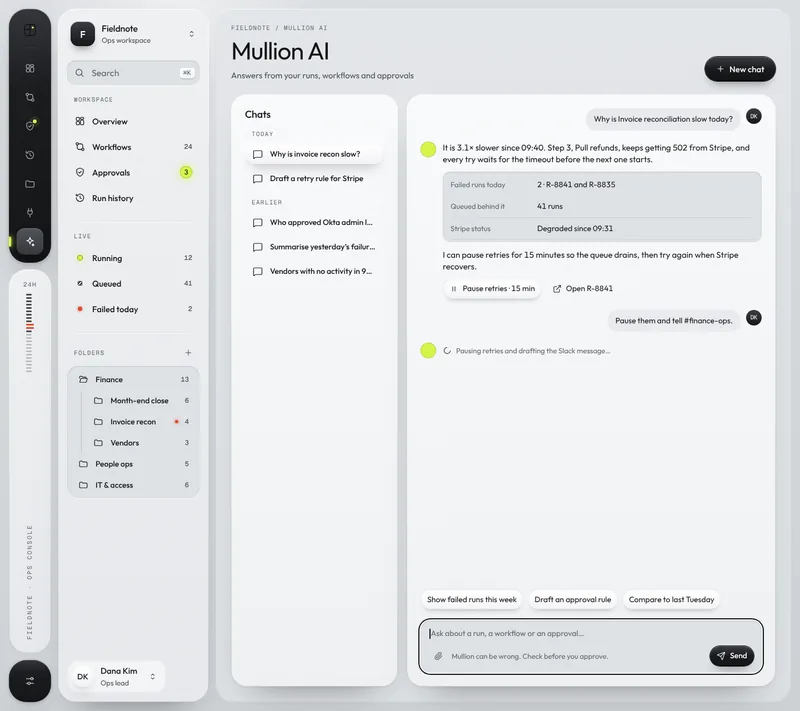
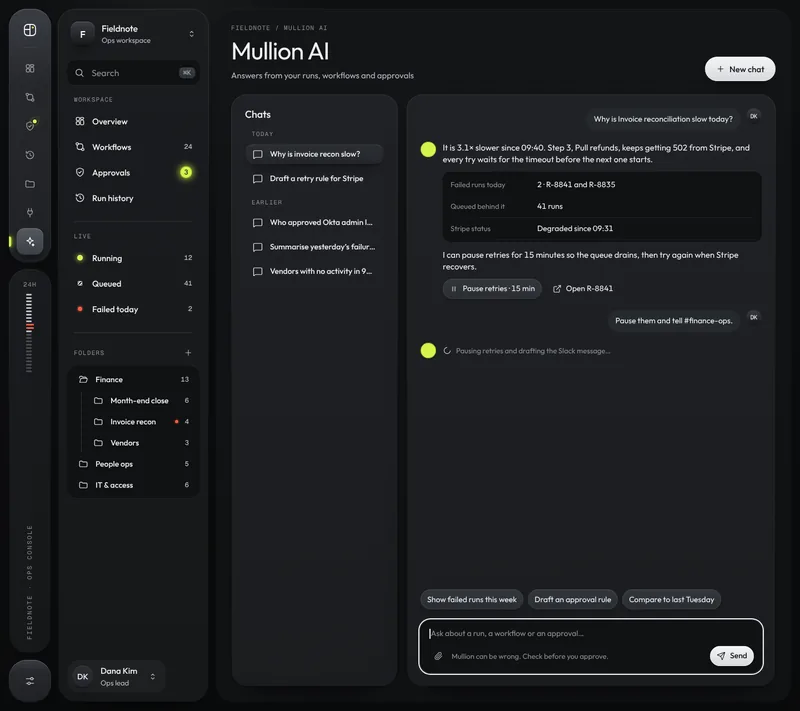
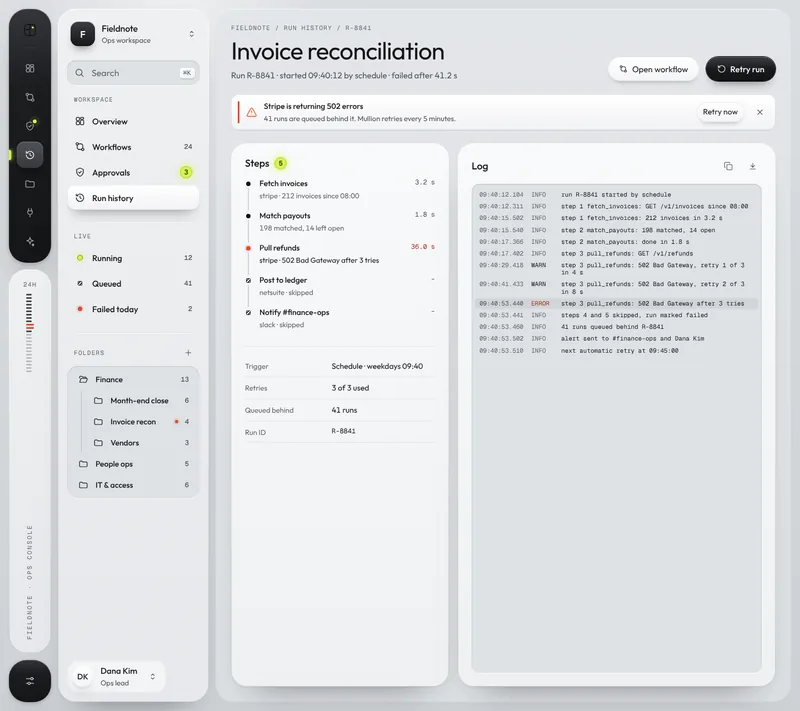
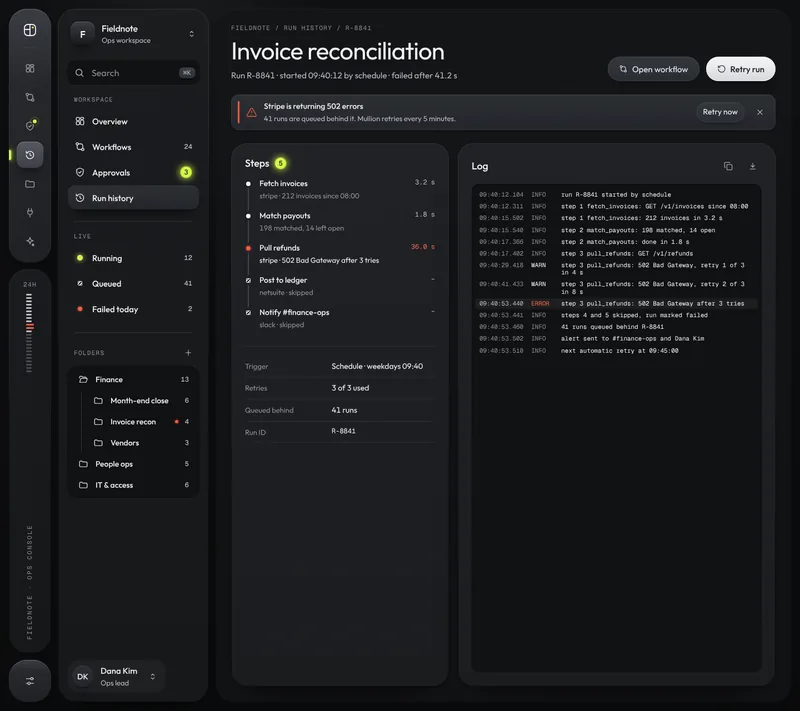
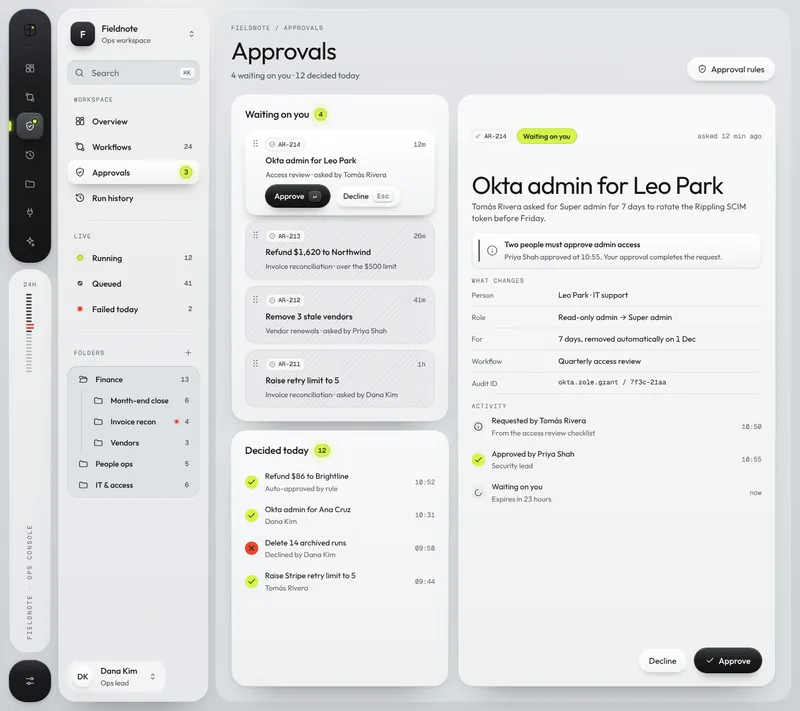
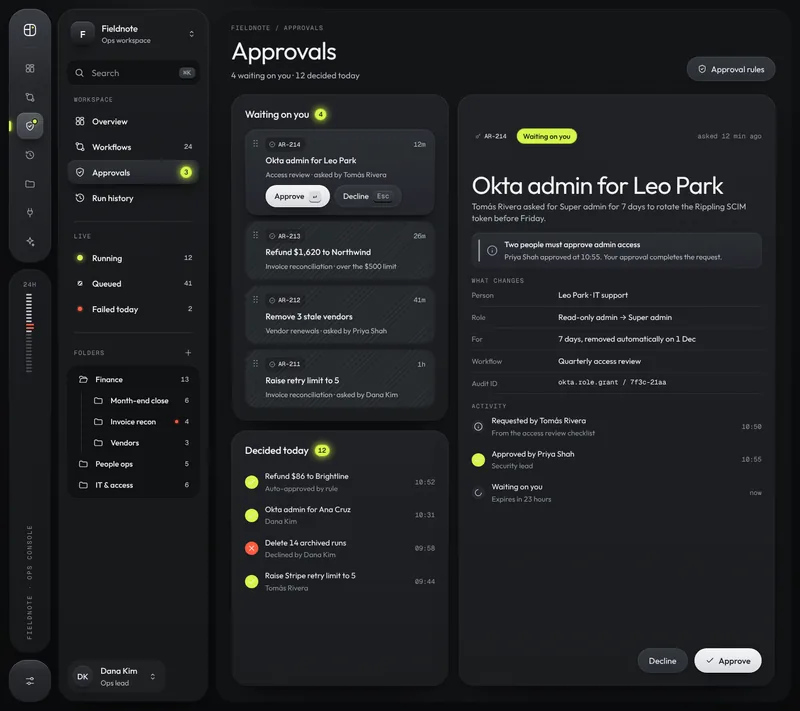
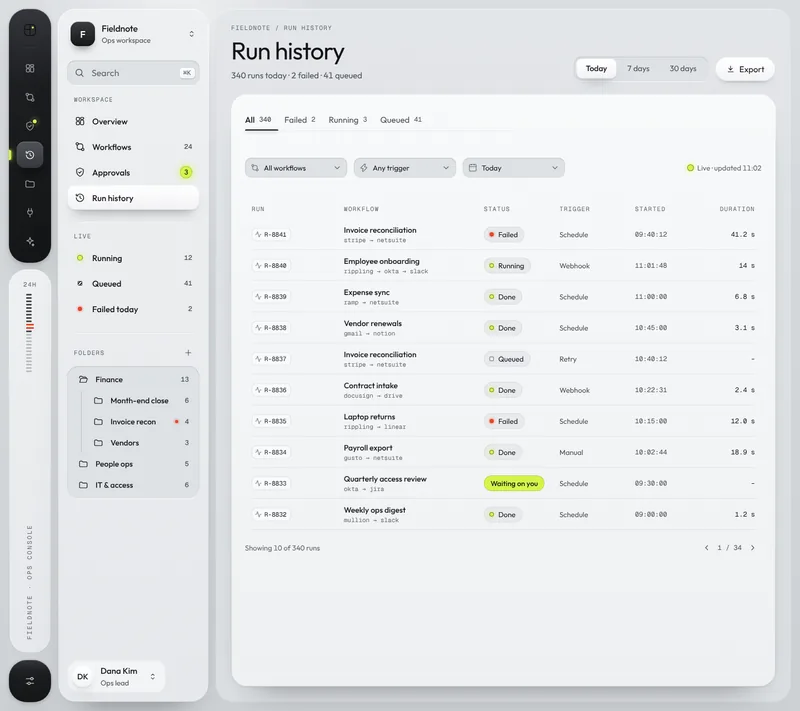
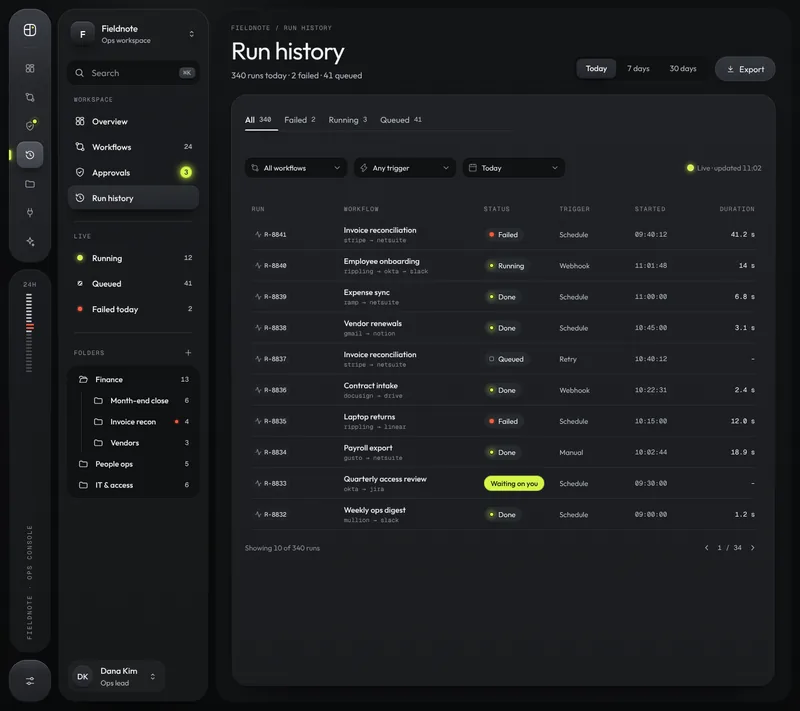
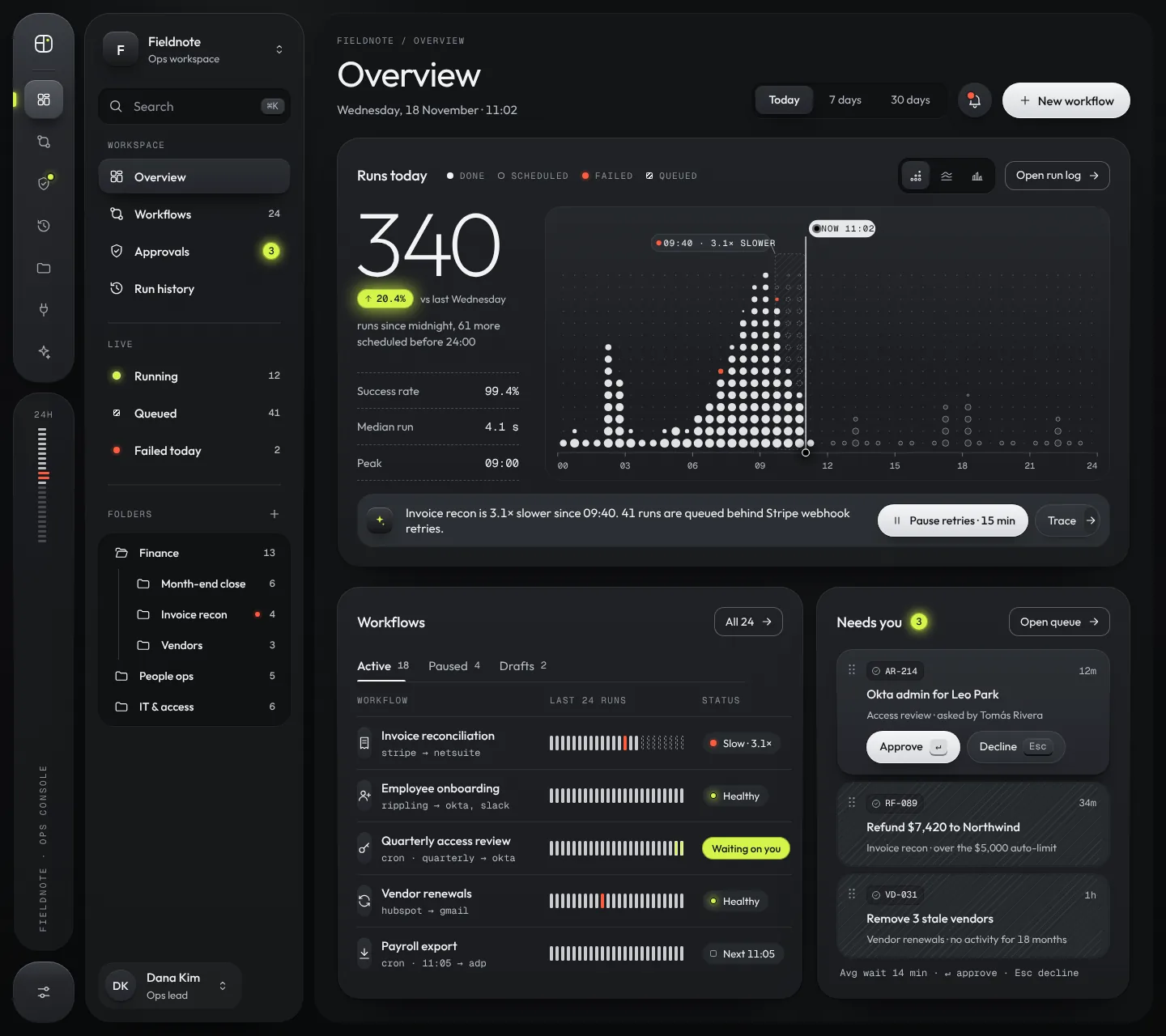
Fieldnote, the people and the numbers in these screens are changed. Switch the site to the dark theme and every screen on this page follows it.
Three ranked changes, not a grid of tiles.
Before any high-fidelity screen we compared three homes for the AI. The ranked brief won because it answers the first question of the day before anyone types.
Chat first
An empty input with suggested prompts. It fails the articulation barrier: people have to know the question first.
A summary on top
An AI summary above the old tiles. It keeps the original problem, because the summary competes with every tile under it.
A ranked brief
Three changes ranked by impact, each with its numbers, cause, evidence and next step. On a quiet day it says Nothing needs you today. We chose it.
One screen, five answers
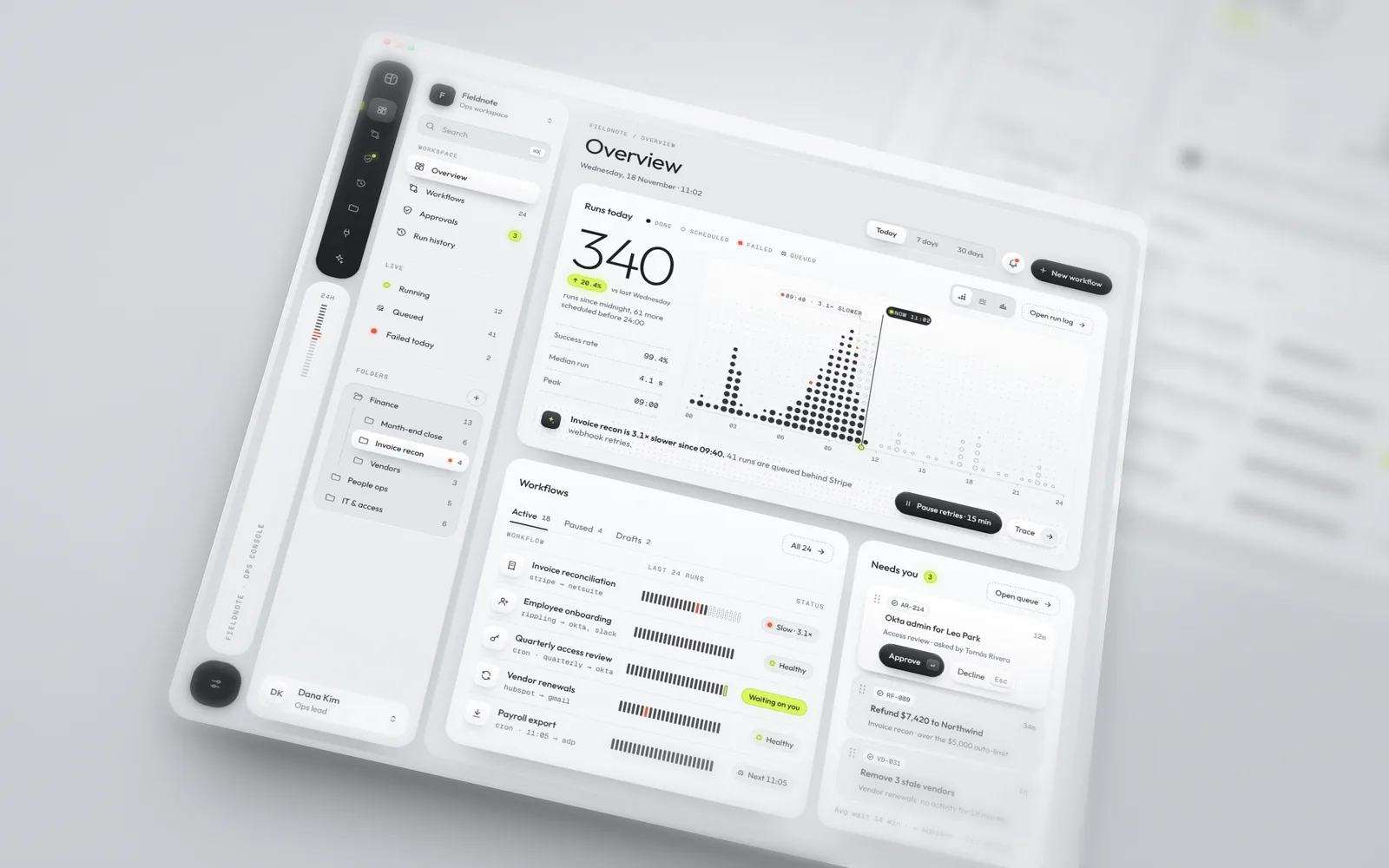
Every part of the Overview answers one question, in the order people ask them.
- How many runs today, against last week
- When it went wrong, marked on the chart
- What to do about it, in one line with one button
- Which workflows are affected
- What waits for you
At 390 px
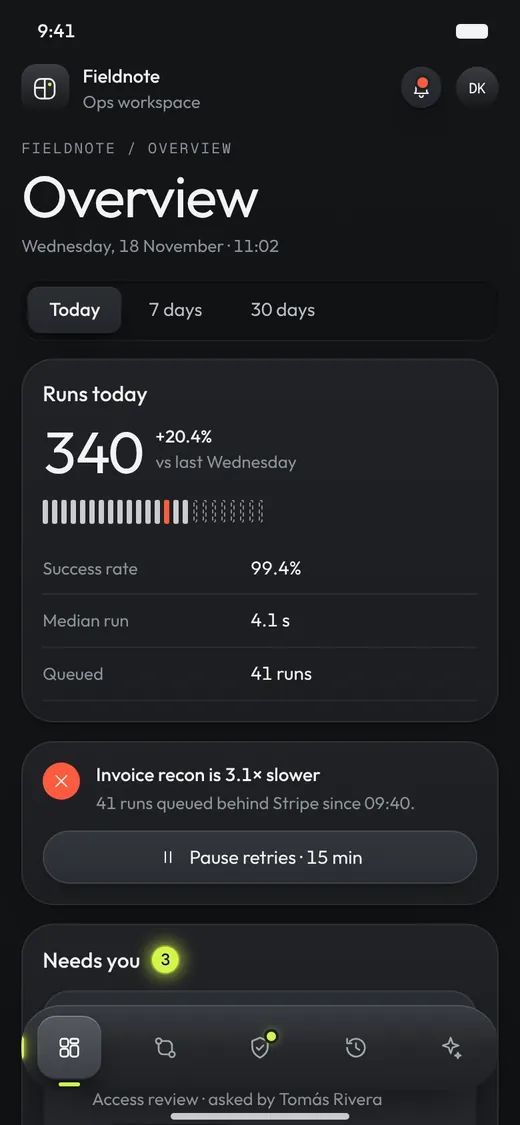
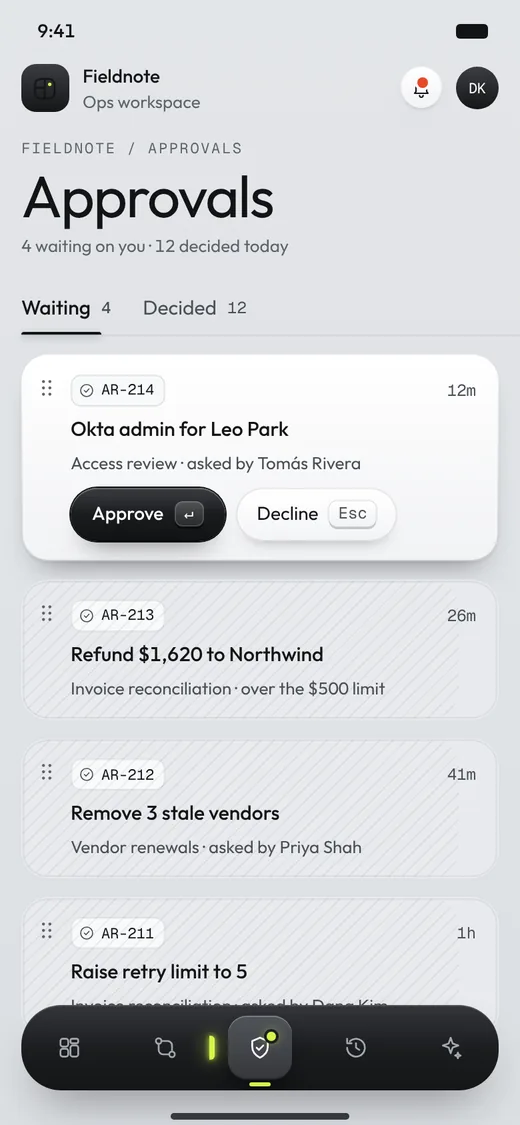
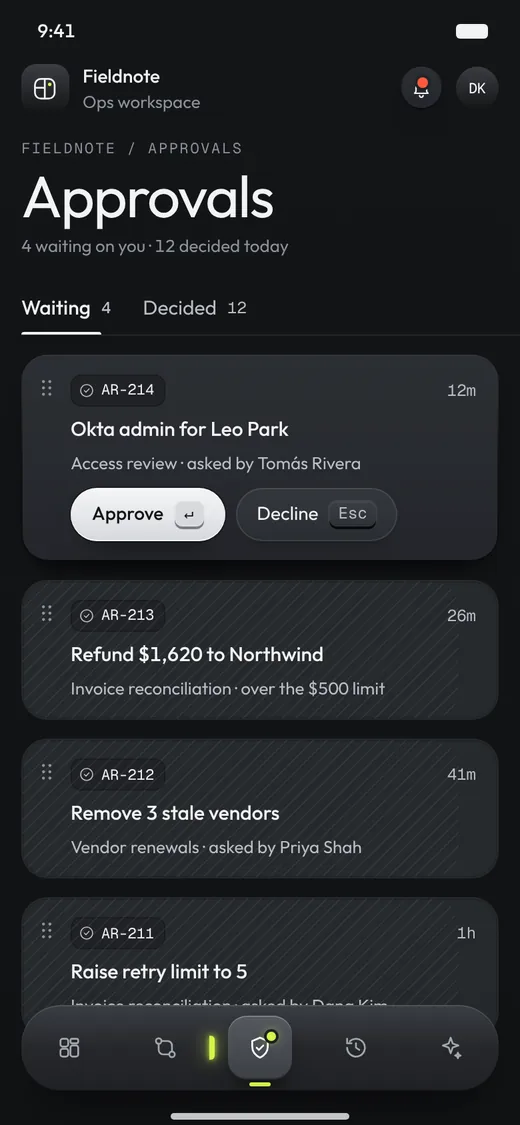
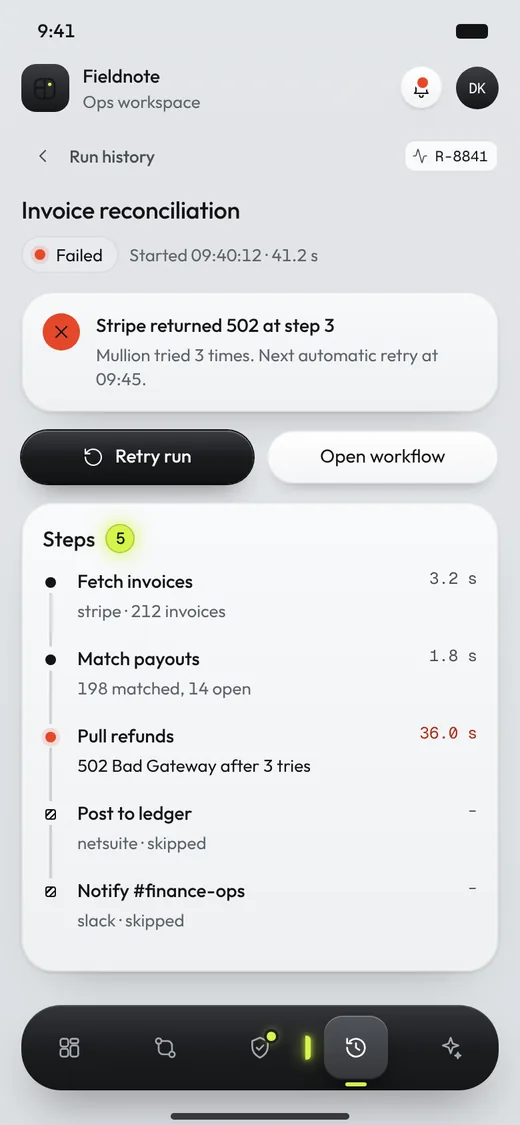
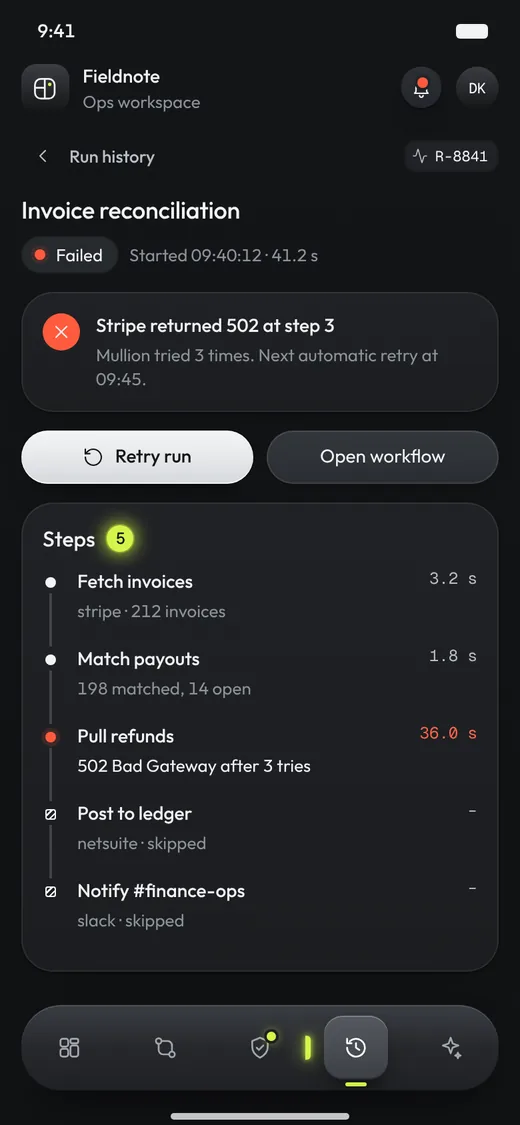
Approvals and the brief are the screens people open on a phone, so Approve and Decline stay within thumb reach and the cards go full width.
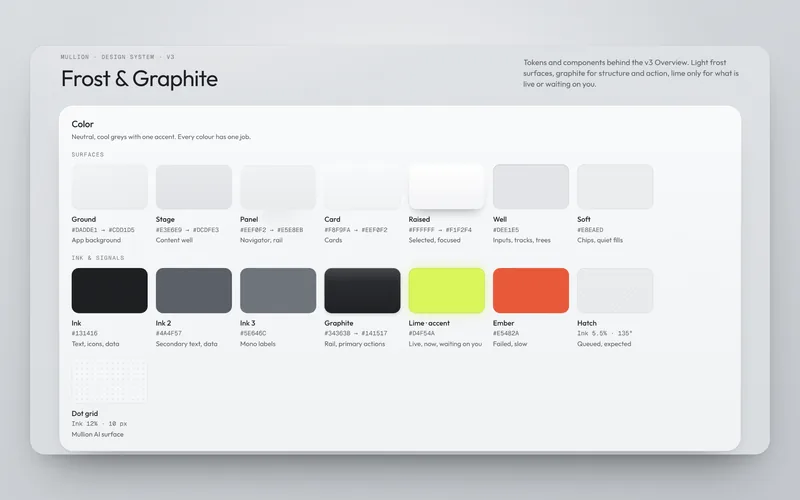
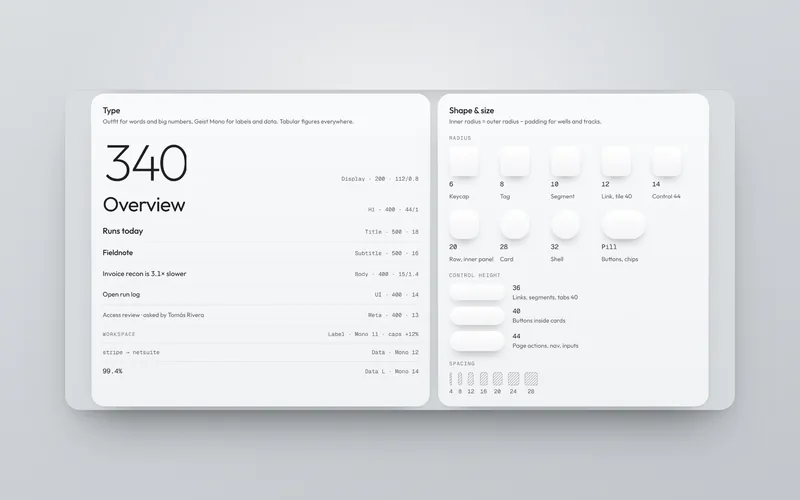
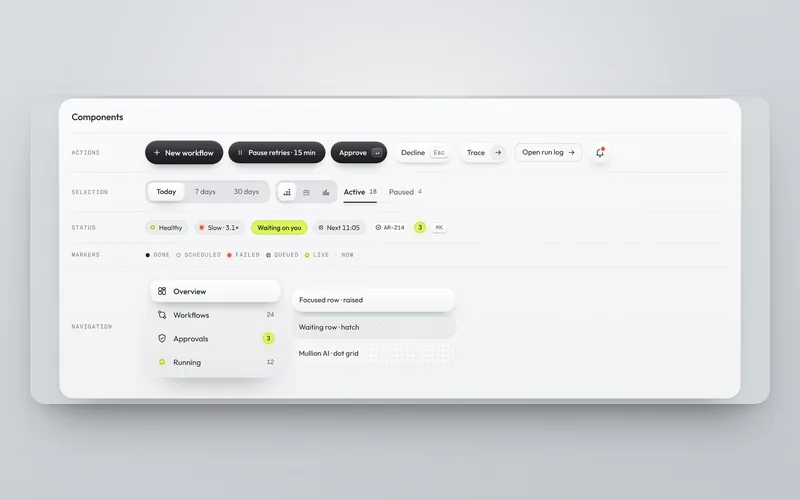
One kit, two themes. No new look for the AI.
Every AI screen is assembled from the Mullion kit, which is why it feels like part of the product and not a plugin. The AI label takes the theme accent: no sparkles, gradients, purple or robot avatars.
Four accents, or your own
Lime, mint, amber and periwinkle, or one custom colour typed once. The AI label follows it, so the AI never brings a colour of its own.
- Tokens ship as CSS variables and as tokens.json for coding agents
- Icons on a Lucide base; fonts under the SIL Open Font License
- Motion on the Web Animations API, off when the system asks for less
- Status colours always come with a word
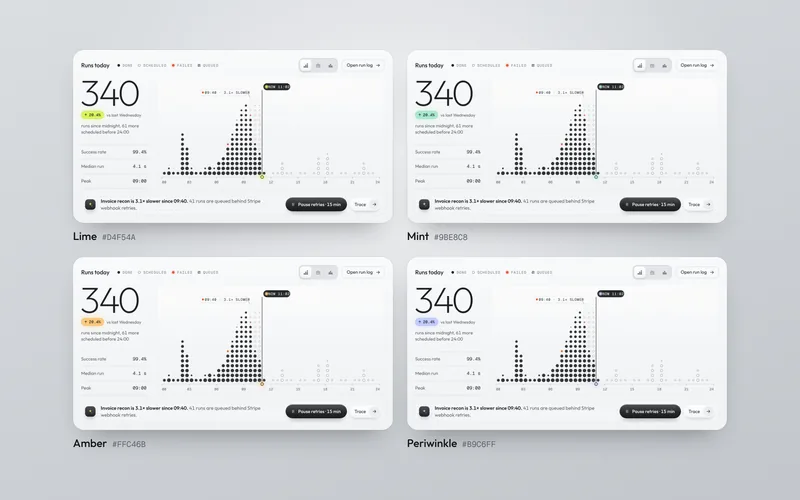
Ten AI screens, built from kit parts
| AI screen | Built from these kit parts |
|---|---|
| Brief | Overview cards, status tags, sparklines, buttons and chips |
| Insight detail | Overview charts, the Run history table, the Run detail timeline |
| Ask with sources | The Mullion AI screen and the Run detail side panel |
| Action preview | The side panel, the Review step of New workflow, Settings toggles, toast |
| Approvals | The Approvals screen, toast and modal |
| Agent log | The Run history table and filters, the Run detail side panel |
| AI rules | Settings lists with toggles, a segmented control, a menu |
| First run | The New workflow wizard and Integrations cards |
| Quality | Overview tiles and charts, Run history tables |
| AI states | Empty, error and loading states, toast, modal |
On top of the kit the AI layer needs six new parts: the AI label, the numbered source chip, the one-line confidence note, the Sources panel, the Now and After block of the action preview and a toast with an undo deadline. Each exists in light and dark and in every state.
Eight chart types. No chart library.
The kit draws its charts as its own React components: the halftone field, ridgelines and frost skyline, plus line, area, bar, donut and sparkline. One card, one data set, three ways to read it.
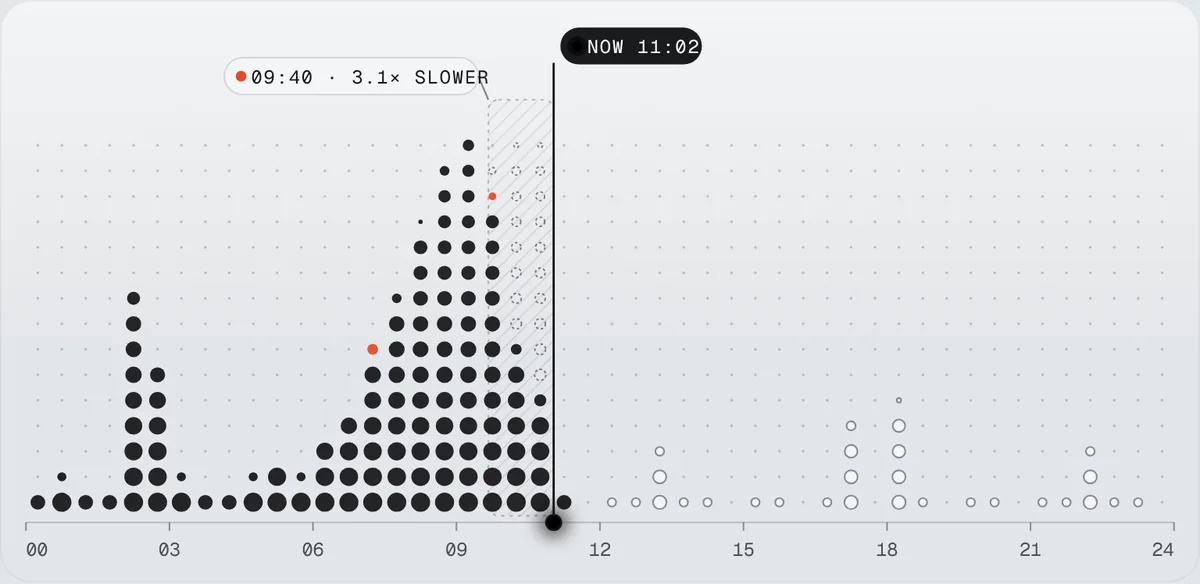
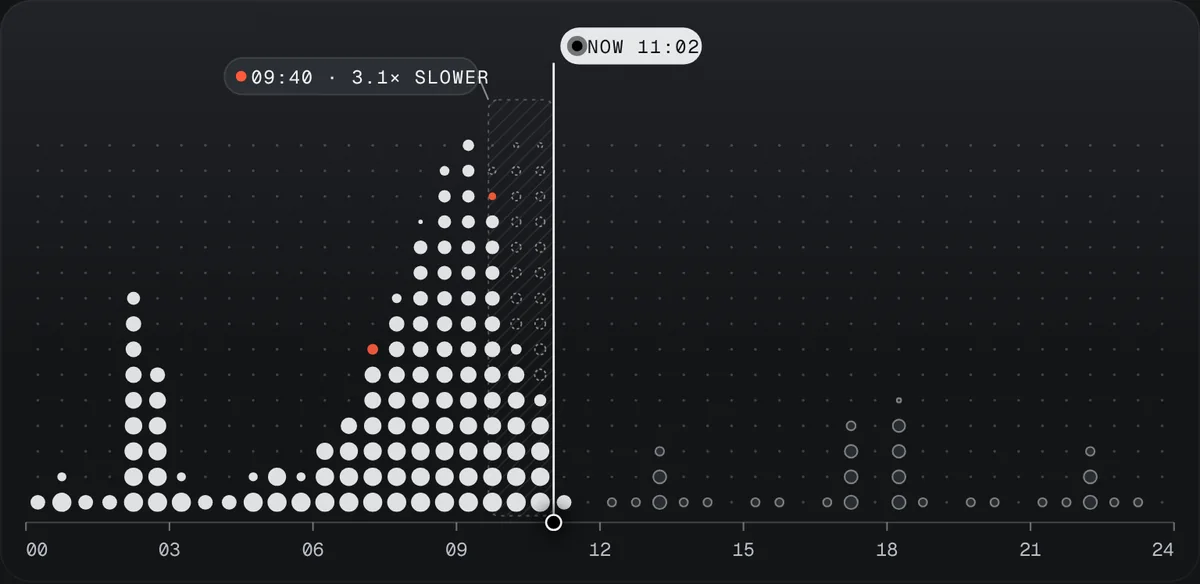
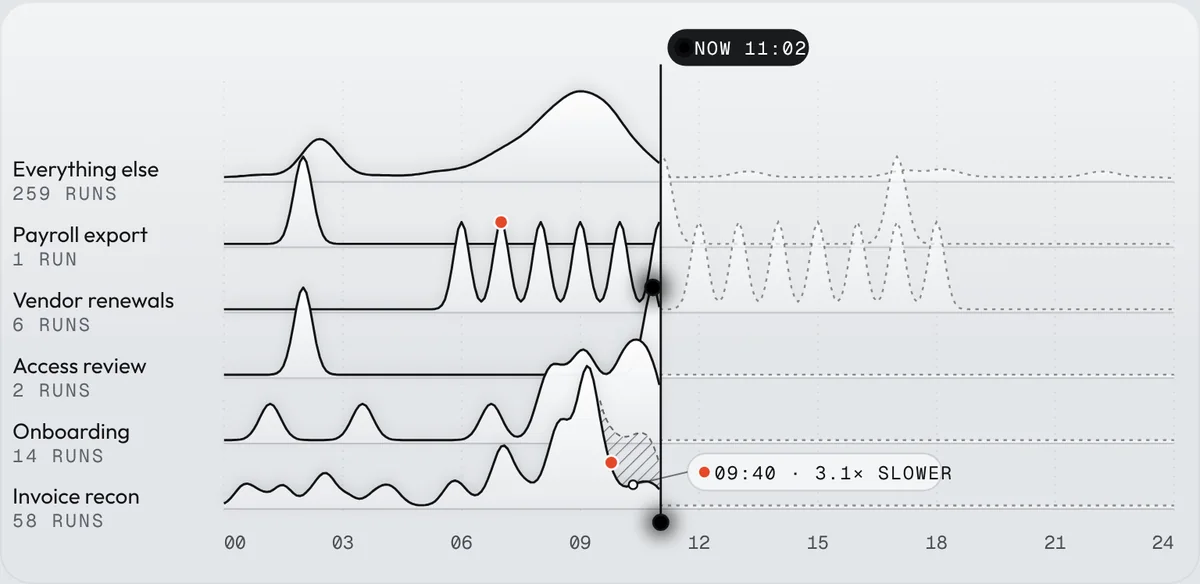
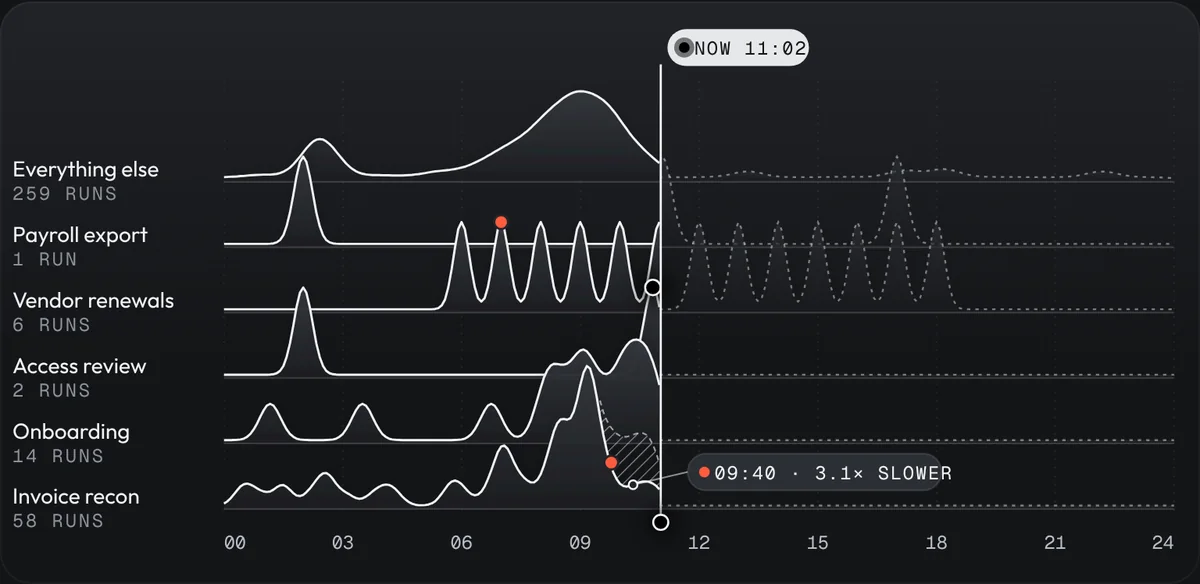
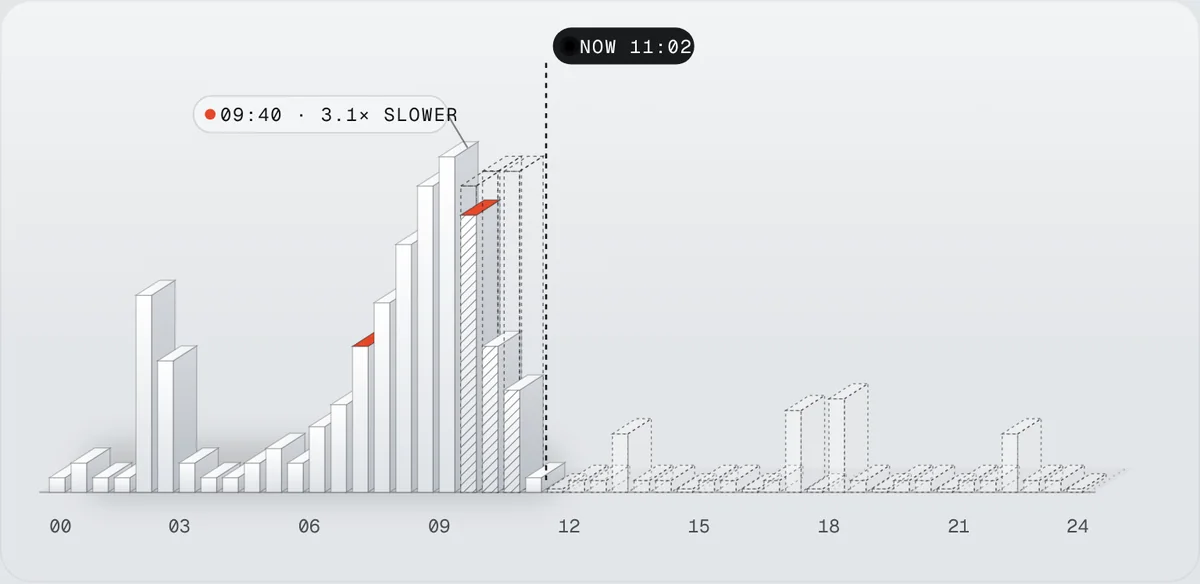
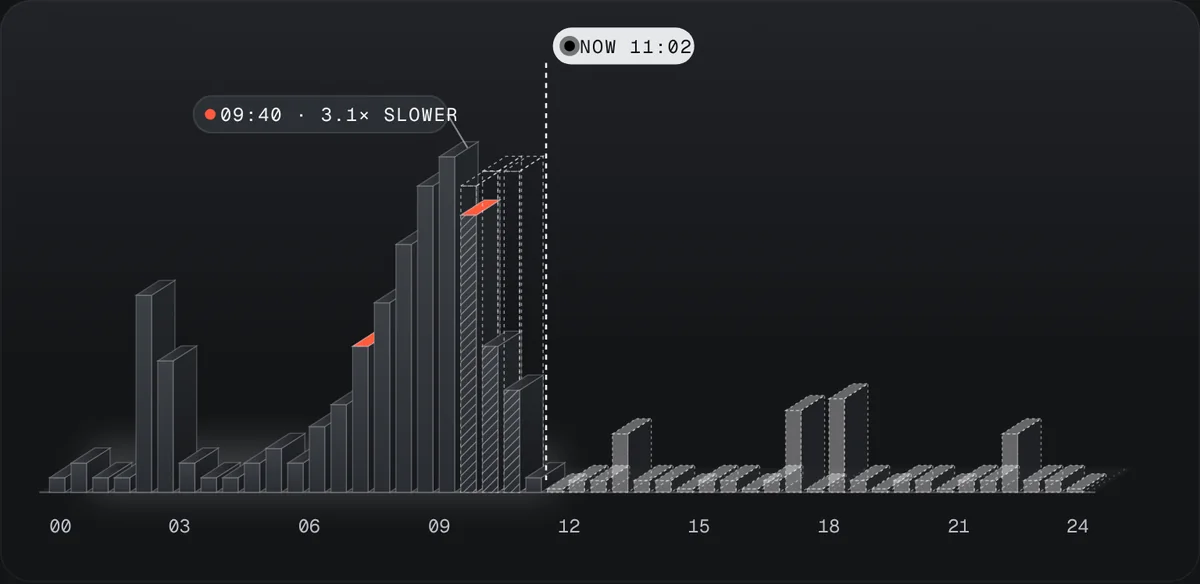
Since when?
On the first brief card: today’s run time, flat until 09:40 and then climbing.
Is this normal?
On the insight detail: run time today against last week, with the Stripe outage and the first 502 marked.
Is the AI getting better?
On the Quality screen: AI suggestions accepted, edited and rejected per day.
Adding AI to your analytics product?25 minutes with Ignat, the founder. You leave with a clear next step.
Seven questions teams ask when they add AI.
Each one shaped the AI layer: the Overview line and the Mullion AI screen in the kit today, and the ten screens of the AI add-on.
- Should an AI dashboard open with a chat box?No. It opens on a brief: what changed since yesterday, ranked by impact, each with its numbers, cause and next step. Ask why opens the chat with the question already written.
- How do you show where an answer comes from?Every number links to a record. Numbered source chips sit inside the sentence, a Sources panel lists the runs and status pages behind them, and the answer lists what it did not check.
- Should AI show a confidence score?Not as a percentage, which suggests a precision the system cannot back up. Confidence is one line in words: Confident, Likely or Not sure, then what it is based on.
- How should an AI agent ask for approval?The agent proposes and a named person approves, in the queue people already use. The preview shows Now and After, what the change touches, who approves and how long undo stays open.
- What should an agent activity log show?Everything the AI did or suggested, in a table that reads like Run history: time, action, who asked, approval and result, kept for 12 months and exported to CSV.
- Who decides what the AI may do alone?The team, in Settings rather than a config file. Presets from Cautious to Hands-on, then rules in three groups: Can do on its own, Needs approval and Never.
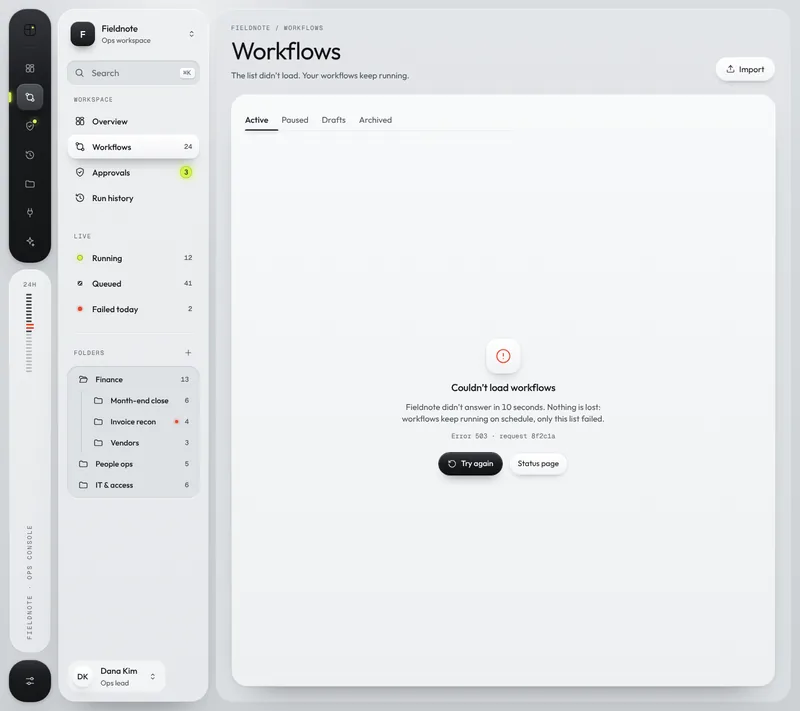
What happens when the AI is wrong?
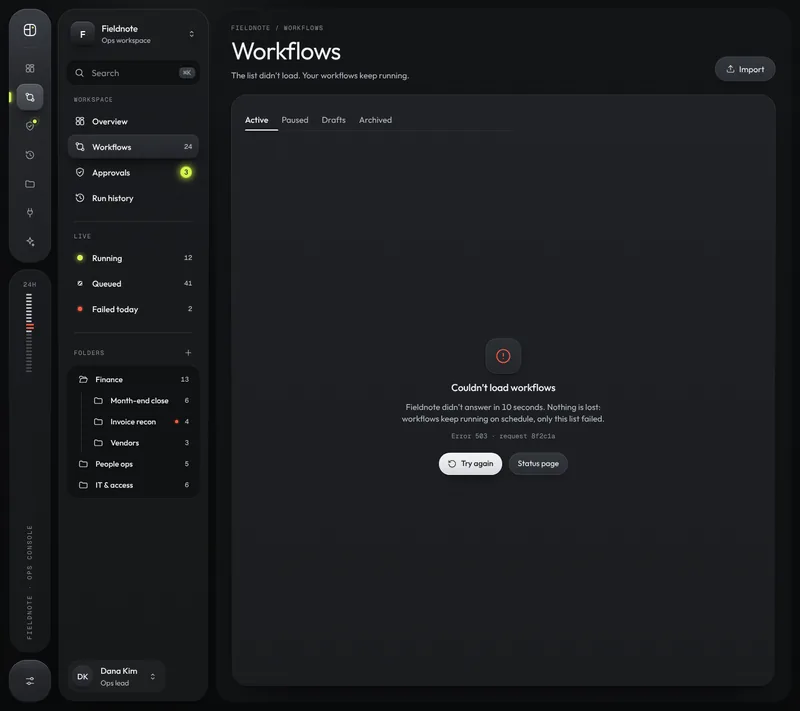
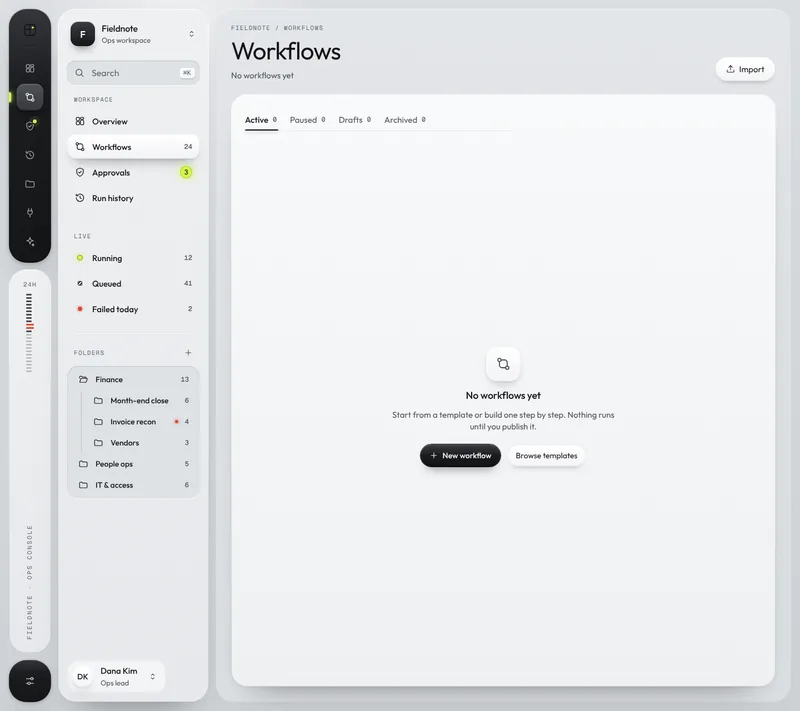
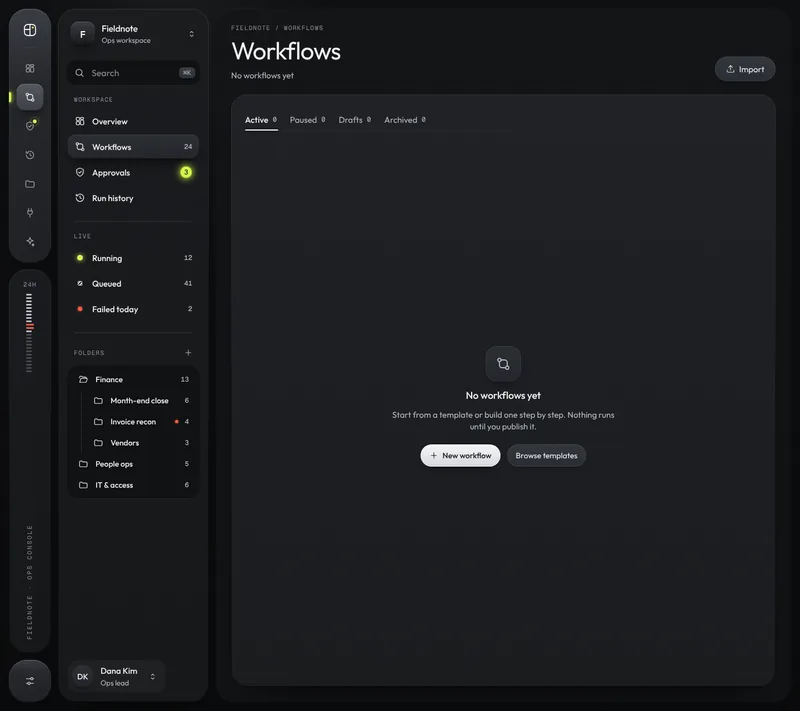
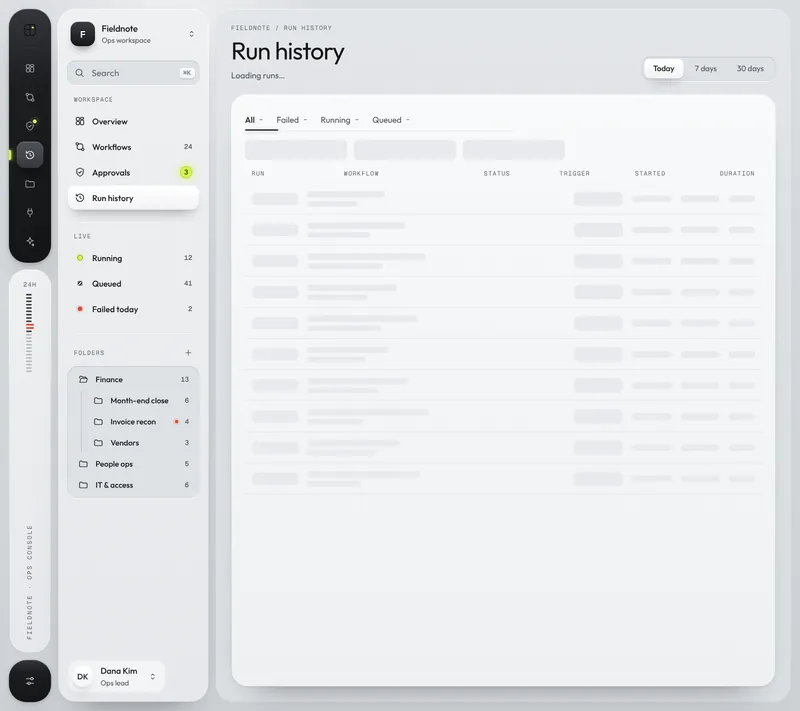
Failure states are designed as fully as the happy path. Each one says what is missing and offers the next step, and there is no generic “Something went wrong”.
- Not sure, when the cause sits in a system the AI cannot read
- No data, when a workflow has not run yet
- This is wrong, a short form on every answer
- Source unavailable, with the time of the last data it used
- Quiet day, when nothing needs a person
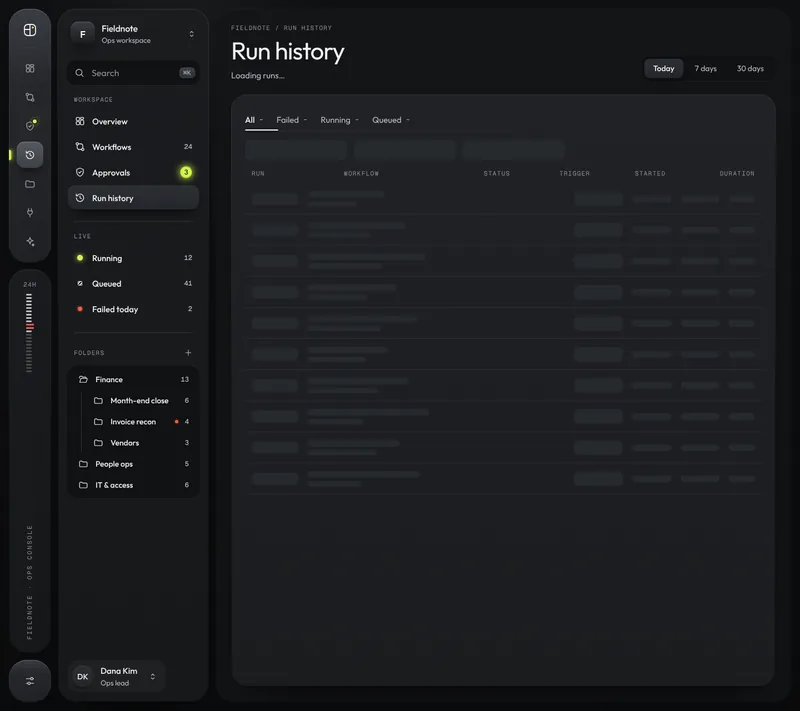
Thirty screens, one product.
Every screen the sidebar promises, designed and coded, in Frost and in Graphite.
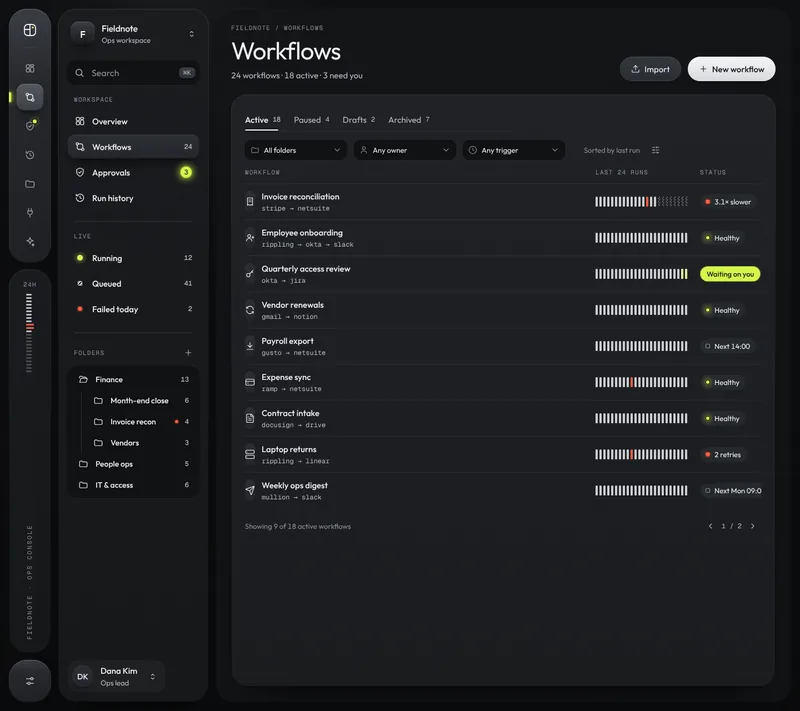
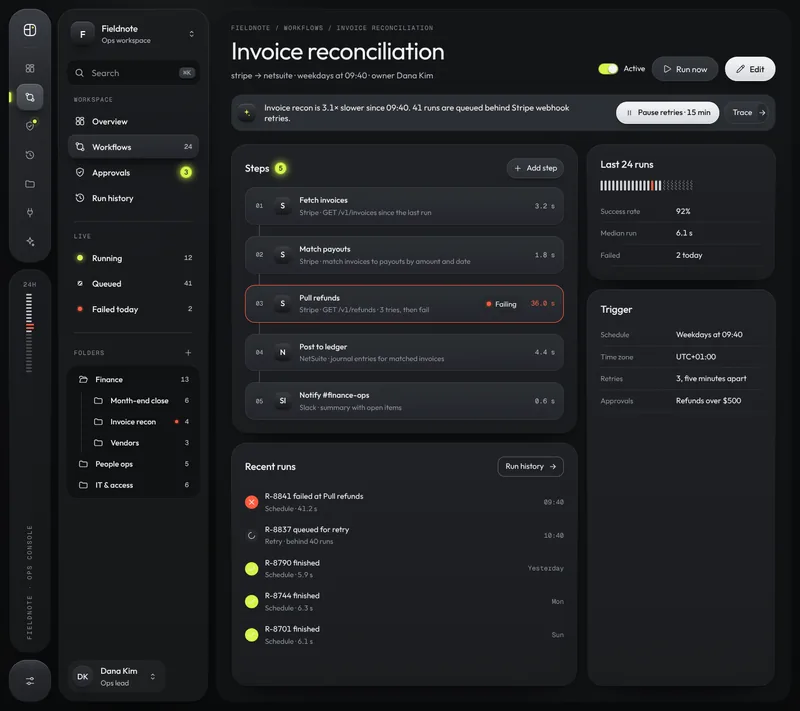
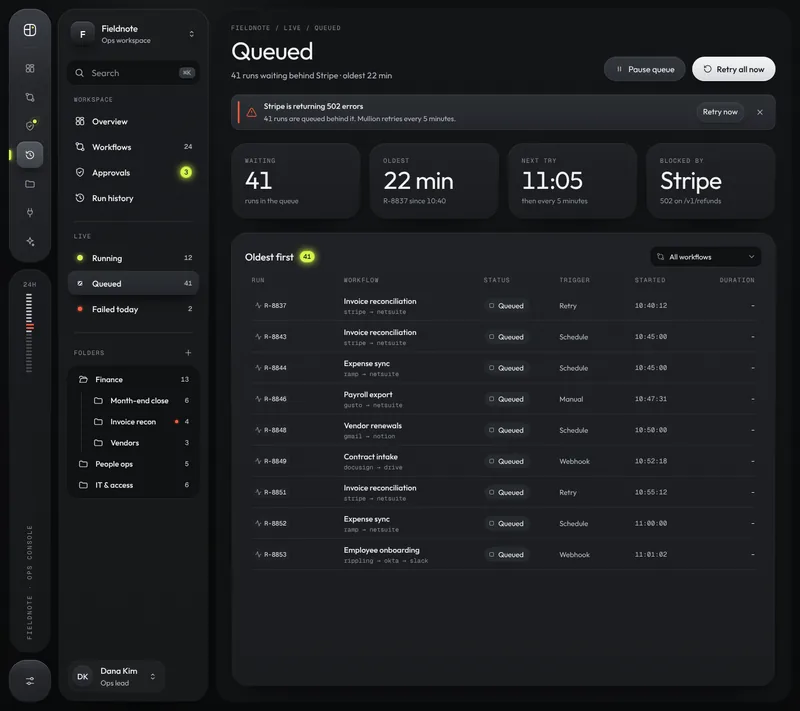
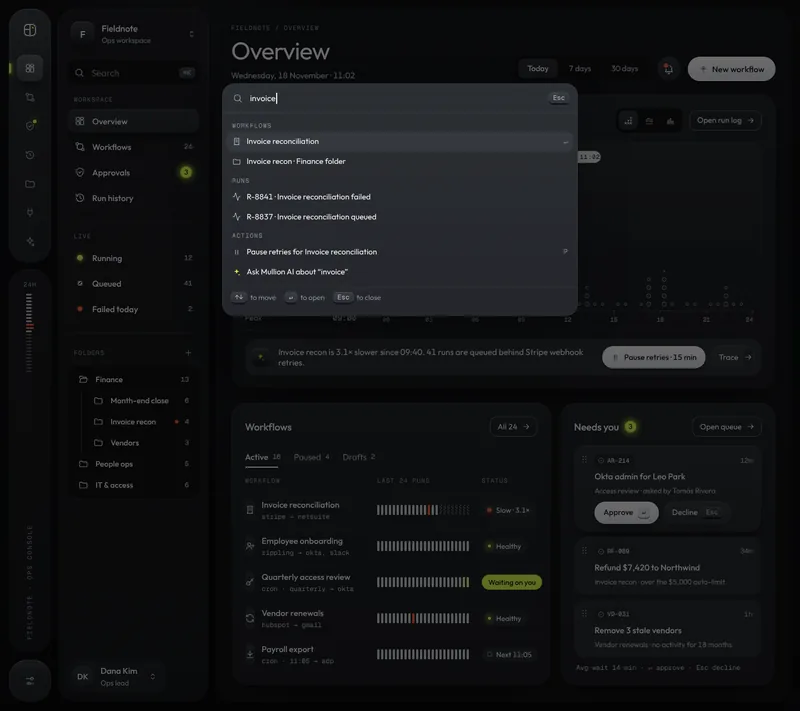
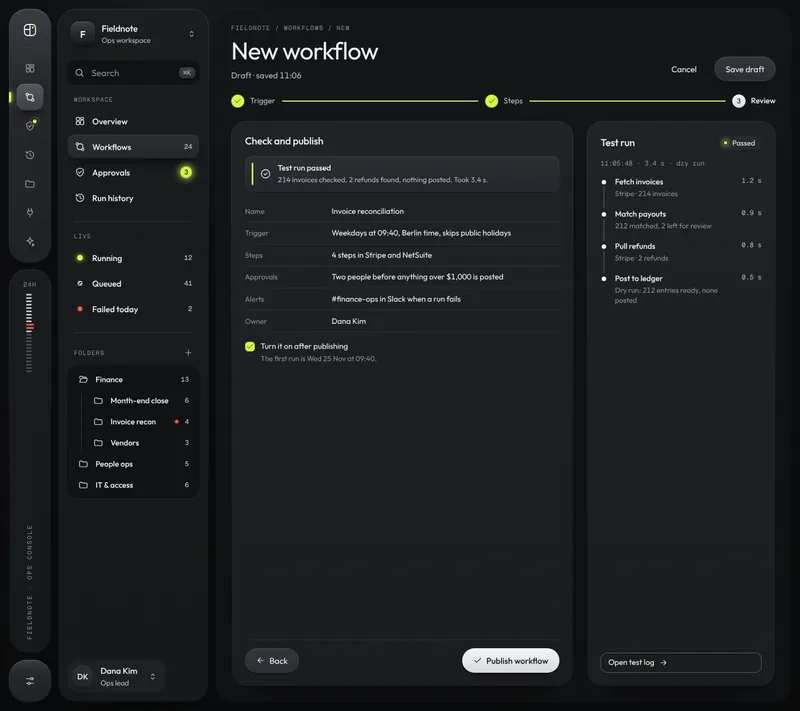
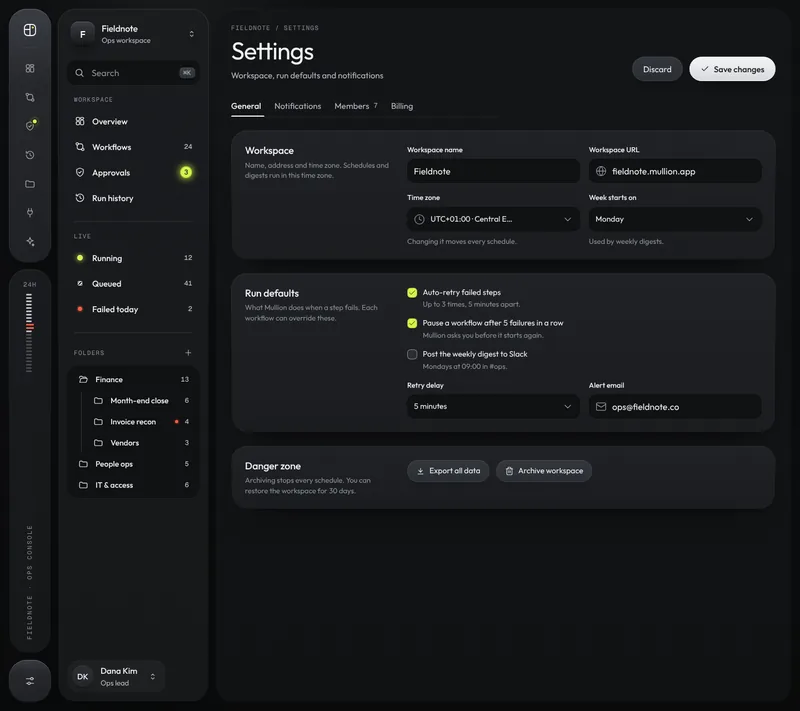
Click through it yourself
The Mullion AI screen runs in the browser with the Fieldnote workspace and its data. Nothing to install and no sign-up.
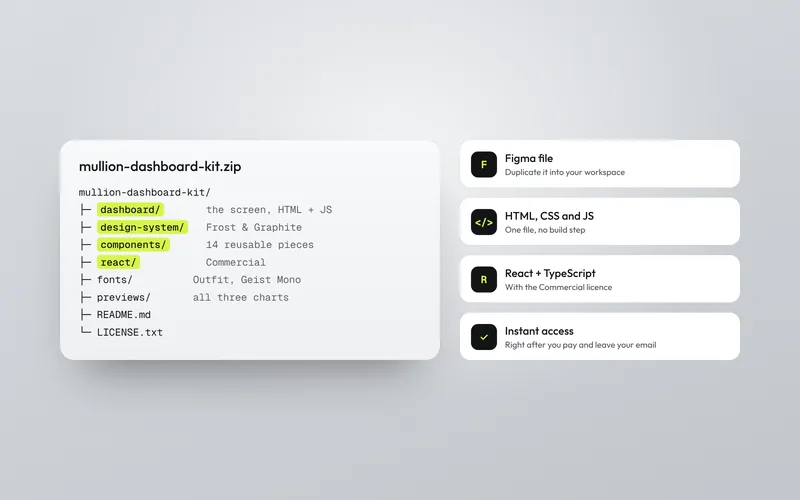
Figma and React with the same names.
An AI dashboard usually breaks at handoff: the designer draws one confidence badge, the engineer builds another, and three months later there are four ways to show a source. Mullion keeps Figma and code in step from the start.
- Five pagesCover, Getting started, Foundations, Components and Screens. Light and dark are variants, so it works on the free plan.
- React and TypeScriptReact 19, built with Vite, no dependencies besides React, and it works in Next.js.
- Props = propertiesEvery Figma property is named like its React prop, so design review and code review use one vocabulary.
- Rules for coding agentsDESIGN.md, AGENTS.md, CLAUDE.md, a Cursor rule, tokens.json and a Claude skill.
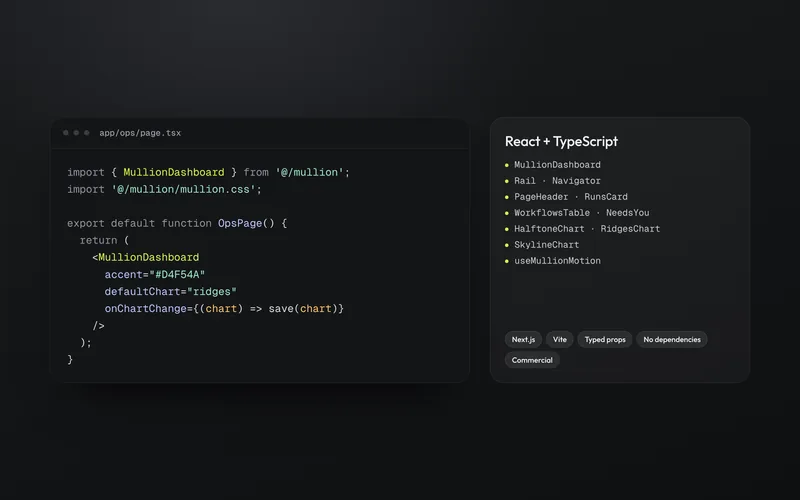
The AI parts are specified as data first
| Component | What it takes |
|---|---|
| Source chip and Sources panel | A number, a label, the record type (run, approval, status page or settings) and a link to the record |
| Confidence line | A level (confident, likely or not sure), what the answer is based on and what was not checked |
| Action preview | Now and After values, what the change touches, the approver and the rule behind them, and the undo window in minutes |
| Agent log row | Time, action, who asked, approval, result and whether undo is still open |
| AI rule | The action, where it applies and who approves it, or that it is never allowed |
Because each part takes data, the interface cannot show a source or a confidence level the backend did not send.
Six lessons for AI dashboard teams.
Design lessons from the research above and from our work on data-heavy products. They apply to any analytics or operations product that adds an AI layer.
- Design for the first question of the dayWrite down what your user needs to know when they open the product in the morning, and make that the home of the AI. Chat can come second.
- Put the trust layer in the design systemSources, confidence and the action preview are components with clear props, so every new AI feature gets them by default.
- Use the approvals people already useA separate AI inbox splits accountability. In Mullion the agent’s request waits in the same queue as vendor payouts.
- Write the agent’s limits in plain wordsIf only an engineer can say what the agent may do alone, nobody else on the team will rely on it.
- Treat failure states as screensAccepted, edited and rejected suggestions give the team a number to improve every week.
- Keep the AI visually quietA small label in the product’s own accent is enough. Sparkles and purple make the AI look like a different product.
Build on the same dashboard
The dashboard in this case is available as a kit: 30 desktop and 3 phone screens, 50+ components and 8 chart types, in Figma and React, for a one-time licence. The AI screens will come to it as a paid add-on.
Sources: Mullion screens and files, Nov 2026 · Gartner, Aug 2025 · Gartner, Jun 2025 · McKinsey, State of AI · KPMG and University of Melbourne · Microsoft, Guidelines for Human-AI Interaction · Google PAIR · Nielsen Norman Group · EU AI Act, Article 14.
How do you design AI features for a B2B SaaS product?
We start from the first question a user has when they open the product, then map the flow from that question to an action and a record of it. The trust parts, sources, confidence, approvals and the log, go into the design system as components, and the failure states get their own screens. Handoff is Figma with the same names as typed React components. More on how we work with SaaS teams is on our SaaS product design page.
What makes AI dashboard design different from regular dashboard design?
A regular dashboard shows the state of things and leaves the reading to people. An AI dashboard also explains, suggests and sometimes acts, so it needs supervision built in: a source for every number, confidence in plain words, a preview and an owner for every action, limits the team can read, and a log of what the agent did.
Should an AI dashboard show confidence scores?
We recommend words instead of percentages. Mullion shows one line under each answer: Confident, Likely or Not sure, then what the answer is based on and what it did not check. A percentage suggests a precision the system cannot back up, while a short note about the data tells people what to double-check.
How do you keep people in control of an AI agent?
With four things that work together. The agent proposes and a named owner approves in the normal approvals queue. Every action shows a preview and an undo window. The limits sit on a settings page in plain language, with presets from Cautious to Hands-on. And an agent log records who asked, who approved and what happened.
Does the EU AI Act affect AI dashboard design?
Article 14 requires high-risk AI systems to give people interface tools to understand, interpret, override and stop them, and it applies from 2 December 2027 for Annex III systems. Most operations dashboards are not high-risk, but the article is a useful checklist for any product where an AI agent changes data. This is design guidance, not legal advice.
Can we use the Mullion kit to build our own AI dashboard?
Yes. The kit is the dashboard this case is built on: 30 desktop and 3 phone screens, 50+ components and 8 chart types, in Figma and code, for a one-time licence. The AI screens will come to it as a paid add-on. Everything that is in it is on the kit page.
Can DIXI design the AI layer for our product?
Yes. This case shows how we approach AI product design, and our work on data-heavy products is in the ComboCurve, Koyfin and HCM case studies. The fastest way to see if we are a fit is a 25-minute call where we look at your product together.
How much does AI dashboard design cost at DIXI?
Product design starts at $12k and usually takes 6–10 weeks; a design partnership starts at $6k a month. We confirm scope and price after a 25-minute call.
