On this page
The short answer
Migrating a website to Astro means rebuilding its page templates as Astro components, moving the content into Markdown files or a headless CMS, and giving every URL that changes one 301 redirect. From WordPress or HubSpot the move usually makes the site much faster. From Webflow, Framer, Wix or Squarespace the bigger wins are lower running costs, code you own and a site that engineers and AI coding tools can change. In our experience, a 20 to 100 page marketing site takes 3 to 8 weeks with a team that has done it before.
We moved dixi.agency from Framer to Astro on 29 October 2026. Four weeks later, this is what the numbers say:
Each number is explained, with screenshots from our own Search Console and PageSpeed reports, in the next section.
Move to Astro if your WordPress or HubSpot site fails Core Web Vitals, if seats and CMS add-ons cost more every year, or if your engineers and AI tools should be able to change the site. Stay where you are if your marketing team ships pages every week in a visual editor and the site already passes Core Web Vitals. Online stores, membership sites and apps with logins are a different project.
What happened when we moved dixi.agency from Framer to Astro?
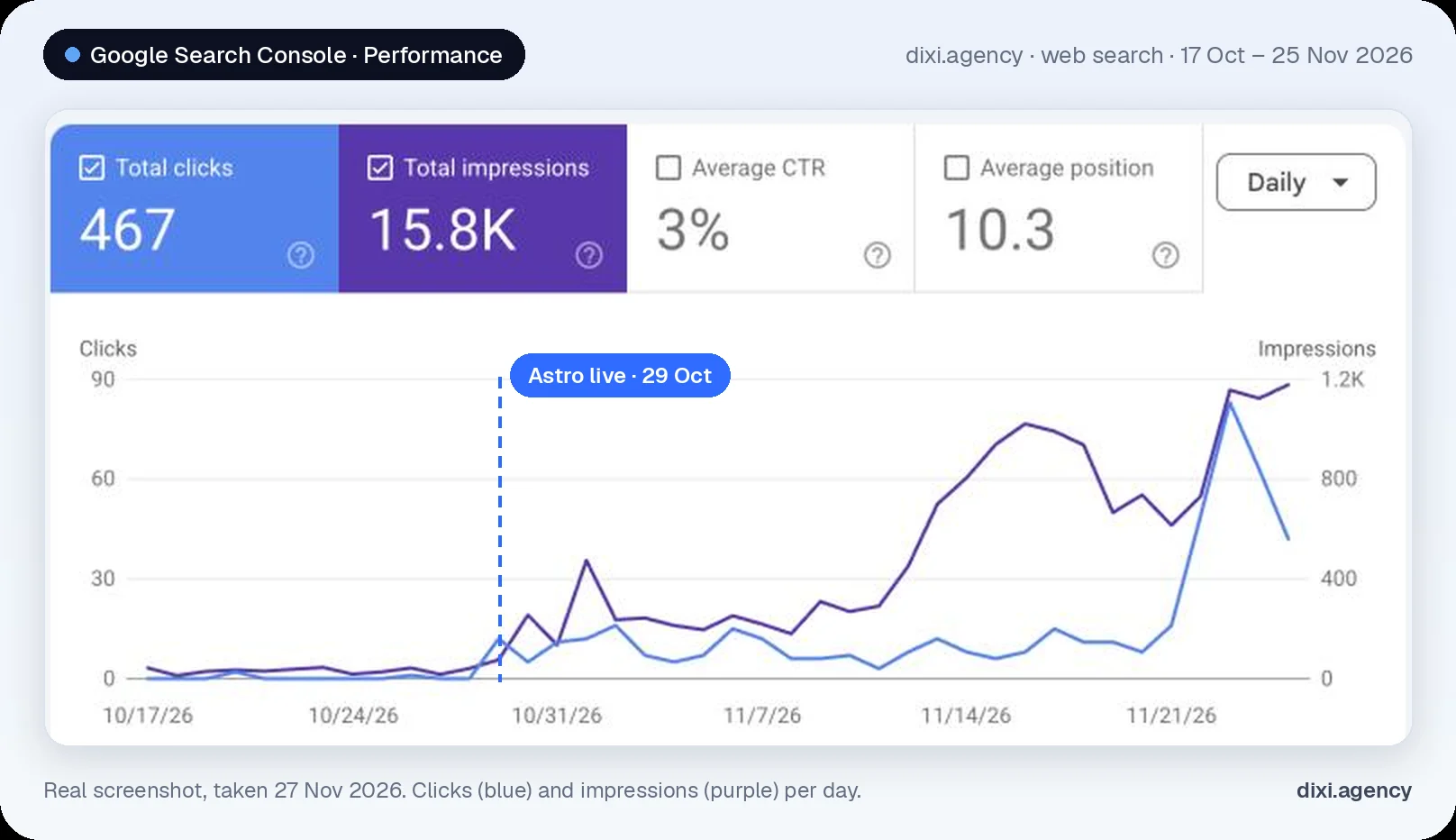
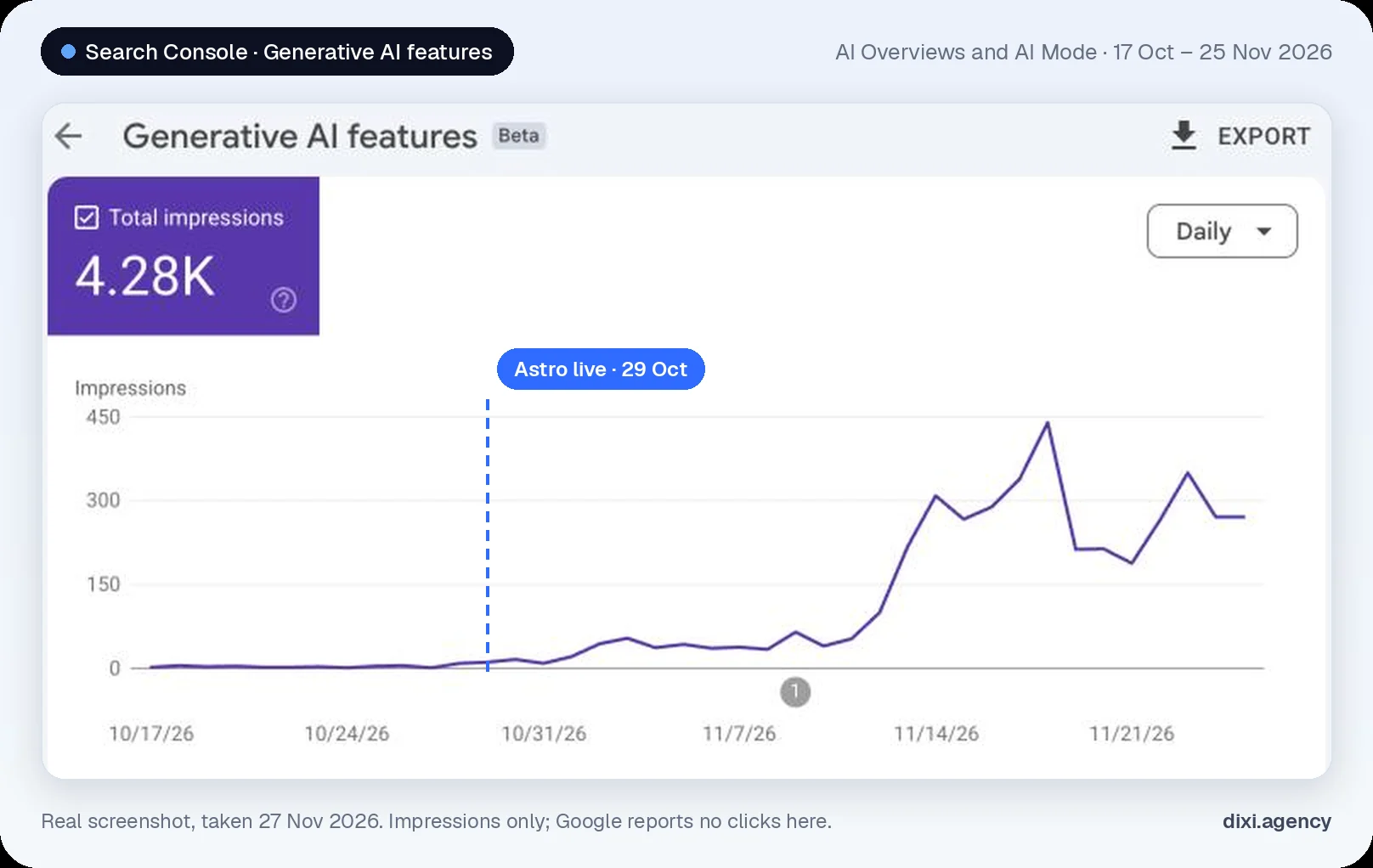
We switched dixi.agency from Framer to an Astro build on Cloudflare on 29 October 2026, kept the domain and gave each of the 32 URLs that changed one 301 redirect. In the 28 days after the switch, Google showed the site about 17 times as often per day as in the 12 days before, and impressions in its AI Overviews and AI Mode rose from about 3 a day to about 150 a day.
Google showed dixi.agency about 17 times as often after the move
| Search Console, dixi.agency | 12 days before (17–28 Oct) | 28 days after (29 Oct–25 Nov) | Last 7 days (19–25 Nov) |
|---|---|---|---|
| Clicks from Google | 3 | 464 | 272 |
| Impressions | 378 | 15,405 | 6,209 |
| Impressions in AI Overviews and AI Mode | 41 | 4,235 | 1,772 |
| Average position | 14.0 | 10.2 | 9.9 |
Source: Google Search Console for sc-domain:dixi.agency, web search, all countries, pulled 27 November 2026. AI figures come from Search Console's generative AI report, which counts impressions only (no clicks or queries). Average position is weighted by daily impressions.
66× the clicks, 44× the AI impressions and 17× the impressions a day
This is the same data as Search Console shows it, straight from our account, with the switch marked:
The speed side held up too. The homepage scored 62 on mobile PageSpeed on Framer (27 October) and 96 on Astro on 3 November, and again when we re-ran it on 27 November, with accessibility, best practices and SEO all at 100:
Framer · 27 Oct 2026Mobile performance 62. The largest element painted at 5.7 s.
Astro · 27 Nov 2026Mobile performance 96. Accessibility, best practices and SEO all at 100.
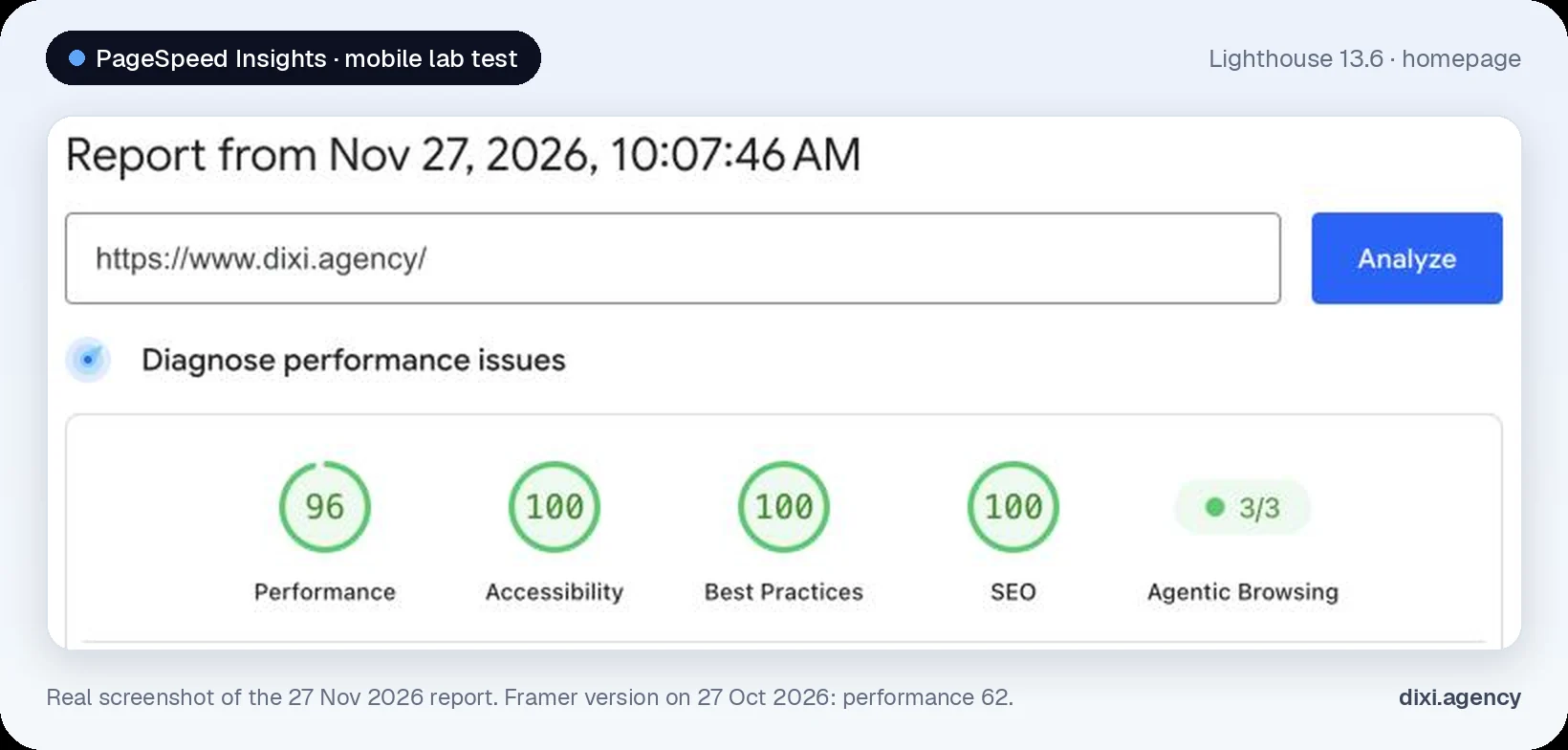
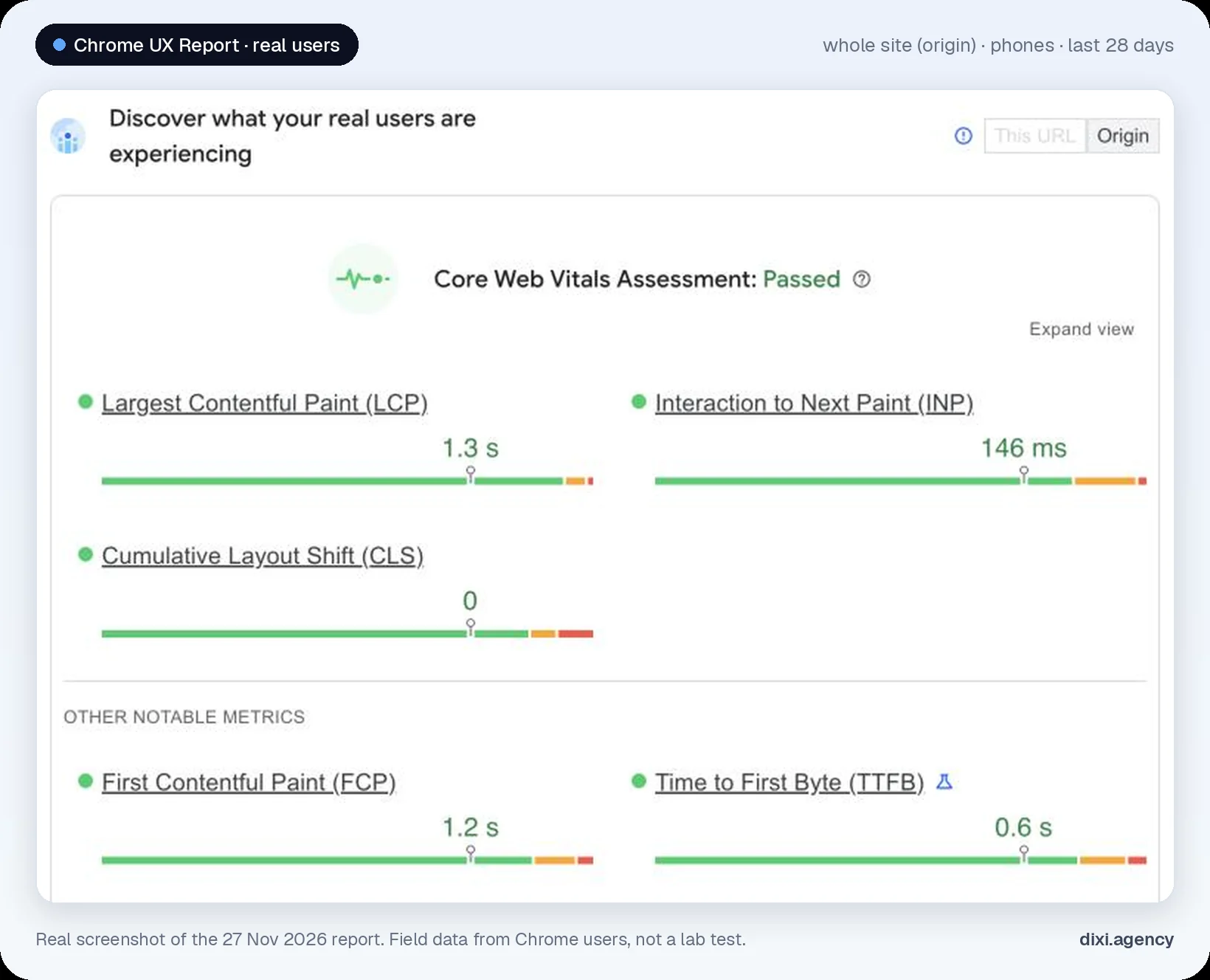
A lab test is one run on one emulated phone. What matters more is that real visitors now pass: Chrome UX Report data for the last 28 days puts the whole site (Google shows origin-level data for it) at LCP 1.3 s, INP 146 ms and CLS 0 on phones.
How long did our own switch take?
The switch itself took a couple of clicks: on 29 October we pointed the domain at the new Astro build, and the redirects went live with it. What made it safe was about a week of groundwork before that day. We built the URL list from Search Console, gave each of the 32 changed addresses one 301, copied titles, descriptions and social images out of Framer's page settings, and set every script to wait for cookie consent. Client projects get the same groundwork, scaled to the size of the site.
About a week of groundwork, then a couple of clicks
- The week beforeAbout a week of groundworkURL list from Search ConsoleEvery address Google knew, not only the ones in the sitemap
- 32 redirectsOne 301 for each URL that changed, straight to its closest new page
- SEO fields copiedTitles, descriptions and social images out of Framer’s page settings
- Consent firstEvery script set to wait for the visitor’s cookie choice
- A couple of clicksThe domain points at the Astro build and the redirects go live with it
Where did the growth come from?
From two things working together: a fast, clean site and far more for Google to find on it. Since launch day we have published 16 of the 20 articles now on our blog, two free guides, a migrations overview and three platform migration pages, and Google needed somewhere fast and crawlable to find them.
The move removed the bottleneck on publishing. On Framer, every new page meant someone on our team building it by hand in the editor. On Astro, a page is a file in a repository that our build scripts, our engineers and AI coding tools can all produce, review and ship the same day. That is how the site grew to 76 URLs in its sitemap in four weeks without anything breaking.
Did the new pages rank for migration searches?
Early signs are good, on small numbers. Our three platform migration pages went live on 6 November, and within three weeks searches about Framer and Webflow moves were showing dixi.agency in the top 10: "framer to astro migration agency" at an average position of 3.7, "framer to astro migration" at 6.2, and question-style searches such as "how can I keep my SEO when migrating a site from Webflow to Astro?" at 2.4. Each had only 2 to 35 impressions, and the query report doesn't say which of our pages ranked.
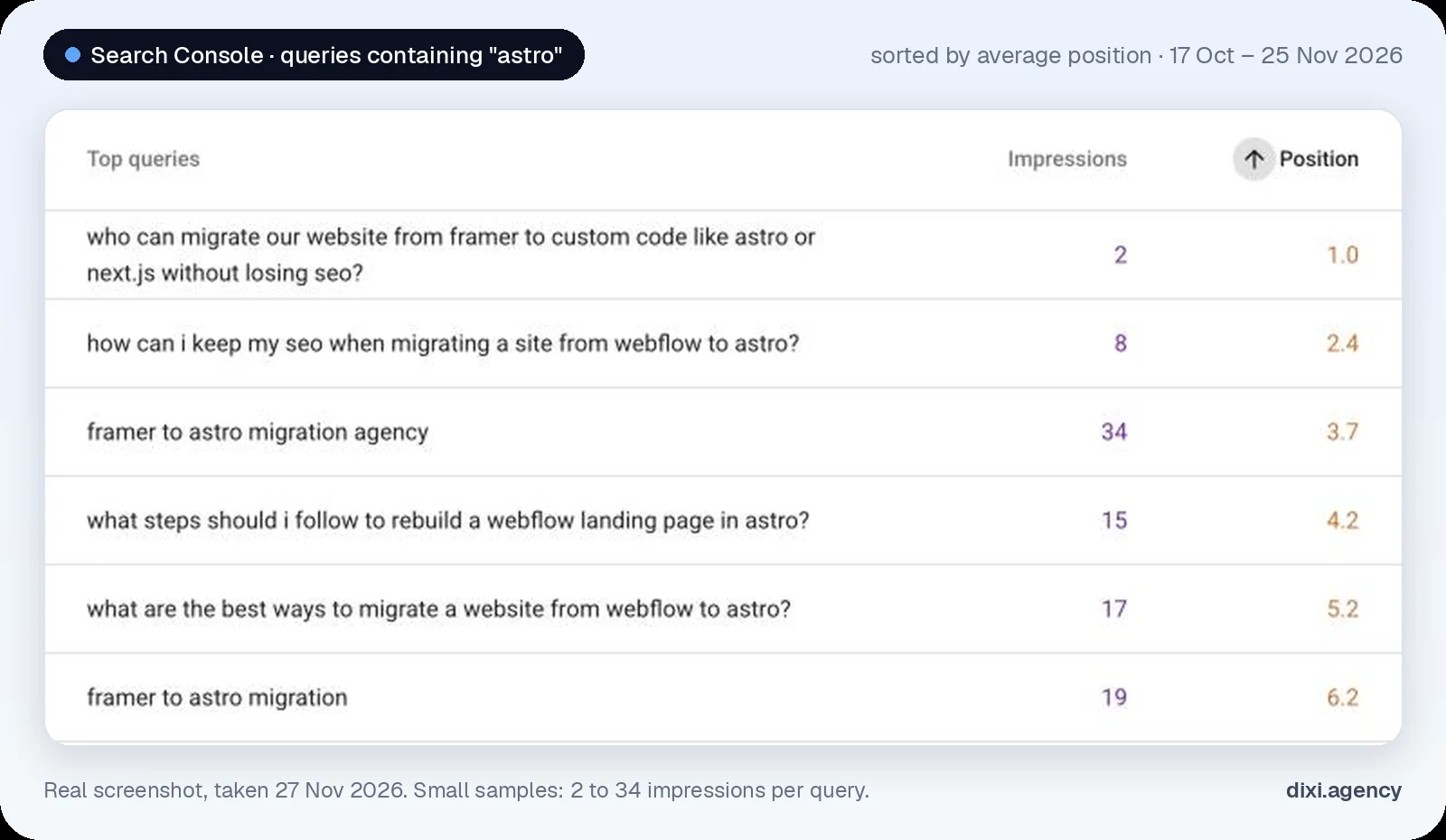
Short head terms rank lower so far: "webflow to astro" at 12.3, "framer to astro" at 14.1 and "wordpress to astro" at 19.8. That matches the rest of the site, where long, question-shaped searches rank first and head terms follow. It is also why this guide exists: the WordPress searches rank worst for us, and we couldn't find one guide that covers HubSpot, Wix and Squarespace moves alongside the site builders.
Long migration questions reached Google’s first page within three weeks
Average position of dixi.agency for searches containing "astro". Further left is better; the shaded band is page one.
- how can I keep my SEO when migrating a site from Webflow to Astro?2.4
- framer to astro migration agency3.7
- what steps should I follow to rebuild a Webflow landing page in Astro?4.2
- what are the best ways to migrate a website from Webflow to Astro?5.2
- framer to astro migration6.2
- webflow to astro12.3
- framer to astro14.1
- wordpress to astro19.8
What surprised us
Four things from our own move are now the first checks we run. Google still had old /en/ case study pages and posts indexed long after we stopped linking to them, so the URL map has to start from Search Console's list of known URLs rather than the sitemap. Video and effects that started on load made the largest element wait. Analytics loaded before visitors chose anything in the cookie banner. And titles, descriptions and social images lived page by page inside Framer's settings, so they had to be copied into code before the old site went dark. What we changed for each is on our Framer to Astro migration page.
What is Astro, and why are so many sites moving to it in 2026?
Astro (often written Astro.js) is a free, open-source web framework for content-driven websites: marketing sites, blogs, docs and landing pages. It builds every page into plain HTML ahead of time, or on the server when needed, and ships JavaScript only for the parts that need it, which Astro calls islands. Your developers can write components in Astro's own format or reuse React, Vue or Svelte components inside them.
Three things made 2026 the year teams started moving. Usage grew fast: in HTTP Archive's crawl, the number of sites built with Astro went from 17,783 in September 2025 to 49,450 in September 2026. Cloudflare bought the company behind Astro in January 2026, kept the framework open source, and noted that Astro already runs inside platforms such as Webflow and Wix (Cloudflare press release). And Astro 7, released in June 2026, made builds 15 to 61% faster and added features for AI coding agents (Astro blog).
Sites on Astro nearly tripled in a year, while Webflow and WordPress shrank
The chart counts origins (sites) that HTTP Archive detects on each platform in its September crawls, on mobile. A falling count for Webflow or WordPress doesn't mean those platforms are bad; it means fewer new sites choose them while more leave.
Astro pros and cons for a business website
Astro is worth it when speed, search visibility and control over the code matter more than editing layouts in a visual builder. The trade-offs are real, so here they are side by side.
| Where Astro is strong | Where it costs you |
|---|---|
| Pages ship as HTML with little JavaScript, so they load fast and search engines and AI crawlers read them easily | No visual page builder: marketers need a CMS on top, and new layouts go through a developer |
| Free and MIT-licensed, and a static site runs on free hosting plans | Logins, dashboards, carts and bookings need a server, an adapter or another tool |
| You own the code and can reuse React, Vue or Svelte components | Someone has to own upgrades, hosting and the build, in-house or paid |
| Works with Markdown files or any headless CMS, including WordPress | Fewer ready-made plugins than WordPress, so some features are built or bought |
| Pages are plain files that engineers and AI coding tools can change and review quickly | A team with no engineer and no agency on call will feel stuck |
Should you migrate to Astro, or stay on your platform?
Move when the platform costs you speed, money or control every month. Stay when your team edits happily and the site already passes Core Web Vitals. How much speed you gain depends on where you start: WordPress and HubSpot sites pass Core Web Vitals far less often than Astro sites, while Webflow, Framer and Squarespace sites pass about as often and Wix sites more often.
WordPress and HubSpot sites pass Core Web Vitals far less often than Astro sites
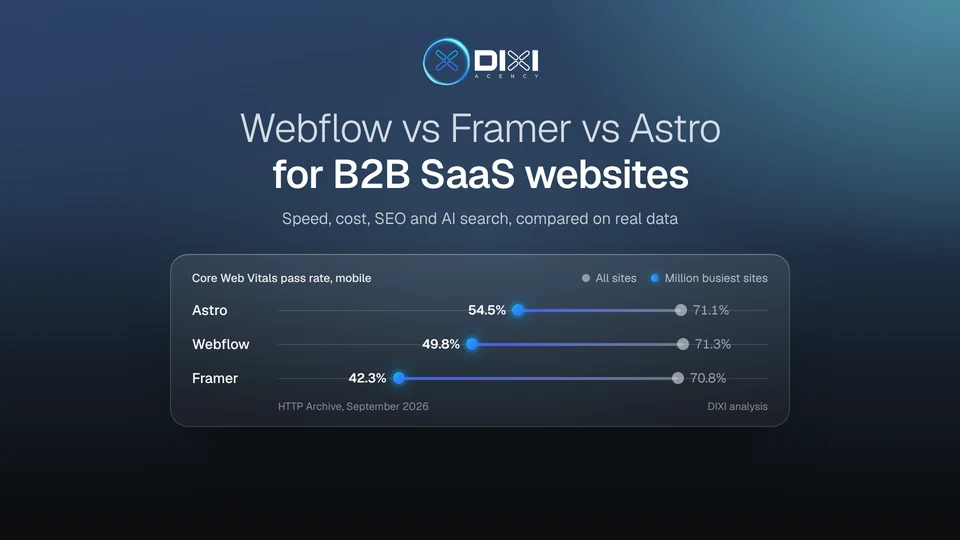
Two things sit behind that chart. Platform averages mix very different sites, so a well-built WordPress site can beat a careless Astro one. Among the top one million sites the picture shifts: Astro still leads at 54.5%, WordPress (50.1%) nearly catches up, and Webflow (49.8%), HubSpot (45.2%) and Framer (42.3%) fall behind. The full speed, cost and SEO comparison of the three most common SaaS platforms is in Webflow vs Framer vs Astro for B2B SaaS websites.
What is the usual reason to leave each platform?
| Moving from | Usual reason to move | What you give up | Our take |
|---|---|---|---|
| WordPress | Plugin updates, hosting, security patches, slow pages | The WordPress editor, unless you keep it as a headless CMS | Worth it for marketing sites and blogs; keep WordPress headless if editors love it |
| HubSpot CMS | Content Hub Professional from $450 a month, HubL templates, speed | Smart content and HubSpot's built-in page tests | Keep HubSpot as your CRM and forms, move only the website |
| Webflow | Seat fees, the 2026 repricing, CMS item limits, interactions as workarounds | Designers editing layouts visually | Worth it when engineers or AI tools touch the site every week |
| Framer | Editor and locale fees, little control over code and scripts | Designers editing layouts visually | Worth it when the site turns into a content engine |
| Wix or Squarespace | A closed platform with no code export and limited technical SEO | The all-in-one editor, bookings and simple commerce | Worth it for B2B sites that outgrew a template; stores belong on Shopify |
| Next.js, Gatsby or another framework | Heavy JavaScript on pages that are mostly content | Nothing much: Astro still runs React, Vue or Svelte components where you need them | Move the marketing pages and docs; keep the app where it is |
Five questions that decide it
Does Search Console's Core Web Vitals report show failing mobile URLs that you can't fix on your current platform?
What do you pay a year for the platform, seats, locales and add-ons, and how fast has that grown?
Who changes the site each week: designers in a visual editor, or engineers and AI coding tools?
Is the CMS shaping your content (item limits, reference fields, per-locale pricing) instead of the other way round?
Does the site need a cart, logins, members or bookings? If yes, Astro alone is the wrong answer: those parts need Shopify, an app or a service behind them.
Two or more answers pointing at the platform usually justify a move. One answer usually means fixing that one thing where you are.
What does a migration to Astro actually involve?
An Astro migration, which some teams call replatforming, has eight parts, and only one of them is writing Astro code. The rest is deciding what moves, mapping every URL, choosing where the content will live, carrying over SEO signals and integrations, testing on staging and watching Search Console after the switch. For a typical B2B marketing site of 20 to 100 pages, plan 3 to 8 weeks.
- Step 1InventoryEvery URL Google knows, templates, forms and scripts
- Step 2URL mapKeep, merge or drop; one 301 per changed URL
- Step 3Content modelFiles, a Git-based editor or a headless CMS
- Step 4 · in parallelRebuildAstro components, islands and images
- Step 5 · in parallelContent importScripted, links rewritten, dates kept
- Step 6 · in parallelIntegrationsForms, CRM, analytics and consent
- Step 7Pre-launch checksCrawl staging against the URL map
- Step 8Switch and watchDNS and redirects, then Search Console for three months
- Inventory (week 1). Crawl the live site and export every URL Google knows about from Search Console (the Pages report and a 16-month Performance export) as well as the sitemap. List templates, CMS collections, forms, scripts, existing redirects and locales. The output is one sheet with one row per URL.
- URL map. For every row decide keep, merge or drop. Keep as many addresses unchanged as you can. Every URL that changes gets one 301 straight to its closest new page: no chains, and no blanket redirects to the homepage. Our free 2027 guide to SaaS websites includes the redirect map template we use.
- Content model. Decide where each collection will live: Markdown or MDX files in the repository, a Git-based editor, or a headless CMS. Define the fields once, including SEO fields (title, description, social image, canonical, noindex).
- Rebuild. Page templates become Astro components that render to plain HTML. Interactive parts (a pricing toggle, a calculator, a form with validation) become small islands that load JavaScript only where they sit. Images go through Astro's image pipeline so they ship in modern formats at the right sizes.
- Content import. Script it rather than copy and paste: the WordPress export file or REST API, Webflow's CSV exports, HubSpot's CMS APIs, Framer's CSV or JSON export plugins. The script converts HTML to Markdown, downloads media, rewrites internal links and keeps publish dates and authors.
- Integrations. Forms, CRM, analytics, consent banner, chat, scheduling and tests. Each one either stays as an embed or moves to a small server function on your host.
- Pre-launch checks. Crawl staging against the URL map and compare titles, descriptions, canonicals, H1s, structured data and word counts with the live site. Run Lighthouse on every template, submit every form end to end, and make sure staging is noindexed and production is not.
- Switch and watch. Point DNS at the new host, turn on the redirects, submit the sitemap and ping IndexNow. Then check Search Console daily for two weeks and weekly for three months. Google's site move guide says to keep redirects "for as long as possible, generally at least 1 year", and that a small to medium site can take a few weeks for most pages to move.
The steps don't all run in a line. Content import and the rebuild usually run side by side once the content model is agreed, and integrations can start as soon as the templates exist. What can't be shortened is the inventory: in our experience, the migrations that lose traffic are the ones that skipped part of it.
Which tools help convert a site to Astro?
No platform exports straight to Astro, so a migration combines the old platform's own exports with a few open-source tools and, more and more, AI coding agents. These are the ones we reach for at each step.
| Step | Tools |
|---|---|
| Inventory | Search Console's Pages report and Performance export, a crawler such as Screaming Frog, the old sitemap |
| Content export | WordPress export file or REST API; Webflow CMS CSV export or Data API; HubSpot HTML export and CMS APIs; Framer CSV or JSON plugins; Squarespace's WordPress-format export; Wix CMS CSV and Blog API |
| Conversion | wordpress-export-to-markdown; Turndown for HTML to Markdown in your own import script; AI coding agents such as Claude Code or Cursor for templates and batches |
| Build | Astro content collections, Astro's image component, @astrojs/sitemap, Pagefind for site search |
| Checks | A crawl of staging against the URL map, Lighthouse on every template, a broken-link check |
How do you migrate WordPress, HubSpot, Webflow, Framer, Wix or Squarespace to Astro?
The eight steps are the same everywhere. What changes from platform to platform is how the content comes out, what the platform quietly did for you that now needs a replacement, and which URLs it invented along the way. Here is the short version for each.
| Moving from | How the content comes out | What needs a replacement | Typical time, 20–100 pages* |
|---|---|---|---|
| WordPress | Tools → Export (an XML file) or the REST API; or keep WordPress as a headless CMS | SEO, forms, search, caching and comment plugins | 3–6 weeks |
| HubSpot CMS | "Export all pages and blog posts (HTML)", blog data as CSV, CMS APIs for posts, pages and HubDB | HubL templates and modules, smart content, page tests; forms and tracking can stay | 4–8 weeks |
| Webflow | CSV export per CMS collection; code export for static pages | Interactions, forms, localization, site search | 3–5 weeks |
| Framer | Download of the published site; CSV or JSON plugins for the CMS | Animations, locales, forms, code components | 3–5 weeks |
| Wix | No site export; CMS collections to CSV, blog posts through Wix's APIs | The whole design, plus bookings or a store (those go to a SaaS tool or Shopify) | 3–6 weeks |
| Squarespace | Export to a WordPress XML file (pages, posts, galleries, text, image and embed blocks) | Products, events, members areas, custom CSS | 3–5 weeks |
| Next.js, Gatsby, Hugo, Jekyll | Already in code: Markdown and MDX move as they are | Data fetching, routing and image components | 2–6 weeks |
*Our estimate for a team that has done it before, including design QA and redirects. A redesign at the same time adds 3–5 weeks.
WordPress to Astro
You have two routes. A full move puts every post and page into Markdown files or a new CMS, and WordPress is switched off. A headless move keeps the WordPress admin your editors know, and Astro fetches the content through the REST API at build time. Astro's WordPress guide covers both. Headless keeps editors happy but keeps a WordPress install to patch, so we suggest it only when the editorial team is large or attached to its workflow.
In a headless setup, one Astro page can build every post from the WordPress REST API at build time:
---
// src/pages/blog/[slug].astro: WordPress stays the CMS, Astro builds the pages
export async function getStaticPaths() {
  const res = await fetch('https://cms.example.com/wp-json/wp/v2/posts?per_page=100&_fields=slug,title,content');
  const posts = await res.json();
  return posts.map((post) => ({ params: { slug: post.slug }, props: { post } }));
}
const { post } = Astro.props;
---
<article>
  <h1 set:html={post.title.rendered} />
  <Fragment set:html={post.content.rendered} />
</article>
The API returns at most 100 posts per request, so a larger blog pages through the results. Custom post types need REST API support switched on in WordPress before Astro can read them.
For a full move, export "All content" from Tools → Export and run it through a converter such as wordpress-export-to-markdown, which writes one Markdown file per post with its front matter and can download the images. Custom fields from ACF and SEO titles from Yoast or Rank Math are easier to read from the REST API than from the export file. Then decide what happens to the URLs WordPress creates on its own: category, tag, author and date archives, /feed/, attachment pages and /wp-content/uploads/ image paths. Image URLs often carry backlinks and Google Images traffic, so keep their paths or redirect them.
| WordPress plugin | What replaces it in Astro |
|---|---|
| Yoast or Rank Math | Title, description and canonical fields in each page's front matter, schema in the layout, the @astrojs/sitemap integration |
| Contact Form 7, Gravity Forms, WPForms | A small form endpoint on your host, or your CRM's form (HubSpot, Attio, Pipedrive) |
| WP Rocket and other caching | Nothing: pages are prebuilt HTML on a CDN |
| Search plugins | Pagefind, a static search index built with the site |
| Redirection | Its export becomes your redirects file |
| WPML or Polylang | Astro's built-in i18n routing |
| ACF | A typed schema for each content collection |
| Comments | Dropped, or a hosted widget such as Giscus |
WordPress sites also carry the largest gain in speed: only 48.3% of WordPress origins passed Core Web Vitals on mobile in September 2026. Our WordPress to Astro migration page covers WooCommerce and the plugin audit in more detail.
HubSpot CMS to Astro
Most teams leaving HubSpot's CMS keep HubSpot itself. The CRM, Marketing Hub, emails and workflows stay; only the website moves. HubSpot forms keep working on an Astro page as an embed or through HubSpot's Forms API, and the HubSpot tracking code still builds each contact's page-view timeline, as long as it loads after cookie consent.
To get the content out, HubSpot lets you "Export all pages and blog posts (HTML)" from the Actions menu of Website Pages, Landing Pages or Blog, and export blog post data as a CSV or Excel file (HubSpot Knowledge Base). Export the URL redirects, HubDB tables and the Files tool as well. Treat the HTML export as raw material for content and reference: HubL templates and drag-and-drop modules don't port, so every template is rebuilt as an Astro component.
What you give up is the part of HubSpot that lives inside the page: smart content that changes by visitor, HubSpot's page tests, memberships and private content, and page analytics inside HubSpot. What you stop paying for is Content Hub, which starts at $450 a month on Professional (3 seats, billed annually) and $1,500 a month on Enterprise (5 seats), according to HubSpot's pricing page. If your blog lives on a subdomain such as blog.company.com and moves to company.com/blog, treat it as a bigger move: every post gets its own 301, and you watch both properties in Search Console. Only 60.0% of HubSpot CMS origins passed Core Web Vitals on mobile in September 2026, so the speed gain is usually real too.
Webflow to Astro
Webflow exports each CMS collection as a CSV file from the CMS panel (Webflow Help). Its code export, available on Workspace plans, gives you the HTML, CSS, JavaScript and assets of your pages, but CMS content, user accounts, ecommerce and localized pages aren't included (Webflow Help: code export). Rich text arrives as HTML, references arrive as slugs, and images arrive as links to Webflow's CDN, so the import script should download every image and rebuild the links between collections. Interactions become CSS transitions or a small animation library, forms post to your own endpoint, Localization becomes Astro's i18n routing, and site search becomes Pagefind.
Webflow components map neatly onto Astro components: each one becomes a component with props for the text, images and links its instances change. Bring Webflow's class-based CSS across as it is, get every page matching, and clean up the styles after launch.
The usual trigger in 2026 is cost. Webflow repriced in May 2026, existing sites move to the new plans at renewal, and a full editor seat costs $39 a month (a limited one $15) on top of the site plan. Speed is rarely the reason: Webflow sites pass Core Web Vitals about as often as Astro sites. Our Webflow to Astro migration page has the cost comparison and the CMS import in detail.
Framer to Astro
Framer lets you download the published site and export CMS collections with CSV or JSON plugins (Framer Help). The downloaded site is generated code, useful as a reference and for assets, but too heavy and tangled to maintain, so the pages are rebuilt as Astro components. Framer Motion effects become CSS or Motion, the open-source library formerly called Framer Motion, which now runs in plain JavaScript as well as in React; React code components can run as Astro islands, and locale copies need their own redirects.
The fees are modest for a small team (Basic $10 and Pro $30 a month per site, billed yearly, plus $20 a month per editor), so the reason to leave is usually control: scripts, structured data, speed on media-heavy pages and how fast you can ship new pages. That was our reason, and the results are at the top of this article. The step-by-step version is on our Framer to Astro migration page.
Wix to Astro
Wix sites can't be exported or hosted anywhere else, because they run on Wix's own technology (Wix Help Center). Moving off Wix is therefore a rebuild: the design is recreated in Astro and the content is moved across. CMS collections export to CSV from the dashboard, blog posts come out through Wix's Blog API, and anything else is copied by a script that reads the live pages.
Watch the URLs. Wix puts blog posts under /post/ (mysite.com/post/post-title), so either keep that path in Astro or redirect each post to its new /blog/slug address. Bookings, events and stores should move to a dedicated tool (a scheduler, an events platform, Shopify) rather than being rebuilt by hand.
Squarespace to Astro
Squarespace exports to a WordPress-format XML file from Settings → Import & export. The file includes layout and gallery pages, one blog with its posts, and text and image blocks; other page types, any second blog, and product, audio and video blocks stay behind, as do custom CSS and style settings (Squarespace Help). That is good news for an Astro move: the same converter used for WordPress turns the file into Markdown, and the rest is rebuilt. Download images from Squarespace's CDN during the import, keep the /blog/slug paths if you can, and move commerce to Shopify.
Next.js, Gatsby, React (Vite or Create React App), Hugo and other frameworks
These are the easiest moves because the content is already in files. Astro has official migration guides for Next.js, Gatsby, Create React App, Hugo, Jekyll, Eleventy, Docusaurus, Nuxt, GitBook and others (Astro docs). React components can keep running inside Astro as islands, MDX moves almost unchanged, and image components switch to Astro's. A common split for SaaS teams is to keep the product in Next.js at app.company.com and move the marketing site and docs to Astro, where pages that are mostly text don't need a JavaScript framework. Next.js origins passed Core Web Vitals only 35.7% of the time in September 2026, the lowest of the platforms in our chart.
Sitecore, Drupal and other enterprise CMSs
Enterprise moves are usually headless. The CMS stays for its workflows, permissions and translations, and Astro renders the public site from its API, or the content moves to a headless CMS such as Sanity, Contentful or Storyblok. The URL map and the content model take most of the time on these projects, because enterprise sites carry years of templates, campaigns and locales.
Where does the content live after the move, and who edits it?
The CMS you pick decides whether your marketing team feels the move as progress or as a loss. There are four sensible setups for an Astro site, from free Markdown files in the repository to a full headless CMS with visual editing. Pick it by who publishes, how often and in how many languages.
| Setup | Who it suits | What it costs | The trade-off |
|---|---|---|---|
| Markdown or MDX files in the repository | Teams where engineers, or AI coding tools, publish most changes | Nothing | Marketers edit through pull requests or ask someone |
| A Git-based editor on top (Keystatic, TinaCMS, Decap, CloudCannon) | Small marketing teams that publish a few times a month | Free to a monthly plan, depending on the tool | Content stays in the repository; visual previews vary by tool |
| An API-based headless CMS (Sanity, Storyblok, Contentful, Payload) | Teams that publish every week, in several languages, with approvals | Free tiers, then per-seat or usage plans | One more vendor; pages rebuild on publish or render on request |
| Your old CMS, headless (WordPress, or HubSpot for blog data) | Large editorial teams attached to their workflow | Hosting and upkeep of the old CMS | You keep patching it, and two systems must stay in sync |
Our own site keeps everything in the repository: each page and article is a data file, so publishing is a commit that our build checks before it goes live. That suits a small senior team that works with AI coding tools every day. For clients whose marketers publish weekly, we usually pair Astro with a headless CMS so nobody waits for a developer to fix a typo.
What happens to forms, CRM, analytics and other scripts?
They move one by one, and each move is a chance to make the site lighter. On a builder, scripts tend to pile up in a global code box. On Astro you decide where each one loads, so most of them can wait for consent or for the visitor to need them.
- Forms. Either keep your CRM's form (HubSpot, Attio, Pipedrive) as an embed, or post to a small function on your host that writes to the CRM, notifies your team and blocks spam with a challenge such as Cloudflare Turnstile. Test every form end to end on staging, including the thank-you page and the CRM record.
- Analytics. Keep the same event names before and after, so you can compare like with like. GA4 now has a built-in AI Assistant channel for visits from ChatGPT, Gemini and other assistants. Cookieless tools such as Cloudflare Web Analytics or Plausible can run without a consent banner in many cases; check with whoever owns your privacy policy.
- Consent. Every third-party script waits for the visitor's choice. On our old Framer site analytics loaded before anyone clicked the banner, and fixing that was one of the first things we did on Astro.
- Chat, schedulers and video. Load them when the visitor clicks or scrolls to them. A chat widget is often the heaviest thing on a B2B site.
- A/B tests. Page tests that lived inside the old platform (HubSpot, Webflow Optimize) need a new home. If your traffic is modest, read A/B testing a low-traffic B2B SaaS website before you pay for a testing tool.
How do you keep your rankings when you migrate to Astro?
Rankings live in URLs, content and links, and all three can survive a platform change. Keep the addresses that rank, carry every signal across field by field, and make every redirect a real server-side 301. Our SaaS website redesign without losing SEO checklist covers the launch day and the 90-day watch; these are the Astro-specific parts that trip teams up.
Ticked: 0 of 10
Why is my Astro redirect not a 301?
Because on a static build Astro can't send status codes: there is no server, so the redirects option writes a small HTML page that sends visitors on with a meta refresh. Google usually follows it, but it is not the server-side permanent redirect a migration needs. The fix is to let the host answer with a real 301. On Cloudflare or Netlify that is a _redirects file in the public folder, one line per old URL. These three lines are from our own file:
# public/_redirects (Cloudflare or Netlify): one line per old URL
/en/case-study-koyfin   /koyfincase   301
/cases                  /work         301
/get-in-touch           /contact      301
If the site renders some pages on the server through Cloudflare Workers, remember that _redirects rules don't apply to requests the Worker code serves; handle those redirects in the Worker or in Astro's middleware.
A minimal SEO setup for the migrated site
Four small pieces cover most of what a builder used to do for you. First, the site URL, trailing-slash rule and sitemap in the config:
// astro.config.mjs
import { defineConfig } from 'astro/config';
import sitemap from '@astrojs/sitemap';

export default defineConfig({
  site: 'https://www.example.com', // used for canonicals and the sitemap
  trailingSlash: 'never',          // match the URL style in your redirect map
  integrations: [sitemap()],
});
Second, one SEO component in the layout, so every page gets a title, description, canonical and social image:
---
// src/components/Seo.astro
const { title, description, image = '/og/default.jpg', noindex = false } = Astro.props;
const canonical = new URL(Astro.url.pathname, Astro.site);
---
<title>{title}</title>
<meta name="description" content={description} />
<link rel="canonical" href={canonical} />
{noindex && <meta name="robots" content="noindex" />}
<meta property="og:title" content={title} />
<meta property="og:description" content={description} />
<meta property="og:image" content={new URL(image, Astro.site)} />
Third, a content collection whose schema makes the SEO fields required, so a migrated post can't ship without them. Keeping the old address in each file makes the redirect map easy to generate and check:
// src/content.config.ts
import { defineCollection } from 'astro:content';
import { glob } from 'astro/loaders';
import { z } from 'astro/zod';

const blog = defineCollection({
  loader: glob({ base: './src/content/blog', pattern: '**/*.{md,mdx}' }),
  schema: z.object({
    title: z.string(),
    description: z.string(),
    pubDate: z.coerce.date(),
    updatedDate: z.coerce.date().optional(),
    oldUrl: z.string().optional(), // address on the old platform, for the redirect map
    noindex: z.boolean().default(false),
  }),
});

export const collections = { blog };
Fourth, structured data as JSON-LD in the layouts for articles, breadcrumbs and your organization, filled from the same fields. The collection format follows Astro's content collections guide.
One more thing to expect: average position often looks worse for a few weeks. Ours read 16.2 in the first 13 days after the switch, most likely because the site suddenly appeared for many new queries far down the results, then improved to 8.7 over the next 15 days. Judge the move on impressions, clicks and the positions of the pages that ranked before; the site-wide average misleads in the first weeks.
Will ChatGPT, Claude, Perplexity and Google's AI still find you after the move?
They will if the new pages are complete HTML that their crawlers are allowed to fetch, and if the content answers the questions buyers ask. Astro helps with the first part, because it renders every page to HTML before anyone requests it. The second part is the same on any platform: answer-first pages, clear facts and mentions of your brand on other sites.
Our own numbers show how quickly this can move. In the 12 days before the switch, Google's AI Overviews and AI Mode showed dixi.agency 41 times, about 3 a day. In the 28 days after, they showed it 4,235 times, about 150 a day, and 68 different URLs of ours appeared in them over the whole period. These were the pages Google's AI features showed most:
Source: Search Console's generative AI report, which Google launched in June 2026 and rolled out to all sites by the end of August 2026 (Google Search Central). It counts impressions only, with no clicks or queries, and some of the impressions come from AI-visibility tools that run prompts automatically, so read it as visibility rather than demand.
What to check on the new site:
- Read your pages without JavaScript. Fetch a few key pages with JavaScript off, or with curl, and make sure prices, features, FAQs and tab content are in the HTML. Content that only appears after a script runs is often invisible to AI crawlers. On Astro this is the default; on builders it is worth checking before you leave, so you know what you are fixing.
- Check your CDN's bot settings as well as robots.txt. If you move to Cloudflare, look at its AI crawler controls. Cloudflare's documentation says training blocks also apply to mixed-purpose crawlers that crawl for both search and training (Cloudflare docs), and press reports name Googlebot, Applebot and Bingbot among them (Help Net Security). A B2B site that wants to be recommended should leave search crawling on.
- Don't confuse Google-Extended with AI Overviews. Blocking Google-Extended in robots.txt limits Gemini training and grounding, but Google says it does not affect inclusion in Search, and AI Overviews and AI Mode are part of Search.
- Write pages that can be quoted. Question-shaped headings, a 40–70 word answer under each, numbers with dates, and your company named inside the key claims. In our experience that matters more than the framework.
- Treat llms.txt and schema as hygiene. We publish an llms.txt with every page and price, and structured data on every template, but neither is a lever on its own.
- Measure it. Use Search Console's generative AI report for Google, GA4's AI Assistant channel for visits from assistants, and a monthly manual check of the prompts your buyers use.
The longer version of this is our GEO playbook for getting a B2B site recommended by ChatGPT, and our test of what a buyer's AI agent finds on SaaS websites.
Can AI coding agents migrate your site to Astro?
They can do most of the typing: AI coding agents such as Claude Code or Cursor convert content and templates quickly, and in 2026 several teams have published moves where agents did the heavy lifting. What agents don't do well on their own is the judgement: which URLs to keep, how to model the content, what to drop, and whether the new site is actually better. The teams with good results kept those decisions human and gave the agents small, checkable tasks.
| Team and move | Size | How long | What they reported |
|---|---|---|---|
| Omnia, Webflow to Astro | About 800 pages, English and Spanish | 23 hours from kickoff to DNS switch | 8 h 46 min of agent work, about $1,200 in tokens |
| Nomio, Webflow to CloudCannon and Astro | Marketing site | 2.5 days, with Claude | Adding a case study went from 2–3 hours to about 5 minutes |
| DailyBot, to Astro | 16 page types in 3 languages, about 700 pages per language | Six weeks | A Markdown twin of every page so agents can read the site too |
| Code With Andrea, Publish to Astro | 400+ pages | Two weeks of a couple of hours a day | Split the move into small issues with acceptance criteria instead of one big rewrite |
Astro itself is getting ready for this. Astro 7, released in June 2026, can detect coding agents, run its dev server in the background and output structured JSON logs that agents can read (Astro blog). Our own site is built the same way: the templates, build scripts and most new pages are written with AI coding tools, and a person reviews every change before it goes live.
The pattern that works: a person builds the inventory and the URL map and signs off the content model, agents convert content and templates in small batches, scripted checks compare old and new pages, and a person does the design review and the launch. What goes wrong is asking an agent to "migrate the site" in one go and trusting a passing build.
How much does it cost to migrate to Astro, and to run it afterwards?
A migration without a redesign costs anywhere from your own engineers' time plus AI tokens to a five-figure agency project, depending on size and how much you want done for you. DIXI moves marketing sites from $6,000 in 3–5 weeks, or from $12,000 in 6–10 weeks with a new design. Running costs usually fall, sometimes to zero.
| Route | What you pay | Good for |
|---|---|---|
| Do it yourself with AI coding tools | Your engineers' time plus tokens (Omnia reported about $1,200 for 800 pages) | Teams with an engineer who owns the website and has done a migration before |
| A freelancer | Hourly or fixed; varies widely by region and seniority | Small sites with simple content and no redesign |
| An agency | DIXI from $6,000 (move) or $12,000 (move and redesign); our survey of 20 agencies found a middle starting price of $12,000 for a full SaaS site | Sites where rankings, design quality and the CMS setup all matter |
Who should do the work is a decision in its own right, and our guide Agency, freelancer, in-house or template compares the five options with a year-one cost model. To estimate your own project, our cost calculator has a migration mode.
What the site costs to run afterwards:
| Platform | What you pay for every month or year |
|---|---|
| HubSpot Content Hub | From $450 a month on Professional (3 seats) or $1,500 a month on Enterprise (5 seats), billed annually |
| Webflow | A site plan, plus $39 a month for each full editor seat or $15 for a limited one, billed yearly |
| Framer | Basic $10 or Pro $30 a month per site, billed yearly, plus $20 a month per editor |
| WordPress | Managed hosting, premium plugins and someone to apply updates and security patches |
| Astro | The framework is free. Static pages on Cloudflare's free plan cost nothing to serve; server functions are free up to 100,000 requests a day, then paid from $5 a month. A headless CMS adds its own seats only if you pick one |
We pay $0 a month to host dixi.agency. The honest catch is that the money you stop paying to a platform partly moves to whoever maintains the code, which is why we also offer support for Astro sites from $1,000 a month.
Where should you host the new Astro site?
Any static host works, and the free plans are generous, with one catch for companies. Vercel's free Hobby plan is restricted to personal, non-commercial use, so a company website needs its Pro plan (Vercel fair use guidelines).
| Host | Free plan | Paid plans | Watch out for |
|---|---|---|---|
| Cloudflare | Static pages free; Workers free plan up to 100,000 requests a day (Cloudflare limits) | From $5 a month | _redirects holds up to 2,000 static and 100 dynamic rules; use Bulk Redirects beyond that |
| Netlify | 300 credits a month; each production deploy uses 15 (Netlify docs) | Personal $9 a month; Pro $20 a month with unlimited members since April 2026 (Netlify changelog) | A site that publishes several times a day uses up the free credits quickly |
| Vercel | Hobby: personal and non-commercial use only | Pro from $20 a month (Vercel pricing) | A business site needs Pro from day one |
We host dixi.agency on Cloudflare: the static pages cost nothing to serve, and our redirects, form handling and lead storage run on the same account.
What goes wrong in Astro migrations, including ours?
Failed migrations rarely fail because of Astro. The usual cause is a URL nobody listed, a field nobody copied or a decision nobody made. These are the common mistakes, five of which we ran into on our own site.
- Building the URL map from the sitemap. We hit this Google remembers pages your sitemap forgot. Our Framer site still had old /en/ and /uk-ua/ copies in Google's index long after we stopped linking to them.
- Redirecting everything to the homepage, or stacking new redirects on top of the old platform's, which creates chains. Every old URL gets one hop to its closest match.
- Shipping meta refresh pages instead of 301s because the redirects were set only in Astro's config on a static host.
- Losing fields that lived in the builder's settings: We hit this titles, descriptions, social images and canonicals that no export included. We copied ours into code before switching off Framer.
- Moving the old scripts as they were. We hit this Our Framer site loaded analytics before the cookie banner was answered; the new site waits for consent.
- Rebuilding every animation one to one. We hit this Video and effects on our first screen were what kept the old homepage's largest element waiting, so they now start after the page has painted.
- Testing forms by looking at them. Submit every form on staging and check the CRM record, the notification and the thank-you page.
- Choosing a CMS the marketing team won't use, then routing every typo through a developer.
- Changing everything at once without a baseline. We hit this We changed platform, design and copy together, so we can't say how much of the growth came from Astro alone. Record a baseline of positions, conversions and Core Web Vitals before you start.
- Switching off the old site on launch day. Keep the old account for a few weeks for exports, comparisons and anything you missed.
- Blocking crawlers by accident with a CDN's AI bot setting or a staging robots.txt that ships to production.
- Judging the move in week one. Average position and even impressions can wobble for a few weeks while Google recrawls.
FAQ
Is Astro good for SEO?
Yes. Astro renders every page to plain HTML with very little JavaScript, which search engines and AI crawlers read easily, and it gives you full control over titles, canonicals, structured data, sitemaps and redirects. The platform doesn't rank pages on its own, though: content, links and a clean migration matter more. In HTTP Archive's September 2026 data, Astro sites passed Core Web Vitals on mobile 71.1% of the time.
How long does it take to migrate a website to Astro?
A 20 to 100 page marketing site usually takes 3 to 8 weeks without a redesign, depending on the platform, and 3 to 5 weeks more with one. On our own site the switch itself was a couple of clicks, after about a week of groundwork on the URL map, redirects and SEO fields. Large blogs, several languages, complex CMS relationships or an enterprise CMS add time. AI coding agents can shorten the build itself to days, but the inventory, URL map and checks still take a person's time.
How much does it cost to migrate to Astro?
From your own engineers' time plus AI tokens if you do it in-house, to a five-figure project with an agency. DIXI's website migrations start at $6,000 (3–5 weeks) and a migration with a new design at $12,000 (6–10 weeks). Hosting a static Astro site on Cloudflare's free plan costs nothing.
Will I lose Google rankings if I move to Astro?
Not if every URL that ranks keeps its address or gets one server-side 301 to its closest match, and titles, content and structured data carry over. Expect some movement for a few weeks while Google recrawls. Our own site had little search traffic to lose before the move, and its impressions per day grew about 17 times in the four weeks after the switch, helped by the new content we published.
Can marketers edit an Astro site without a developer?
Yes, if you give them a CMS. Git-based editors such as Keystatic, TinaCMS or CloudCannon, or a headless CMS such as Sanity or Storyblok, let marketers publish pages and posts on their own. What they lose compared with Webflow or Framer is free-form layout editing: new layouts and components go through a developer.
Can we keep HubSpot or WordPress and still use Astro?
Yes. With HubSpot, the usual setup keeps the CRM, forms, emails and tracking and moves only the website to Astro. With WordPress, you can keep the admin as a headless CMS and let Astro build the public site from its API, though you still have to keep WordPress patched.
Is Astro a safe long-term choice now that Cloudflare owns it?
Cloudflare acquired The Astro Technology Company in January 2026 and said Astro will remain open source (Cloudflare press release); Astro's own announcement adds that it stays free and MIT-licensed (Astro blog). Astro still deploys to Netlify, Vercel or any static host, and since then it has shipped Astro 7 with faster builds. The number of sites on Astro grew 178% in the year to September 2026 in HTTP Archive's data.
Can AI tools migrate my website to Astro?
They can convert content and templates quickly: Omnia moved about 800 pages from Webflow in 23 hours with AI agents. They still need a person to own the URL map, the content model, the design review and the launch checks. Treat agents as a fast team that needs clear, small tasks and someone to check the work.
Should we redesign at the same time as we migrate?
If the current design no longer fits your product or positioning, yes: doing both in one move saves a second launch and a second round of redirects. If the design works, move first and improve page by page afterwards, so you can see the effect of each change. We did both at once and can't separate the platform's effect from the redesign's.
Astro vs Next.js: which is better for a SaaS marketing site?
Astro for pages that are mostly content (marketing pages, blog, docs), Next.js for the product itself. Astro ships less JavaScript by default and can still use your React components where you need them. Many SaaS teams keep the app on Next.js at app.company.com and run the marketing site on Astro.
Is Astro better than WordPress for SEO?
For most marketing sites and blogs, yes, mainly because it is fast by default. In September 2026, 71.1% of Astro origins passed Core Web Vitals on mobile against 48.3% of WordPress origins, and Astro gives you full control over titles, canonicals, structured data and redirects without plugins. A well-built WordPress site with a fast theme and good hosting can rank just as well; it simply takes more upkeep to stay fast as plugins pile up.
Does Astro have a CMS?
Not a built-in admin. Content lives in Markdown or MDX files by default, and you add an editor on top: a Git-based one such as Keystatic, TinaCMS, Decap or CloudCannon, or a headless CMS such as Sanity, Storyblok, Contentful, Payload or WordPress used headless. Astro's docs keep a guide for each major CMS.
Is Astro free?
Yes. Astro is open source under the MIT license, and a static Astro site can run on Cloudflare's or Netlify's free plans. Costs come from a paid CMS if you choose one, a paid hosting plan when traffic or deploys grow, and whoever maintains the code.
Can you export code from Webflow or Framer?
Partly. Webflow's code export, available on Workspace plans, gives you the HTML, CSS, JavaScript and assets of your pages, but not CMS content, user accounts, ecommerce or localized pages; CMS collections export separately as CSV files. Framer lets you download the published site as generated code and export CMS collections with CSV or JSON plugins. Neither gives you source code a team would want to maintain, which is why a move to Astro rebuilds the templates and imports the content.
Can Webflow and Astro work together?
Yes. Webflow Cloud deploys Astro apps (Astro 5, 6 and 7) with the Cloudflare adapter (@astrojs/cloudflare), either on their own or alongside a Webflow site, so marketers can keep pages in the Webflow Designer while engineers build docs, tools or data-heavy pages in Astro. Our Webflow vs Framer vs Astro comparison covers when that hybrid setup is worth it.
How do I upgrade an existing Astro site to Astro 7?
That is a different job from moving a site to Astro. Run npx @astrojs/upgrade, which updates Astro and its official integrations together, then work through the breaking changes in Astro's v7 upgrade guide. Sites that use remark or rehype plugins need the most attention, because Astro 7 switched to a new default Markdown pipeline.
Sources
Our data: Google Search Console for sc-domain:dixi.agency (17 October to 25 November 2026, web search, including the generative AI report), PageSpeed Insights and Chrome UX Report for https://www.dixi.agency/ (27 October, 3 November and 27 November 2026), and our own sitemap and publishing dates. All pulled on 27 November 2026.
- Google Search Central: How to move a site with URL changes, Introducing Search generative AI performance reports, AI features and your website
- HTTP Archive: Technology Report, Core Web Vitals and adoption by platform, September 2026, mobile
- Astro: Migrating from WordPress, Migration guides, Routing and redirects, Astro 7
- Cloudflare: Cloudflare acquires Astro, Workers static assets redirects, Block AI bots; Help Net Security on the September 2026 defaults
- HubSpot: Export web content and data, Content Hub pricing
- Webflow: Import and export CMS content
- Framer: Porting your data from Framer
- Wix: Exporting your Wix site elsewhere, Blog post URLs, Exporting CMS collections
- Squarespace export contents: Kinsta, Squarespace to WordPress
- wordpress-export-to-markdown on npm
- AI-assisted migrations: Omnia, Nomio on CloudCannon, DailyBot, Code With Andrea
- More sources: Squarespace Help, exporting your site, Webflow Help, code export, Astro joins Cloudflare, Astro content collections, Astro CMS guides, Upgrade to Astro v7, Cloudflare Workers limits, Netlify credits, Netlify April 2026 pricing update, Vercel fair use guidelines, Cloudflare acquisition press release on Nasdaq.
- Also: Webflow Cloud framework support, Headless WordPress and Astro, Motion: Framer Motion is now independent.